
Synthesia vs HeyGen 2026
In-depth head-to-head comparison of avatar quality, pricing, voice cloning, and enterprise features.
Read Article →
HeyGen produces the most realistic-looking AI avatars I’ve tested — Avatar V digital twins are genuinely impressive. But the overall package lands at 4.0/5 because of a confusing credit system, Avatar Shots geoblocked in the US/Japan, and inconsistent support. On the Creator plan ($24/month), you get photoreal avatars, voice cloning, and translation into 175+ languages with lip-sync. Avatar V (April 2026) is the standout feature: 15 seconds of footage gives you a twin that holds its identity across angles, outfits, and long renders. Great fit for: teams that prioritize avatar realism above all else and can work around the platform’s rough edges.
If you want AI avatars with full commercial rights on every plan and lower pricing, Synthesys offers 80+ avatars, UGC persona generation, and dubbing in 40+ languages starting at $29/month, or $20/month billed annually. See the full avatar comparison.
HeyGen is an AI avatar video platform that turns text scripts into professional talking-head videos without cameras or studios. Built around Avatar V digital twins and 175+ language translation with lip-sync, it’s used by over 100,000 businesses including 25% of Fortune 500 companies. Plans start at $24/month with a free tier.
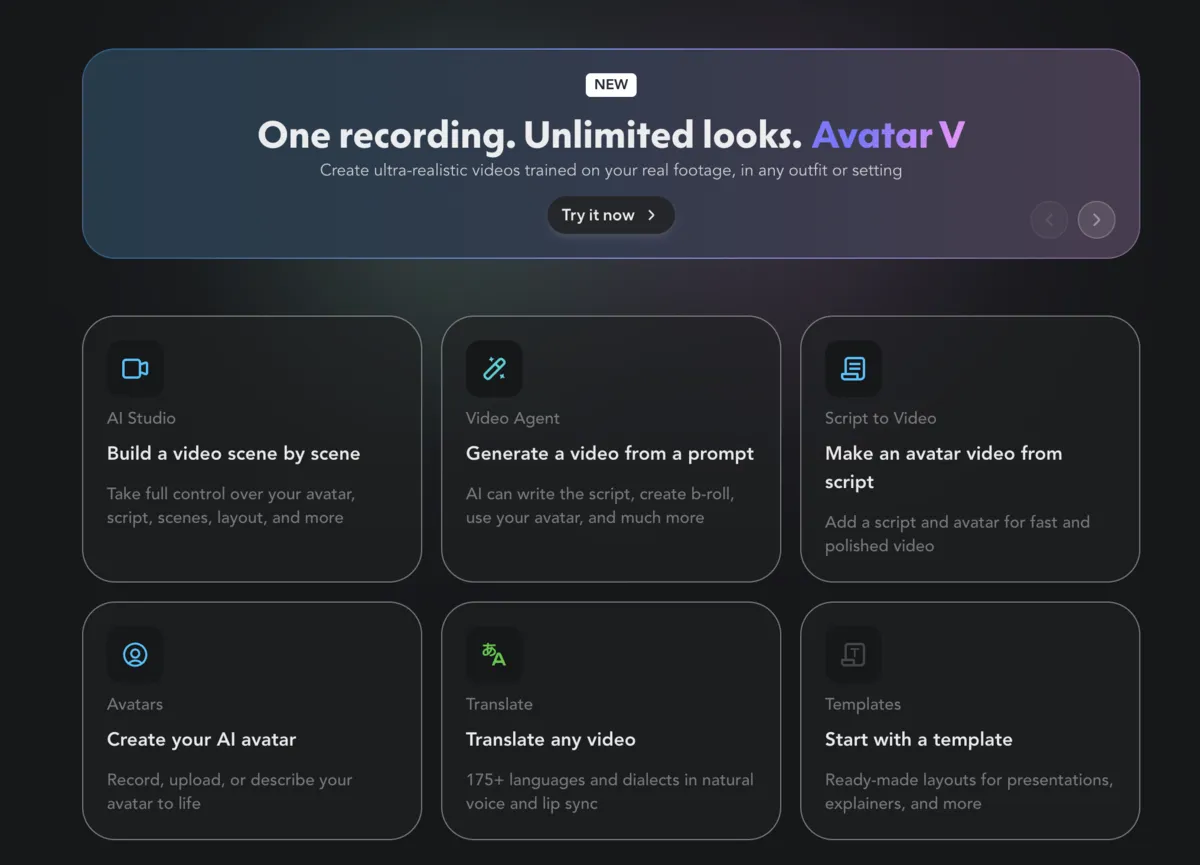
You pick or create an avatar, paste a script, and HeyGen generates a video with lip-synced speech and natural gestures. For custom avatars, record 15 seconds of yourself and Avatar V builds a digital twin. The platform has six creation modes: Script to Video, Video Agent, AI Studio, Translate, Avatars, and Templates.
Select from HeyGen's library of realistic AI avatars
Browse through dozens of professional avatars of different ages, ethnicities, and styles. Each avatar is designed for business, education, or marketing content.
Input what you want your avatar to say
Simply paste or type your script. The AI will handle pronunciation, pacing, and natural delivery.
Choose from AI voices or clone your own
Pick from a library of natural-sounding voices, or upload 2-3 minutes of your own audio to create a voice clone that sounds just like you.
Add visuals and create your video
Include backgrounds, graphics, or screen recordings. Click generate and watch your avatar deliver your message in minutes.
Film a short clip on any phone or webcam
That’s it. No professional equipment, no studio lighting. Avatar V learns your specific gestures, expressions, and movement patterns from this single clip.
Change outfits, settings, and styles without re-recording
Avatar V separates your performance (how you move and speak) from your appearance. Record once, then generate yourself in any outfit, setting, or look. Your motion stays real.
Your digital twin maintains identity consistency
Your avatar holds its identity across close-ups, wide shots, and long-form content without the “identity drift” that plagues other platforms. Multi-angle consistency means the face that appears at the start is the same face at the end.
Avatar V replaced the old 2-3 minute capture with 15 seconds of video. HeyGen uses a “selective attention mechanism” that pulls identity from the whole clip instead of pinning everything to one reference frame. In practice, that means the twin holds up across different shots, wardrobe, and length without the usual slow drift.
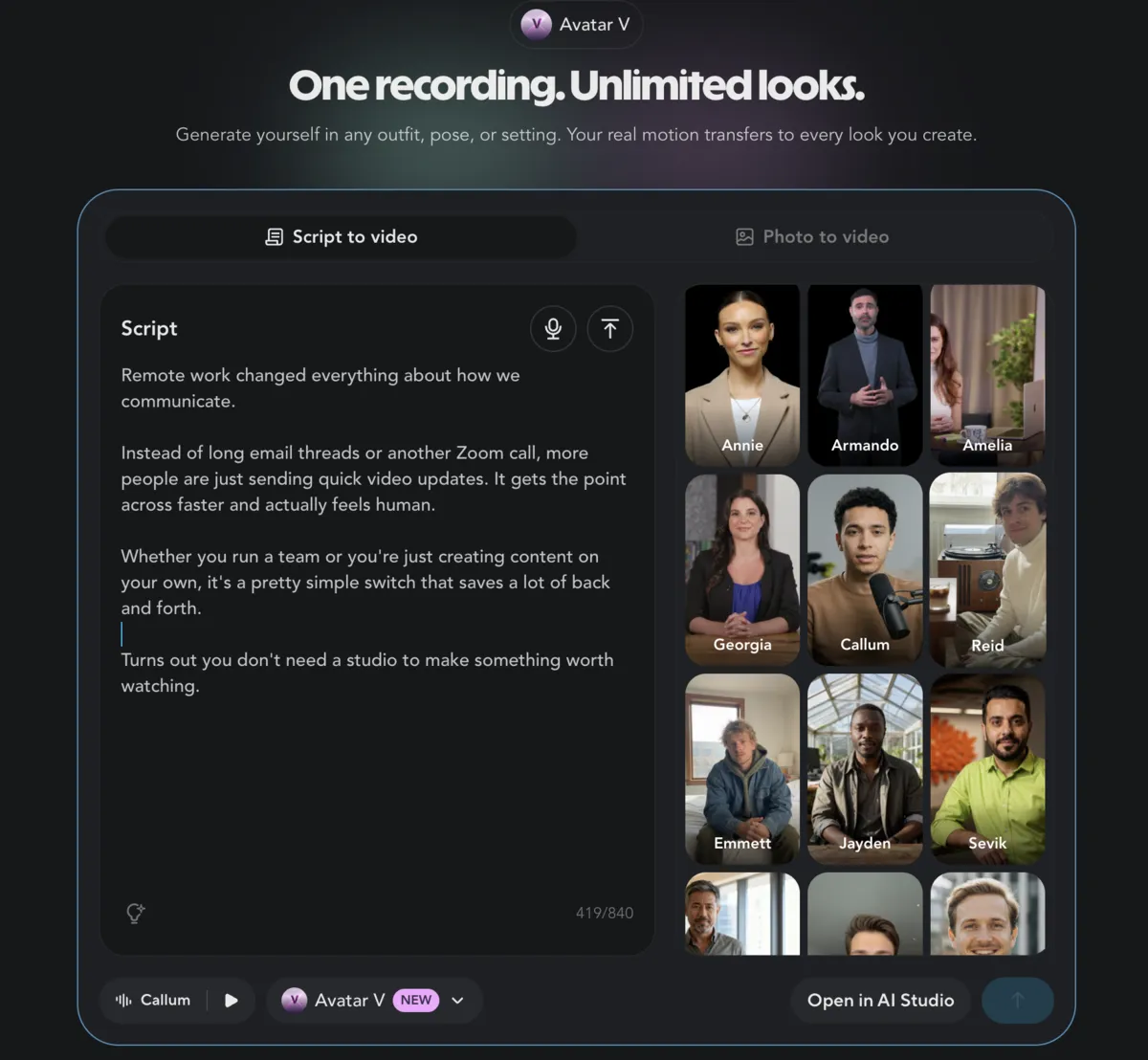
I typed a script in HeyGen, picked the Callum avatar, and hit generate. No camera, no edit pass, no cleanup. What you see is straight out of Script to Video:
After it renders, I usually pop the file into AI Studio if I need fixes: tweak a line in the transcript, drop in B-roll, add captions, that kind of thing, without starting over from the script screen.
HeyGen packs Avatar V digital twins, advanced voice cloning from 2-3 minutes of audio, video translation across 175+ languages with lip-sync, Seedance 2.0 cinematic motion, AI Studio editing, screen recording, brand customization, and a native ChatGPT integration. The platform handles everything from talking-head clips to full multi-character scenes. If translating existing footage is your main goal, my best AI dubbing tools comparison covers the platforms built specifically for that.
Record 15 seconds, get a digital twin that holds identity across angles, outfits, and video lengths. Selective attention mechanism prevents drift.
Captures your unique tone, pitch, rhythm, and style from just 2-3 minutes of audio. Your clone can speak any language naturally.
Translate into 175+ languages with natural voices and automatic lip-sync. Worth the price for global reach alone.
Cinematic avatar video with full-body motion, camera angles, and multi-character scenes. Powered by Seedance 2.0 integration.
Professional templates for marketing videos, explainers, and social media content
Combine avatars with screen recordings for tutorials and product demos
Logos, custom colors, fonts, and company-specific avatars for enterprises
Text-based post-production: rewrite a word in the transcript and the avatar re-delivers it with matching lip-sync and movement
Native app inside ChatGPT lets you describe a video in chat and HeyGen produces it with avatars, motion graphics, b-roll, and narration
HeyGen has a native app inside ChatGPT (live since February 2026). You describe the video in chat; Video Agent picks avatars, throws in motion graphics and b-roll, stacks narration, and hands back something watchable. I keep nudging it in the same thread when the first cut is close but not quite. Everything still burns your normal HeyGen credits.
Seedance 2.0 landed in HeyGen around April 2026. That’s the piece that gets you out of the “talking head on a loop” look and into footage where the body actually moves.
Avatar Shots drops any HeyGen avatar into a staged scene. You’re not stuck with a torso clip on a flat background; you get full-body motion, camera moves, interaction with the environment, and multi-character setups if you want them. I usually type something plain (“walk through a busy office, turn to camera mid-sentence”) and let it render.
Video Agent with Seedance is the longer-form version of the same idea. One prompt for the whole video, and the agent strings scenes together with transitions, B-roll, and Seedance-driven avatar motion. Composition, camera beats, and pacing are mostly on autopilot, which saves time when I’m not storyboarding every cut.
Regional availability: Avatar Shots is currently geoblocked in the United States and Japan. If you’re in either region, you won’t see the Avatar Shots option in your dashboard. Video Agent with Seedance and all other HeyGen features remain available globally.
When a render is close but annoying, AI Studio is where I fix it without nuking the whole project. It’s transcript-first: click a word, change the copy, and the avatar re-performs that beat with lip-sync and motion that still match the take. Pacing, B-roll, captions, and music are all in the same workspace.
First passes are almost never publish-ready. This is the step that keeps me from bouncing back to “edit script, regenerate, wait again” every time I spot a typo.
HeyGen has a permanent free plan (3 videos/month at 720p with watermark). The Creator plan starts at $24/month billed annually ($29 monthly) with unlimited videos, voice cloning, and 175+ languages. Pro runs $79/month annually for 4K export and 10x credits. Enterprise pricing is custom.
| Plan | Annual (Save 22%) | Monthly |
|---|---|---|
| Free | Annual $0/mo | Monthly $0/mo |
| ||
| Recommended Creator | Annual $24/mo billed annually | Monthly $29/mo |
| ||
| Pro | Annual $79/mo billed annually | Monthly $99/mo |
| ||
| Enterprise | Annual Custom | Monthly Custom |
| ||
If you do go with HeyGen, Creator at $24/month billed yearly is the tier that makes sense: unlimited videos, Avatar V, voice cloning, and 175+ languages. Just be aware of the credit system — actual output depends on how many credits each feature consumes.
See how HeyGen stacks up against Synthesia, Synthesys, and D-ID in the full avatar comparison.
View Avatar Comparison →I’ve put a lot of time into HeyGen, and Avatar V’s realism is the standout — 15-second recordings that hold identity across angles and outfits. Voice cloning and 175+ language translation with lip-sync justify the $24/month entry alone. The friction comes from the credit system, which is genuinely confusing, plus inconsistent support and 4K locked behind the $99 Pro tier.
HeyGen works best for sales teams scaling personalized outreach, content creators who need consistent video output, global businesses translating content into multiple languages, and e-learning teams building courses without camera crews. It’s less suited for short-deadline workflows where the credit system adds friction, or teams that need guaranteed enterprise support.
Personalized video messages at scale without recording each one
10x your video output for social media and YouTube
Reach international audiences with translated videos that match their language
Generate unlimited lesson videos without being camera-ready every time
I also reach for it when an exec needs face time on camera but can’t block a shoot every week, or when a social team has to keep feeds full without re-recording the same setup.
B2B sales teams, e-learning companies, and content creators drive most HeyGen adoption. Sales teams report 3x response rates using personalized avatar videos, while e-learning creators cut localization costs by 85% translating into 8+ languages. LinkedIn creators scale from 2 to 5 videos per week, growing from 5K to 50K followers.
| Use Case | What They Did | Results |
|---|---|---|
| B2B Sales | 500+ personalized videos/week | 3x response, 40% more deals |
| E-Learning | 20 videos → 8 languages | 85% cost savings, 220% growth |
| 2→5 videos/week with avatar | 5K→50K followers, 90% faster |
HeyGen leads on avatar realism and voice cloning, while Synthesia dominates enterprise compliance with SOC 2 Type II and SAML SSO. D-ID targets quick, low-cost social clips. HeyGen starts at $24/month versus Synthesia at $19/month and D-ID at $19/month. All three support multilingual video, but HeyGen covers the most languages at 175+.
| Feature | HeyGen | Synthesia | D-ID |
|---|---|---|---|
| Avatar Realism | ★★★★★ | ★★★★☆ | ★★★☆☆ |
| Voice Cloning | ★★★★★ | ★★★☆☆ | ☆☆☆☆☆ |
| Languages | 175+ | 160+ | 30+ |
| Lip-Sync Quality | ★★★★★ | ★★★★☆ | ★★★☆☆ |
| Starting Price | $24/mo | $19/mo | $19/mo |
| Best For | Realism & creators | Enterprise | Quick clips |
Bottom Line: If Avatar V realism, Seedance-style motion, and strong cloning matter most, HeyGen is the default I’d shortlist. Synthesia still wins a lot of enterprise checklists and language workflows; the Synthesia vs HeyGen piece covers that split in depth. D-ID is the one I mention when someone just needs fast, cheap social cuts.
Ethics Consideration: The avatars look good enough that disclosure matters. HeyGen adds watermarks and TOS guardrails, but the human side is still on you: label AI-presenter content clearly, and don’t ship anything meant to trick people.
The gap between average and professional HeyGen output comes down to your recording quality, script style, and post-production workflow. Good lighting and natural delivery in your 15-second Avatar V clip make a bigger difference than any prompt trick.
Get the best 15-second clip for your digital twin
Write for natural AI delivery
Create a natural-sounding voice clone
Prepare content for global audiences
Get the most value from your plan
Avatar V is HeyGen's latest avatar model (April 2026). It creates a digital twin from just 15 seconds of video footage, replacing the old 2-3 minute recording process. Avatar V uses a selective attention mechanism that extracts identity signals across all frames, so your digital twin holds its likeness across any camera angle, outfit, or video length without degradation. You record once and generate unlimited looks.
Seedance 2.0 is a motion model HeyGen integrated in April 2026 that enables cinematic avatar video with full-body movement, camera angles, and multi-character scenes. Avatar Shots is the feature that uses Seedance to place any HeyGen avatar into dynamic scenes. Note: Avatar Shots is currently geoblocked in the United States and Japan.
HeyGen's avatars are among the most realistic in the industry, especially after the Avatar V update. In professional settings, most viewers don't immediately recognize them as AI. The new model maintains identity consistency across long videos and different camera angles — a significant improvement over older avatar technology.
Yes. HeyGen's AI Studio is a text-based video editor that lets you modify your video after generation. Highlight a word in the transcript, retype it, and the avatar re-delivers that segment with matching lip-sync. You can also adjust pacing, insert B-roll, add captions, and swap background music without regenerating the entire video.
Yes. All videos you create with HeyGen are yours to use commercially, including for ads, marketing, sales, and monetized content. Ensure you comply with platform terms regarding disclosure and ethical use.
You can either upgrade your plan for more credits or wait until your next billing cycle. HeyGen doesn't charge overage fees — it pauses video generation. You can also purchase additional credits if needed.
HeyGen's voice cloning works best with the language you record in. While your cloned voice can speak other languages, it may carry an accent. For best results in multiple languages, consider recording separate voice samples in each target language.
HeyGen has a native app inside ChatGPT. You describe the video you want in a conversation, and HeyGen's Video Agent produces it with avatars, motion graphics, b-roll, and narration. You can refine the result by continuing the conversation. Video generation uses your HeyGen account credits.
Yes. HeyGen is SOC 2 Type II certified, GDPR compliant, and EU AI Act compliant. Your data is encrypted, biometric data (for avatar creation) requires explicit consent, and HeyGen employs both human and AI moderation to prevent misuse. Enterprise teams get SSO, dedicated support, and a Data Processing Addendum.
Both are top-tier AI avatar platforms. HeyGen leads in avatar realism (Avatar V), cinematic video (Seedance 2.0), voice cloning, and ChatGPT integration — ideal for marketing teams and solo creators. Synthesia excels in enterprise features with team collaboration, interactive video, and AI Dubbing. HeyGen starts at $24/month (Creator, annual); Synthesia has a free tier with 10 minutes/month. See the full Synthesia vs HeyGen comparison.
HeyGen is worth it if you need professional avatar videos at scale. The Creator plan at $24/month (annual) gives you unlimited videos, Avatar V digital twins, voice cloning, AI Studio editing, and translation across 175+ languages. The free plan (3 videos/month at 720p) is enough to evaluate quality. It's less ideal if your brand depends on authentic, unscripted presence.
HeyGen nails avatar realism — Avatar V and Seedance 2.0 produce the most convincing digital humans in the market. But the platform around those avatars is where the score drops. The credit system is hard to predict, Avatar Shots is geoblocked in the US and Japan, support is inconsistent, and competitors like Synthesia (4.7/5) offer a more polished overall experience with better enterprise features. HeyGen is worth considering if avatar realism is your top priority, but for most teams, the alternatives deliver more value.
Strengths: Avatar V 15-second digital twins, Seedance 2.0 cinematic motion, best-in-class voice cloning, video translation across 175+ languages, ChatGPT integration.
Weaknesses: Confusing credit system, Avatar Shots geoblocked in the US/Japan, inconsistent support, AI Studio still limited vs professional NLEs, no compliance certifications beyond SOC 2.
AI avatars with full commercial rights on every plan, UGC persona generation, and 40+ language dubbing.
See how HeyGen stacks up against Synthesia, Synthesys, D-ID, and other AI avatar platforms.
 Featured
 In-depth head-to-head comparison of avatar quality, pricing, voice cloning, and enterprise features.
Read Article → 12 min read
 Enterprise-focused AI video platform with professional avatars and extensive language support.
Read Article →
Budget-friendly AI avatars with full commercial rights on every plan and UGC persona generation.
Read Article →