
HeyGen Review 2026: 3 Free Videos, Then $24 a Month
HeyGen's free plan is 3 videos a month; Creator is $24/mo. Avatar V builds a digital twin from 15 seconds of footage and translates into 175+ languages.
Read Article →
In this Synthesia AI review, I test the video platform trusted by over 50,000 companies, now running on Synthesia 3.0 with Express-2 avatars and Veo 3 integration. Synthesia turns typed scripts into professional presenter-led videos using photorealistic AI avatars, no camera or editing skills needed. After spending several weeks with the platform, here’s whether Synthesia delivers on its promise and who should actually use it.
Great fit for: L&D teams, HR communicators, course creators, and marketing teams who want consistent presenter-led videos without filming days.
Synthesia is an AI video platform that converts typed scripts into professional videos using photorealistic digital avatars. The 3.0 update, launched in 2026, added Express-2 full-body avatars, Veo 3 generative video integration, interactive Video Agents, and Express-Voice instant voice cloning. It’s a substantial upgrade over what was already a solid product.
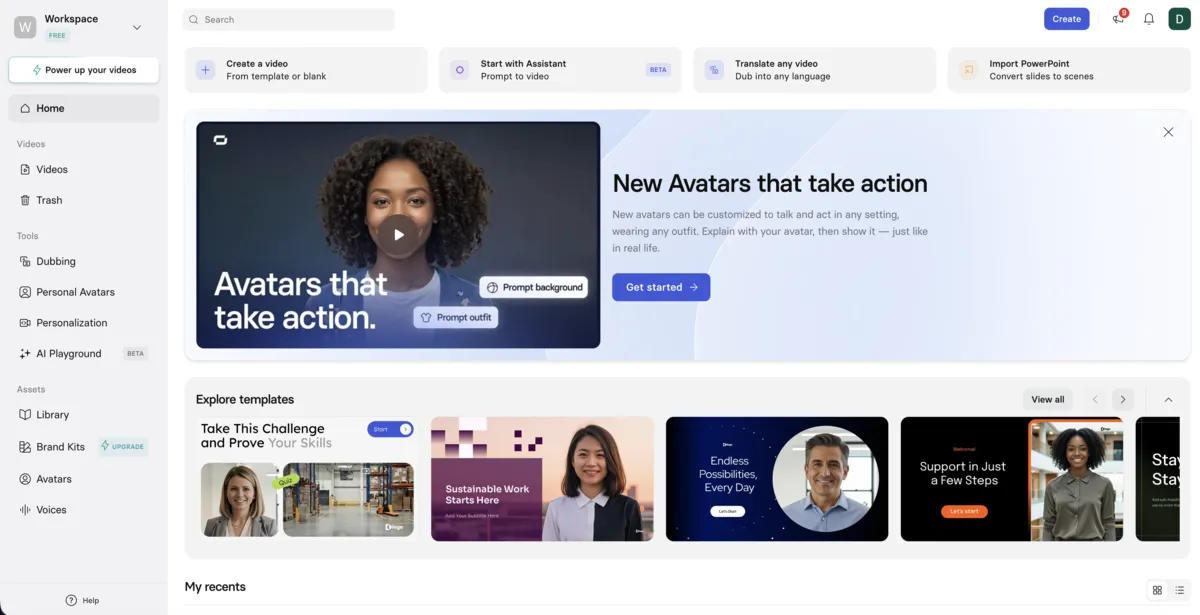
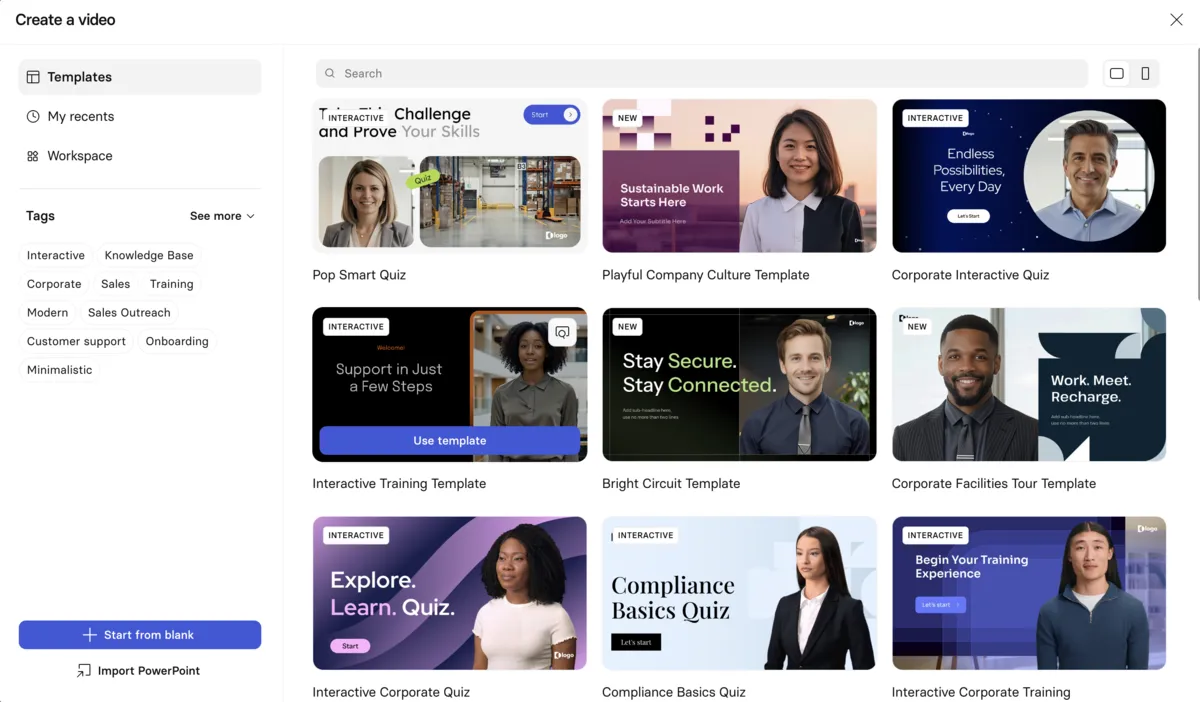
Synthesia works by pairing your typed script with an AI avatar that speaks it on screen with natural lip sync, gestures, and facial expressions. You pick an avatar, write or paste your script in any of 160+ languages, add branding elements, and hit generate. Express-2 handles the rendering, and Synthesia claims finished 1080p video in minutes — though my multi-scene test took closer to 30 minutes.
The workflow breaks down into four steps:
Select from 125-240+ Express-2 AI avatars
Pick a photorealistic presenter, create a custom avatar from a single photo, or generate an entirely new avatar with a text prompt.
Type or paste in any of 160+ languages
Just type what you want your avatar to say. No voice recording needed.
Add branding, backgrounds, and screen recordings
Make it yours with logos, colors, and visual elements.
Get your video in minutes, not days
Click generate, download, and share across your platforms.
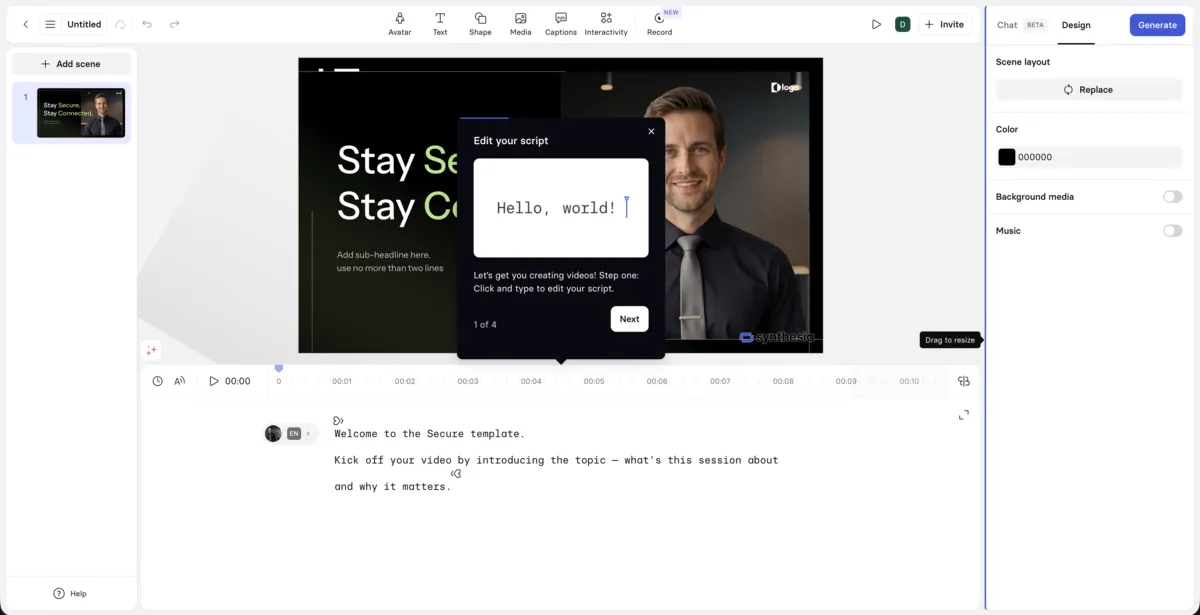
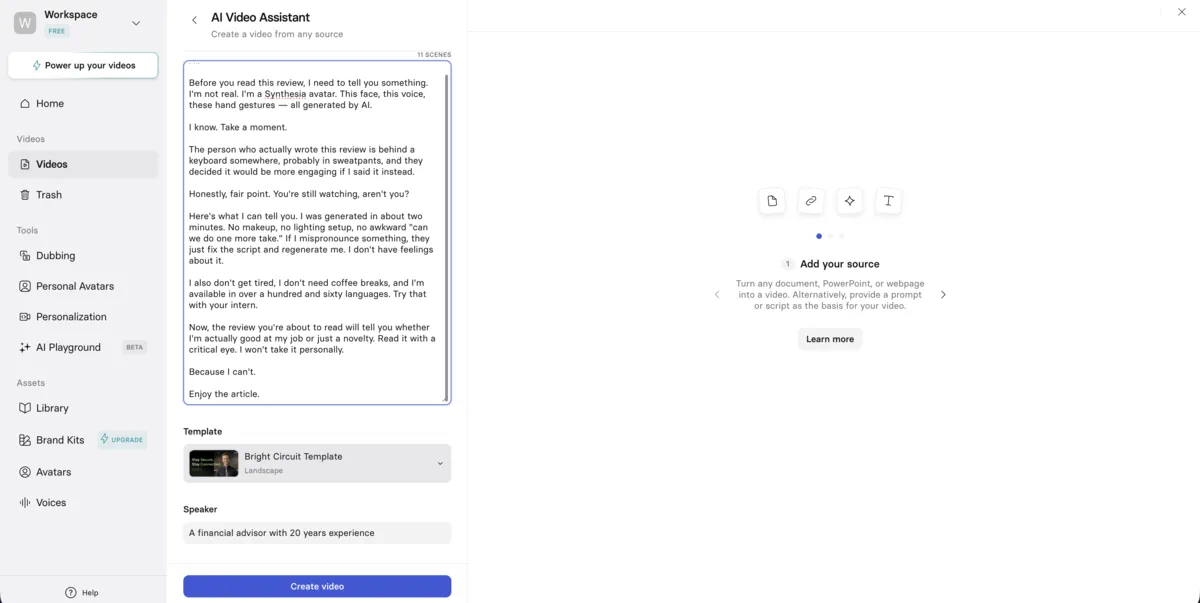
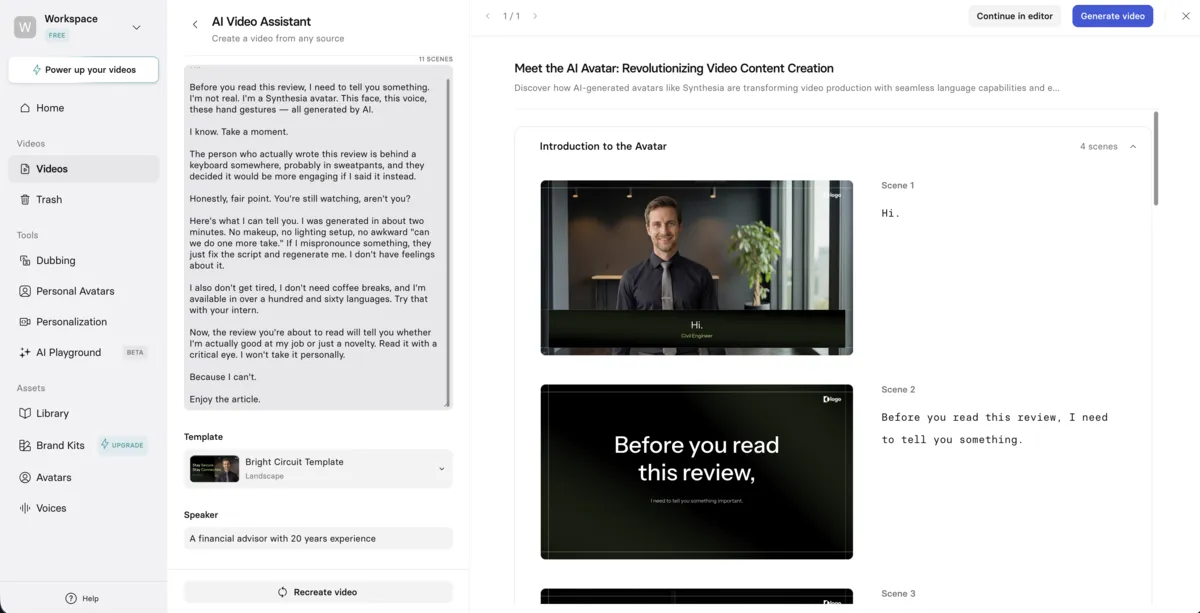
Speed: Synthesia’s docs claim Express-2 renders roughly one minute of 1080p video in about two minutes. In practice, my 11-scene demo video took about 30 minutes from script to finished render. Short single-scene clips are faster, but plan for longer wait times on multi-scene or customized videos.
The 3.0 update changed a lot about Synthesia. Express-2 avatars now deliver full-body gestures with facial expressions and natural lip sync. Veo 3 integration lets you generate AI B-roll directly inside the editor. And Video Agents turn passive training videos into two-way conversations that capture viewer data in real time.
Full-body AI avatars with natural hand gestures, facial expressions, and lip sync powered by a diffusion transformer model
Generate cinematic B-roll footage from text or image prompts directly inside the Synthesia editor
Interactive AI avatars that talk, listen, and act in real time for training role-plays and customer onboarding
Clone your voice in seconds. Preserves your tone, accent, and rhythm without fine-tuning or long recording sessions
Type in any language, avatar speaks it fluently. AI Dubbing translates existing videos with frame-accurate lip sync
Upload a single image to create your AI avatar—no video recording needed. Available on Starter plans and above
Upload logo, set colors, create templates. Keep all videos consistent and on-brand across your organization
SOC 2 Type II, ISO 42001, ISO 27701, and GDPR compliant. SSO integration available
Synthesia uses a credit-based system across four tiers: Free, Starter, Creator, and Enterprise. Credits are the shared currency for video generation, AI Dubbing, and other AI features. The Starter plan works out to roughly 10 minutes of video per month, while Creator gives about 30 minutes. Enterprise unlocks unlimited minutes with custom pricing.
| Plan | Annual (Save up to 34%) | Monthly |
|---|---|---|
| Free | Annual $0/mo | Monthly $0/mo |
| ||
| Starter | Annual $14/mo billed annually | Monthly $19/mo |
| ||
| Recommended Creator | Annual $59/mo billed annually | Monthly $89/mo |
| ||
| Enterprise | Annual Custom | Monthly Custom |
| ||
Yearly billing cuts Starter by 26% (to $14/month) and Creator by 34% (to $59/month). Worth it if you know you’ll use the platform consistently.
Start creating professional AI videos in minutes. No credit card required for the free plan.
Try Synthesia FreeA single Synthesia video can run up to 4 hours. Each video holds a maximum of 150 scenes, and each scene can be up to 5 minutes long. These limits are the same on every plan, though your monthly or yearly minute allowance decides how much you can generate.
In practice the allowance matters more than the ceiling. The free plan’s 10 minutes a month caps what you can realistically produce, Starter gives 120 minutes a year, and Creator gives 360. Only Enterprise, with unlimited minutes, lets you get anywhere near the 4-hour maximum. The 150-scene cap is the other limit to watch, since a long script split into many short scenes can hit it well before you run out of runtime.
I’ve spent a lot of time testing Synthesia across training modules, marketing videos, and multilingual content. The Express-2 avatars and Veo 3 integration genuinely improve production quality. But the credit-based pricing model and enterprise-locked features like SCORM export and 1-click translation remain real drawbacks for smaller teams. For how Synthesia’s AI Dubbing measures up against dedicated alternatives, see my best AI dubbing tools comparison.
Synthesia works best for L&D teams, corporate trainers, and marketing departments that need professional presenter-led videos without filming. If you’re regularly creating training modules, onboarding content, or multilingual marketing videos, the avatar quality and enterprise security will matter to you. It’s not built for UGC creators or anyone who needs an unscripted, conversational feel.
Employee training, onboarding, compliance—update easily, translate to any language
Consistent videos for social, YouTube, and email without production headaches
Lecture videos and tutorials at scale. Reach global students in their language
Personalized video messages, product demos, and sales content that gets watched
Also great for HR teams (onboarding, policy updates, announcements) and internal comms (company-wide updates, executive communications).
| Use Case | Why Synthesia Isn't the Best Fit |
|---|---|
| Vloggers & casual creators | Need authentic, unscripted feel that AI can't replicate |
| Entertainment & creative projects | Requires complex cinematography and creative control |
| Emotional content | AI voices lack subtle emotional nuance |
| Ultra-tight budgets | Though free plan helps, paid plans are mid-range pricing |
Synthesia and HeyGen are the two leading AI avatar platforms in 2026, but they target different users. Synthesia leads on enterprise security (SOC 2, ISO 42001, ISO 27701), structured collaboration, and PowerPoint-to-video workflows. HeyGen leads on avatar realism with its Avatar V technology and UGC-style content, though it scores lower overall (4.0/5) due to credit system complexity and regional restrictions.
Note: Synthesia excels at professional, scripted content with enterprise governance. HeyGen produces lifelike avatars for social media and UGC-style content but scores lower overall (4.0/5). For a budget-friendly alternative with full commercial rights, consider Synthesys. See the full comparison, the detailed Synthesia vs. HeyGen breakdown, or the Synthesys vs Synthesia comparison.
The biggest win with Synthesia is speed. What used to take months of filming, editing, and localization can now happen in weeks. The platform works especially well for global training rollouts where the same content needs to exist in a dozen languages. Here are two real examples from Synthesia’s customer base.
| Use Case | What They Did | Results |
|---|---|---|
| Global Training | 50 training modules in English, translated to 14 languages | 75% cost savings, 3 weeks vs 6 months |
| Marketing Team | Weekly product update videos with custom avatar | 8 hours → 45 min/video, 4x video output, 3x engagement |
Here’s what a raw first draft looks like straight out of Synthesia’s free plan. I fed it a script, picked an avatar, and hit generate — no edits, no retakes. The script described the speaker as an experienced financial advisor, but Synthesia cast what looks more like a civil engineer in a nice shirt. That’s the kind of thing you’d fix in a second pass: swap the avatar, adjust the background, maybe tweak the pacing. The point here isn’t a polished final product. It’s showing you what the platform produces before you start refining.
First draft, not final cut: The video above is unedited output from Synthesia’s free plan (watermark included). A production version would involve picking the right avatar for the role, adjusting scene transitions, and adding branded overlays. Synthesia lets you iterate on all of this without re-recording anything.
Most people’s first Synthesia video is mediocre because they write scripts the way they write emails. The trick is writing for speech, not reading. Beyond that, picking the right avatar for your audience and using Veo 3 B-roll to break up talking head segments makes a noticeable difference. Set up your Brand Kit before you do anything else.
Write for speaking, not reading
Match avatar to audience and tone
Keep viewers engaged
Set up Brand Kit on day one
Synthesia holds four compliance certifications: SOC 2 Type II, ISO 42001, ISO 27701, and GDPR. That’s more than any other AI video platform I’ve reviewed. For companies in finance, healthcare, or government, this matters — most competitors hold only SOC 2 or less.
Regular third-party audits verify security controls are working effectively
International standard for AI management systems—ensures responsible AI use
Privacy information management certification added with Synthesia 3.0
Full compliance with European data protection regulations
Enterprise-Ready: These certifications make Synthesia one of the few AI video platforms suitable for regulated industries like financial services and healthcare. The April 2026 update added live compliance monitoring and brand-secure background templates.
Synthesia 3.0 is the latest version of the platform, launched in 2026. It includes Express-2 full-body avatars with natural gestures and facial expressions, Veo 3 integration for AI-generated B-roll, interactive Video Agents, Express-Voice instant voice cloning, and enhanced AI Dubbing with frame-accurate lip sync across 30+ languages.
Yes. Type your script in your target language (or use translation tools), and Synthesia's AI generates the video with proper pronunciation and lip sync. The platform supports 160+ languages. Enterprise plans include 1-click translation that automates this across multiple languages simultaneously.
Synthesia claims most videos render in 3-5 minutes at 1080p/30fps. In my testing, a single-scene clip was ready in a few minutes, but an 11-scene video took about 30 minutes. Third-party reviews report similar results: 3-10 minutes for simple videos, up to 30 minutes for longer or customized ones.
Yes. With Synthesia 3.0, you can create a Personal Avatar from a single photo—no video recording required. Starter plans include 3 Personal Avatars, Creator includes 5, and Enterprise offers unlimited. Custom studio avatars with enhanced realism cost $1,000/year extra.
Video Agents are interactive AI avatars that can talk, listen, and respond in real time. They turn passive training videos into two-way conversations, run role-plays, screen job candidates, and capture data that feeds back into your business systems. This feature is part of Synthesia 3.0.
With Synthesia 3.0, rejected videos now remain editable and can be resubmitted rather than being deleted. You retain access to prior versions that didn't violate policy. However, healthcare and biotech companies should review Synthesia's Acceptable Use Policy before committing, as some legitimate content in regulated industries has been flagged.
Synthesia offers four tiers: Free ($0, 10 mins/month), Starter ($14/month billed annually or $19/month), Creator ($59/month billed annually or $89/month), and Enterprise (custom pricing). Annual billing saves 26% on Starter and 34% on Creator. Credits are the shared currency across all AI features.
Yes, videos created on Synthesia's free plan include a Synthesia watermark. The free plan also limits you to 10 minutes of video per month and 9 AI avatars. Upgrading to the Starter plan ($14/month annually) removes the watermark.
Synthesia is the stronger overall choice (4.7/5 vs HeyGen's 4.0/5). It leads on enterprise security (SOC 2, ISO 42001, ISO 27701, GDPR), collaboration workflows, and structured training content. HeyGen has more realistic avatars and voice cloning, but its credit system complexity and regional restrictions lower its score. Synthesia starts at $14/month vs HeyGen's $24/month. See the full Synthesia vs. HeyGen comparison for a detailed breakdown.
A single Synthesia video can be up to 4 hours long, with a maximum of 150 scenes and up to 5 minutes per scene. Those caps apply on every plan. In day-to-day use, your plan's minute allowance (10 minutes/month on Free, 120 minutes/year on Starter, 360 on Creator) is the practical limit.
Credits are Synthesia's shared currency across all AI features—video generation, AI Dubbing, and other tools draw from the same pool. The Starter plan includes 14,500 credits/year (roughly 120 video minutes), while Creator includes 44,000 credits/year (roughly 360 video minutes). Enterprise plans have custom credit allocations with unlimited video minutes.
Synthesia 3.0 is a genuine improvement. Express-2 avatars, Veo 3 B-roll generation, and Video Agents fix the three biggest problems with earlier versions: stiff avatars, limited creative options, and one-way passive content. For enterprise video production, I haven’t found another platform that covers this much ground with this level of compliance.
Strengths: Express-2 avatar quality, Veo 3 integration, four compliance certifications, 160+ languages with frame-accurate AI Dubbing, interactive Video Agents, and an intuitive editor.
Weaknesses: Credit-based pricing demands careful planning, key features like SCORM export remain enterprise-only, AI voice quality still drops in some non-English languages, and content moderation can be overly broad for regulated industries.
 Featured 14 min read
 HeyGen's free plan is 3 videos a month; Creator is $24/mo. Avatar V builds a digital twin from 15 seconds of footage and translates into 175+ languages.
Read Article → 14 min read
 Synthesia costs $14/mo and wins on compliance, Veo 3 and free minutes. HeyGen is $24/mo and still leads on avatar realism. Full feature comparison.
Read Article → 21 min read
 InVideo, Synthesia, Synthesys, Fliki and Runway compared on output, pricing and free tiers. Every free option carries a watermark or a usage cap.
Read Article →