
Best AI Music Generators 2026: 4 Tools Tested
Best AI music generators for 2026: ElevenLabs, Suno, Soundraw, AIVA tested with one prompt. ElevenLabs wins on quality; Suno's free plan no longer downloads.
Read Article →
Soundraw is an AI background music generator aimed at creators who monetize on YouTube, Spotify, or podcasts and want zero copyright risk. Every track is royalty free AI music generated from compositions written and recorded by Soundraw’s in-house production team, not scraped from copyrighted songs. The output is solid for background music, the Mixer tool provides real customization, and at $11.04/month on annual billing it undercuts most stock music libraries. In 2026 Soundraw also shipped Grid, a separate loop-based beatmaking app for iPhone and Mac, covered below.
Generate unlimited AI music and preview tracks before subscribing. No credit card required.
Start Creating with Soundraw →The Soundraw AI music generator creates royalty-free instrumental tracks from genre, mood, and energy selections. You can generate and preview unlimited tracks without paying — downloads start at the Creator plan ($11.04/mo annual). Unlike tools that accept text prompts (like Suno or ElevenLabs Music), Soundraw uses a click-and-slider interface where you pick parameters and the AI builds the arrangement.
Copyright is where Soundraw diverges from other AI music tools. The AI is trained exclusively on music produced by Soundraw’s own team of composers and producers. Nothing is scraped from the internet and no existing songs are used in training. Every generated track carries a worldwide perpetual license for commercial use.
Here is a Soundraw-generated Pop track using default settings: Pop genre, medium energy, and no post-generation tweaks.
The track is clean and well-mixed. It works fine as background for a YouTube video or podcast intro. It will not be mistaken for a human-produced hit single, but that is not the point. Soundraw is a production tool when you need background music you can keep consistent and adjust without fighting the file.
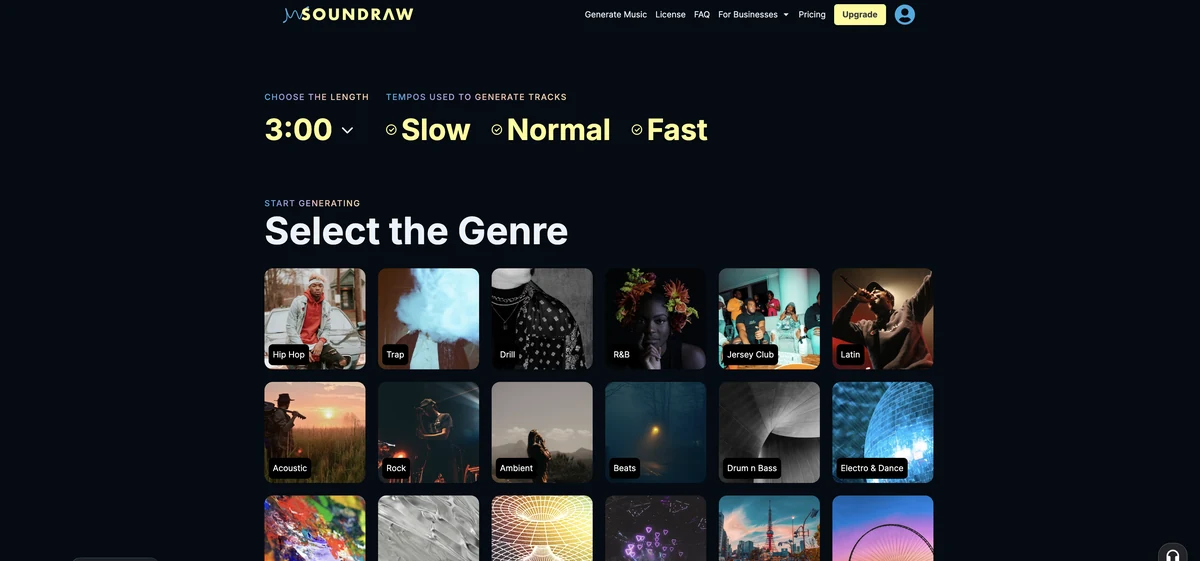
30+ genres from Hip-Hop to Lo-Fi to Orchestral. Blend multiple genres for unique sounds
Set energy level and emotional tone. Energetic, Dark, Peaceful, Romantic, and more
Generate tracks from 15 seconds to 5+ minutes for any use case
Toggle drums, bass, melody, and FX. Full control with the Mixer tool
Choose one or blend multiple genres
Hip-Hop + Orchestra, Trap + Lo-Fi, Acoustic + Folk. Genre blending produces tracks you will not find in stock libraries.
Choose energy and duration
Pick from moods like Energetic, Dark, Peaceful, and Romantic. Set duration from 15 seconds to over 5 minutes.
AI creates 15 unique tracks instantly
Multiple options in seconds. Pick your favorite as a starting point, then customize.
Fine-tune every element bar-by-bar
Toggle instruments, adjust intensity, change tempo, modify song structure. No DAW needed.
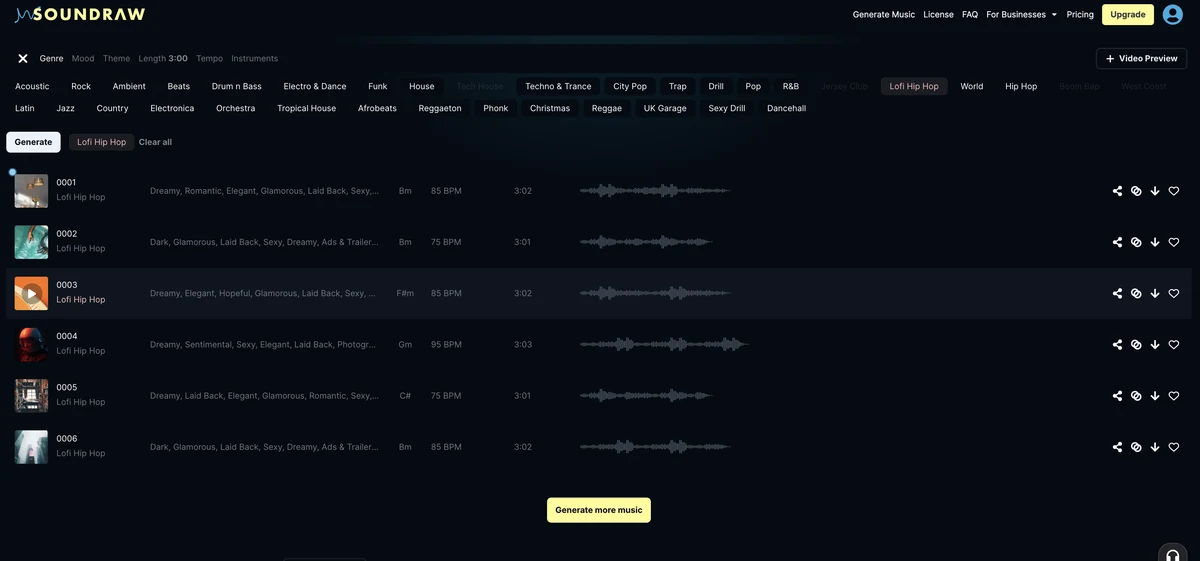
The Mixer is Soundraw’s strongest feature. After generation, you get bar-by-bar control over every element of the track.
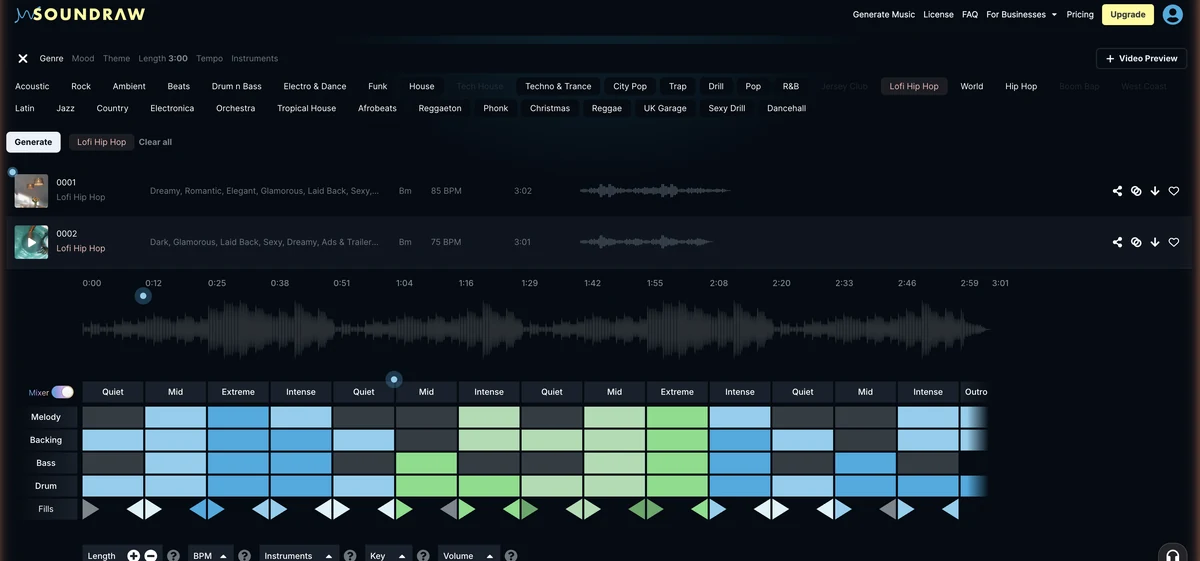
Mute or solo drums, bass, melody, and FX for complete control over the mix
Bar-by-bar energy control for perfect pacing. Low energy for talking heads, high for action
Speed up or slow down to match your content without regenerating
Arrange intro, verse, chorus, and outro your way. Extend or shorten sections
Genre blending is where Soundraw produces its most distinct output. The AI fuses styles in combinations that stock libraries do not offer.
Genre blending combinations and where they fit best
| Genre Combo | Best For | Quality |
|---|---|---|
| Hip-Hop + Cinematic | Epic YouTube intros and trailers | Excellent |
| Lo-Fi + Jazz | Chill study and background music | Excellent |
| Electronic + Orchestral | Tension builders and transitions | Good |
| Acoustic + Folk | Warm podcast music and vlogs | Good |
| Trap + Lo-Fi | Modern social media content | Excellent |
| Rock + Electronic | High-energy gaming content | Good |
Soundraw introduced Dynamic Tracks in mid-2024 for songs one minute or longer, and the feature is included on every plan. Generated tracks now include natural variations throughout their duration instead of repeating loops. The result sounds less loop-obvious, with small shifts in energy and arrangement over time.
Grid is a separate Soundraw app built for beatmakers rather than for background music. You pick loops, layer them, describe the sound you want in plain language, and shape the song structure with a click. Finished projects export as stems that drag straight into a DAW, and the app records vocals over the beat. Every loop comes from the same in-house catalog that trains the web generator, so the copyright position is identical.
The iPhone version reached the App Store on May 14, 2026, Soundraw’s Grid page lists a Mac download alongside it, and Android is on a waitlist. Soundraw announced the app more widely in an August 2026 press release. Grid is priced on its own page, separately from the Creator and Artist plans below.
SOUNDRAW Grid annual pricing as shown on Soundraw's Grid page in September 2026. Monthly billing exists but is not listed here.
| Grid plan | Annual price | What you get |
|---|---|---|
| Free | $0 | Preview loops and packs, 8 download credits a month, save 3 projects |
| Pro | $149.99/year ($99.99 first year) | Commercial and personal use, keep 100% of recording royalties, 100 download credits a month, up to 100 projects |
| Unlimited | $249.99/year ($199.99 first year) | Everything in Pro plus unlimited downloads and projects |
Pick the web generator for finished background tracks with bar-level Mixer control. Pick Grid if you make beats, want to type what you hear in your head, or need stems on your phone.
Soundraw’s Creator plan costs $12.99 a month, or $11.04 a month on annual billing, and covers unlimited MP3 downloads with commercial rights. The Artist plans for releasing music run from $25.99 to $64.99 monthly, or $19.49 to $32.50 a month on annual billing. All prices below were checked in September 2026 on the US pricing page.
| Plan | Annual | Monthly |
|---|---|---|
| Free | Annual $0 | Monthly $0 |
| ||
| Recommended Creator | Annual $11.04/mo billed annually | Monthly $12.99/mo |
| ||
| Artist Starter | Annual $19.49/mo billed annually | Monthly $25.99/mo |
| ||
| Artist Pro | Annual $23.39/mo billed annually | Monthly $38.99/mo |
| ||
| Artist Unlimited | Annual $32.50/mo billed annually | Monthly $64.99/mo |
| ||
Soundraw shows every plan as a discount from a higher list price: Creator is listed at $19.99 a month, or $16.99 a month on annual billing, before the cut to $12.99 and $11.04. The discounted rates were already in place in April 2026, so treat them as the going price rather than a short sale.
The free plan lets you generate, customize and save unlimited tracks, but you cannot download any of them. You need the Creator plan ($11.04/mo annual, $12.99 monthly) to export music, and every track downloaded on a paid plan stays licensed after you cancel.
The Creator and Artist plans target different use cases and come with different rights.
AI trained exclusively on in-house compositions. No scraped songs, no legal gray areas, no Content ID matches
Bar-by-bar editing of instruments, intensity, tempo, and song structure. More post-generation control than Suno or AIVA
Combine any two genres for unique sounds. Hip-Hop + Orchestra, Trap + Lo-Fi, and 30+ genre options
WAV and individual stems (drums, bass, melody, FX) on Artist plans for full DAW integration
Songs over 1 minute include natural variations instead of repetitive loops for more organic sound
Integrate Soundraw generation into your own apps, games, or platforms via their REST API
Beyond individual creators, Soundraw offers plans for larger organizations:
Several new AI music tools have launched since Soundraw first shipped. Here is how it compares to the three other tools covered in the Best AI Music Generators 2026 comparison. For a focused Soundraw versus AIVA breakdown, see Soundraw vs AIVA.
Soundraw details checked September 2026; competitor rows as of April 2026
| Feature | Soundraw | ElevenLabs Music | Suno | AIVA |
|---|---|---|---|---|
| Best For | Copyright-safe background music | Studio-quality songs with vocals | Free vocal songs | Orchestral and classical |
| Copyright Safety | 100% in-house training | Licensed | Licensed (paid plans) | Licensed |
| Vocals | No (instrumental only) | Yes, multilingual | Yes, best quality | No (instrumental only) |
| Input Method | Sliders and dropdowns (text prompts in the Grid app) | Text prompts | Text prompts | Style selection |
| Post-Generation Editing | Advanced Mixer (bar-level) | Section editing | Studio 1.2 | Piano Roll + MIDI |
| Stem Export | Artist plans (WAV + Stems) | No | Pro plan | Pro plan |
| MIDI Export | No | No | No | Yes |
| Free Downloads | No (preview only) | No (preview only) | Yes (non-commercial) | 3/month (non-commercial) |
| Entry Price | $11.04/mo (annual) | $7.99/mo (annual) | $8/mo (annual) | €11/mo (annual) |
| Commercial Use | All paid plans | Pro plan ($9.99/mo) | Pro plan ($10/mo) | Standard (€15/mo) |
Pick Soundraw when copyright safety matters most and you mainly need background music for monetized content. Need vocals? ElevenLabs Music or Suno. Need orchestral scores with MIDI export? AIVA. For audio samples and a fuller breakdown, see the Best AI Music Generators 2026 comparison.
Unique background music without copyright risk. No Content ID claims, no revenue sharing
Consistent, professional intros and outros that match your brand. Adjustable length and energy
High-volume production with unlimited music generation. Stems for DAW integration on Artist plans
Enterprise plans and SpaceMusic AI for retail, venues, apps and commercial use at scale
The best results come from combinations
Hip-Hop + Classical produces sounds you will not find in stock libraries. Trap + Lo-Fi and Rock + Electronic are other strong pairings.
Generated tracks are starting points
Spend time muting instruments in quiet sections and boosting energy in key moments. That is where a generic generation starts to feel custom.
Use the intensity slider for video pacing
Low energy for talking heads and narration. Medium for B-roll. High for intros, transitions, and action sequences.
Save 15% to 50% depending on the plan
Creator drops from $12.99 to $11.04 a month on annual billing, a 15% saving. Artist Unlimited halves from $64.99 to $32.50. With a perpetual license on downloads, annual billing is worthwhile for regular use.
Preview unlimited AI music generation. Subscribe when you're ready to download.
See how Soundraw stacks up against ElevenLabs Music, Suno, and AIVA with audio samples.
Soundraw is the safest AI music generator for creators who monetize their content. The copyright model is airtight, the Mixer tool provides real control, and the pricing is fair for unlimited background music.
Soundraw delivers on its core pitch: unlimited AI music with a clear copyright story and customization tools that go beyond picking a preset. As a free AI music generator for previewing and creating tracks, it lets you explore every genre before committing to a paid plan. If you post on YouTube, run a podcast, or produce client video and want background music without worrying about Content ID, it is a strong option as of September 2026.
Is Soundraw worth it at $11.04/month on annual billing? For regular content production, the Creator plan pays for itself after a handful of videos. If you need distribution rights for streaming platforms, the Artist plans add full copyright ownership.
Yes. All paid Soundraw plans include commercial use rights and full monetization. YouTube Content ID will not flag Soundraw tracks because they are original AI-generated compositions trained on in-house music, not licensed existing songs. Soundraw's in-house training model means there is no copyrighted material for Content ID to match against.
Yes, with a subscription. Soundraw grants a perpetual license on any tracks you download while subscribed. Even if you cancel your subscription, previously downloaded tracks remain licensed forever for any commercial use. No attribution is required on any plan.
Yes. A free account can generate unlimited tracks, customize them in the Mixer and save favorites, but it cannot download anything. Downloads start with the Creator plan at $11.04 a month on annual billing or $12.99 monthly, which includes unlimited MP3 downloads and commercial use.
Not right now. Soundraw ran a lifetime plan on AppSumo that is marked sold out as of September 2026. That deal capped downloads at 50 songs a day and excluded Content ID registration and distribution to streaming platforms. Today the only options are the monthly and annual subscriptions.
Grid is Soundraw's loop-based beatmaking app for iPhone and Mac, released in 2026. You describe the sound you want in plain language, layer loops, adjust the structure with a click and export stems to a DAW. It has a free tier with 8 download credits a month, a Pro plan at $149.99 a year ($99.99 for the first year) and an Unlimited plan at $249.99 a year ($199.99 for the first year).
The main generator runs in the browser on any desktop. The SOUNDRAW Grid app is available for iPhone and Mac, and Android is on a waitlist.
Only with Artist plans (Starter at $19.49/mo, Pro at $23.39/mo, or Unlimited at $32.50/mo, all billed annually). The Creator plan covers background music use in videos and podcasts. Artist plans transfer copyright ownership to you, allowing distribution on all streaming platforms with 100% royalty ownership.
No. Soundraw's web generator makes instrumental music only as of September 2026, and its help center says vocals and lyrics are not supported. The Grid app lets you record your own vocals over a beat, but it does not synthesize singing. For AI vocals, ElevenLabs Music and Suno are the two leading options, and you can layer their output over a Soundraw instrumental in your DAW.
Soundraw is the safest choice for copyright-sensitive commercial work because its AI trains only on in-house music. Suno offers the best free tier (50 credits/day) and strongest AI vocals. ElevenLabs Music produces the cleanest overall audio quality with multilingual vocals. Soundraw has the best post-generation editing with its Mixer tool. Suno and ElevenLabs accept text prompts while Soundraw uses sliders. All four tools are compared with audio samples in the Best AI Music Generators 2026 article on GenMediaLab.
For background music in YouTube videos, podcasts, ads, and games, the quality is more than sufficient. The output is clean, well-mixed, and varies with genre blending. For standalone music releases competing with human artists, the compositions lack the emotional depth of human-written songs. Soundraw is a production tool, not a replacement for human composers.
The Creator plan provides MP3 downloads. Artist Pro and Artist Unlimited plans include WAV files and individual stems (drums, bass, melody, FX) for DAW integration. Artist Starter is limited to MP3. All downloads are high-quality, and stems give you full control over the mix in tools like Ableton, Logic Pro, or FL Studio.
Yes. Soundraw offers API access for developers who want to integrate AI music generation into their own platforms, games, or applications. The API supports dynamic track generation and drum mixing. Companies like Canva, Captions, and Wondershare use Soundraw's API for music features in their products.
Soundraw lets you generate and preview unlimited tracks without paying, but downloading requires the Creator plan ($11.04/month annual). For completely free AI music downloads, Suno offers 50 credits per day (non-commercial use) and AIVA provides 3 free downloads per month (non-commercial, with AIVA credit required). Soundraw is the better choice if you need commercial royalty free AI music with no copyright risk.
You can cancel your Soundraw subscription through your account settings. Any tracks you downloaded while subscribed remain licensed under the perpetual license, even after cancellation. Some users have reported the cancellation process could be clearer, so check your billing dashboard to confirm the cancellation went through.
 Featured 23 min read
 Best AI music generators for 2026: ElevenLabs, Suno, Soundraw, AIVA tested with one prompt. ElevenLabs wins on quality; Suno's free plan no longer downloads.
Read Article → 10 min read
 Soundraw vs AIVA tested head-to-head: free tiers, music quality, licensing, and YouTube readiness compared. Find which AI music generator fits your workflow.
Read Article → 9 min read
 LALAL.AI's free tier gives 10 minutes and previews but blocks downloads. Paid starts at €6.75/mo for 10 stem types. Most songs finish in under a minute.
Read Article →