
Best AI Voice Generators 2026: Top 4 Compared
Best AI voice generators for 2026: ElevenLabs, Murf AI, and Speechify tested and Fliki compared on voice quality, cloning, free tiers, and pricing from $6/mo.
Read Article →
ElevenCreative is ElevenLabs’ all-in-one AI creative platform that consolidates voiceovers, music, sound effects, dubbing, and video generation into a single workspace. In this ElevenCreative review, I break down every feature, the pricing math, and where it falls short. It replaces the patchwork of separate tools most creators juggle, powered by v3, the most expressive text-to-speech model available, and backed by 50+ image and video models. The free tier gives you 10,000 credits per month to try everything before paying a cent.
ElevenCreative is the content creation arm of ElevenLabs, a company valued at $11 billion after a $500 million Series D from Sequoia Capital. ElevenLabs now operates three product tiers: ElevenCreative for content creators, ElevenAgents for voice AI applications, and ElevenAPI for developers building with their models.
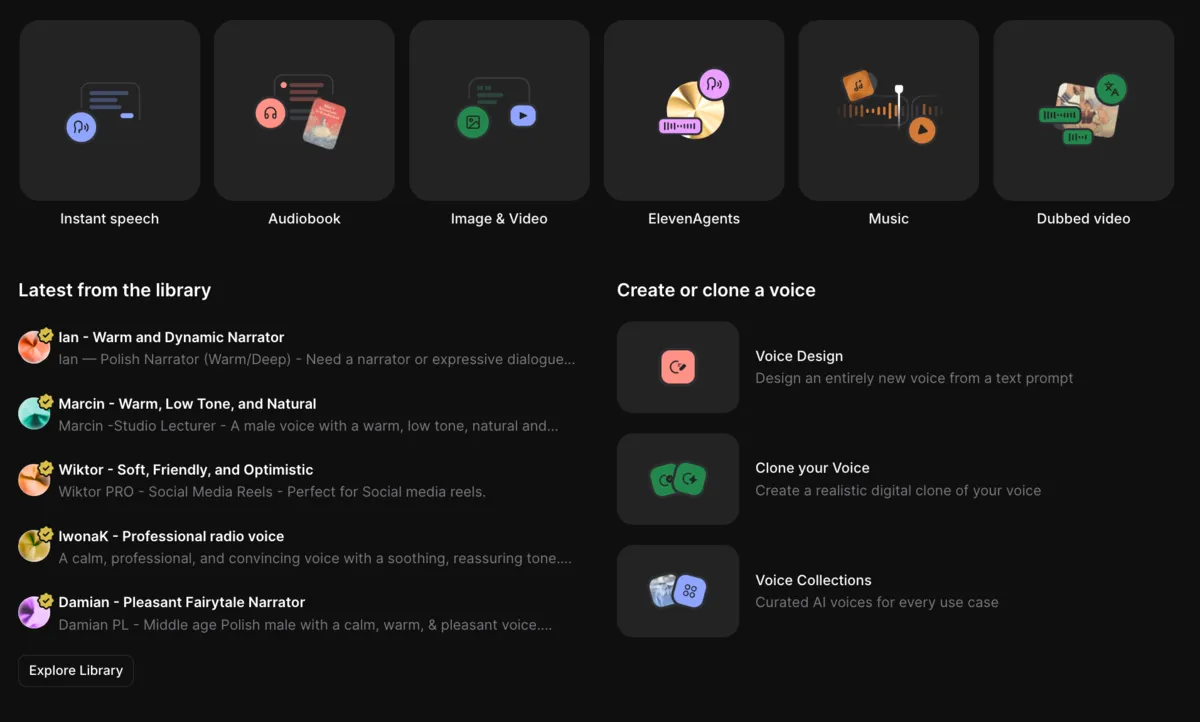
The platform covers twelve core capabilities in a single browser-based workspace:
The most expressive AI voice model with emotion, breathing, and inflection across 70+ languages
Timeline editor with tracks for video, narration, music, SFX, and captions
Node-based canvas for chaining models into repeatable creative pipelines
Generate commercial-ready tracks in any genre, with or without vocals
Create any sound from a text prompt: foley, transitions, ambient, and more
Translate audio and video into 90+ languages while preserving the speaker's voice
ElevenCreative also includes Voice Cloning (instant and professional), Voice Design (create new voices from text prompts), Voice Isolator (extract clean voice from noisy audio), Speech-to-Text (Scribe v2, their transcription model), and Image/Video generation using 50+ third-party models.
Generate voiceovers, music, sound effects, and more. 10,000 free credits per month, no credit card required.
Start Creating with ElevenCreative →The platform is structured around a workspace model. You pick a tool (TTS, Music, Studio, Flows, etc.), create your content, and optionally combine outputs in Studio or Flows for multi-asset projects. Everything stays in one browser tab.
Choose from the generation tools in the sidebar
Navigate to Text to Speech, Music, Sound Effects, Studio, or Flows depending on what you need. Each tool has its own dedicated interface optimized for that content type.
Create voiceovers, music, or sound effects from text prompts
For TTS: type or paste your script, pick a voice from 10,000+ options, and generate. For Music: describe the mood, genre, and length. For Sound Effects: describe the sound you need. Generation typically takes seconds.
Edit and combine assets on a timeline
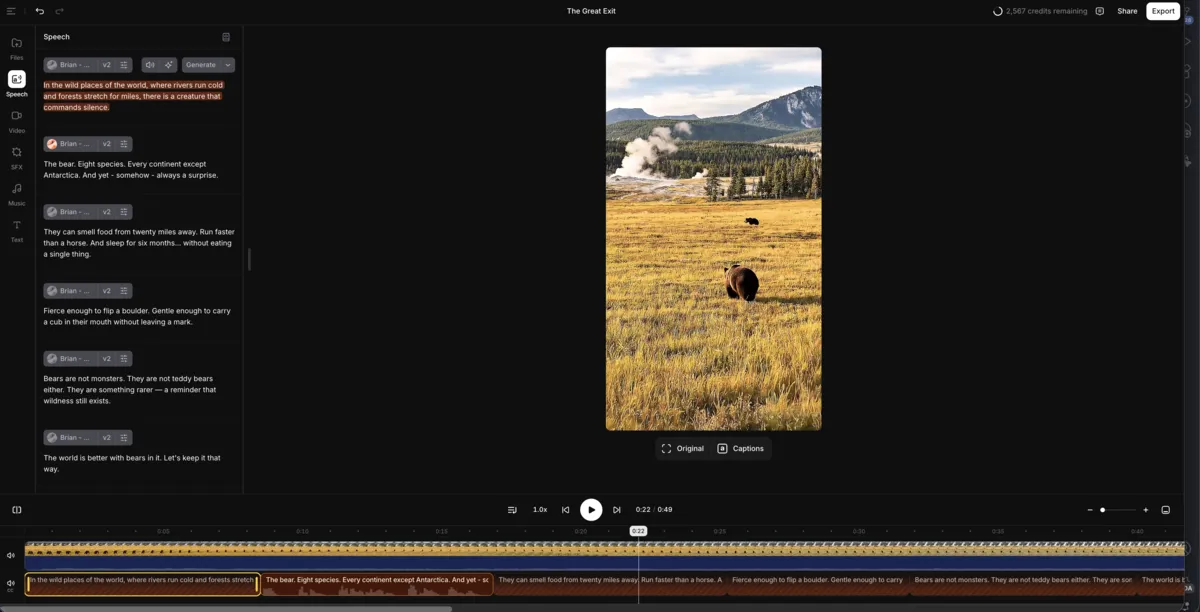
Studio gives you a multi-track timeline with dedicated lanes for video, narration, music, sound effects, and captions. Import footage, layer generated audio, style captions, and export as video or audio.
Automate production with visual pipelines
Flows connects generation models on a node-based canvas. Chain TTS, Music, Sound Effects, and video models together, swap inputs (language, voice, hook), and batch-generate variations without rebuilding the workflow.
Dub content into 90+ languages
Dubbing preserves the original speaker’s tone, emotion, and timing across languages. Voice cloning keeps the speaker’s voice consistent automatically, with phrasing adapted to feel natural in each target language.
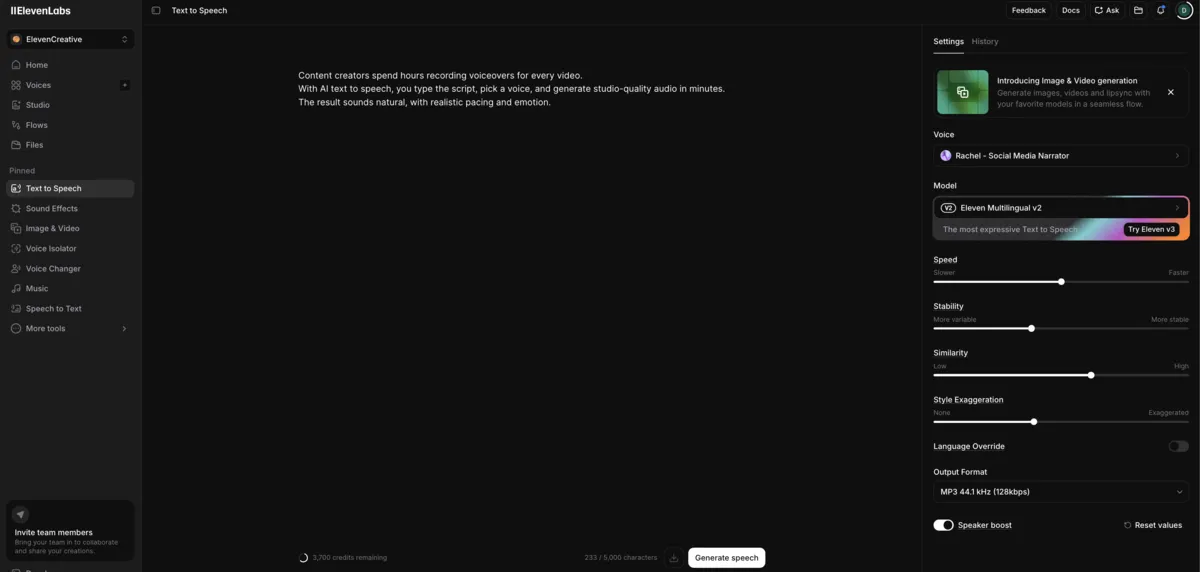
v3 is ElevenCreative’s core model. It generates speech with realistic pacing, breathing, emotion, and inflection. v3 supports Audio Tags via Expressive Mode, letting you insert delivery cues like [laughs], [whispers], or [sighs] at specific moments in the script. Broader tone guidance can also be set directly in the prompt without explicit tags.
v3 works across 70+ languages and accents. The voice library offers 10,000+ pre-made voices filterable by use case, language, and style, plus options to clone your own voice or design entirely new ones.
You can shape delivery at the line level: “[whispers] Don’t tell anyone, but [normal voice] this actually works.” Tags like [laughs], [sighs], and [whispers] give you control over moments that flat TTS models can’t handle.
Two cloning options are available. Instant Voice Cloning needs less than a minute of sample audio and works for quick personal use. Professional Voice Cloning requires 30+ minutes of recordings and produces high-fidelity, multilingual results suitable for production work. Both options let your cloned voice speak across all supported languages.
The free voice cloning guide covers how to prepare a clean sample and which ElevenLabs plan actually unlocks cloning.
If you don’t want to clone a real voice, Voice Design lets you generate new voices from text prompts or sliders controlling age, tone, accent, and personality. This is useful for creating character voices for audiobooks, games, or branded content.
Studio is where individual assets become finished content. It provides a timeline editor with dedicated tracks for video, narration, music, sound effects, and captions. You import footage, generate narration from a script, add a soundtrack, style captions with templates, and export as audio or video.
Studio supports collaboration through sharing and timestamped commenting, so teams can review work without downloading files. Additional workflows include audiobook creation from uploaded documents, AI-generated podcasts via GenFM, AI Soundtrack generation that matches your video’s mood and pacing, and Actor Mode for directing speech delivery using your own voice as a reference.
Flows is the feature that separates ElevenCreative from single-purpose tools. It’s a node-based visual workspace for building end-to-end creative pipelines on an infinite canvas. You connect image, video, voice, music, lip-sync, and sound effects models in sequence, then execute the full pipeline in one run.
The key value is non-destructive iteration. Swap a product image, change the avatar, adjust the hook, or switch the language, and Flows batch-generates all variations automatically. For marketing teams testing hooks, products and languages against each other, one pipeline with swapped inputs replaces a pile of one-off renders.
Templates are available for common use cases: product ads, e-commerce content, and short-form video.
Since June 2026 there is also Flows Agent: open the chat panel in the Flows editor, describe what you want to make, and the agent picks the models, builds and connects the nodes, and runs the generations. Ask for a change and it edits the existing pipeline and re-runs it instead of starting over.
A marketing team producing UGC-style ads can set up a single Flows pipeline that generates the voiceover, music, and sound effects, then swap the hook text and target language to batch-produce 50+ ad variations without reshooting or re-recording anything.
ElevenCreative Music generates commercial-ready tracks in any genre or style, with or without vocals, in multiple languages. For context on how it compares to dedicated music platforms, see the best AI music generators 2026 roundup. Describe the sound, mood, or use case you need and generate an original track. Tracks are adjustable for length and looping.
Music v2, released on May 26, 2026, improved vocals, instrumentation and arrangement across genres and made lyrics and vocals more reliable in the language you write in. Its inpainting lets you select any section of a track and regenerate only that part, and songs can be built section by section: intro, verse, chorus and onward.
Music generated on paid plans is cleared for commercial use, and the models are built in partnership with artists, labels and publishers on licensed data. The exact rights differ by plan: ElevenLabs keeps a Music Commercial Rights table in its music terms, so check it before putting a track in a film, a TV spot, a game or a large ad campaign.
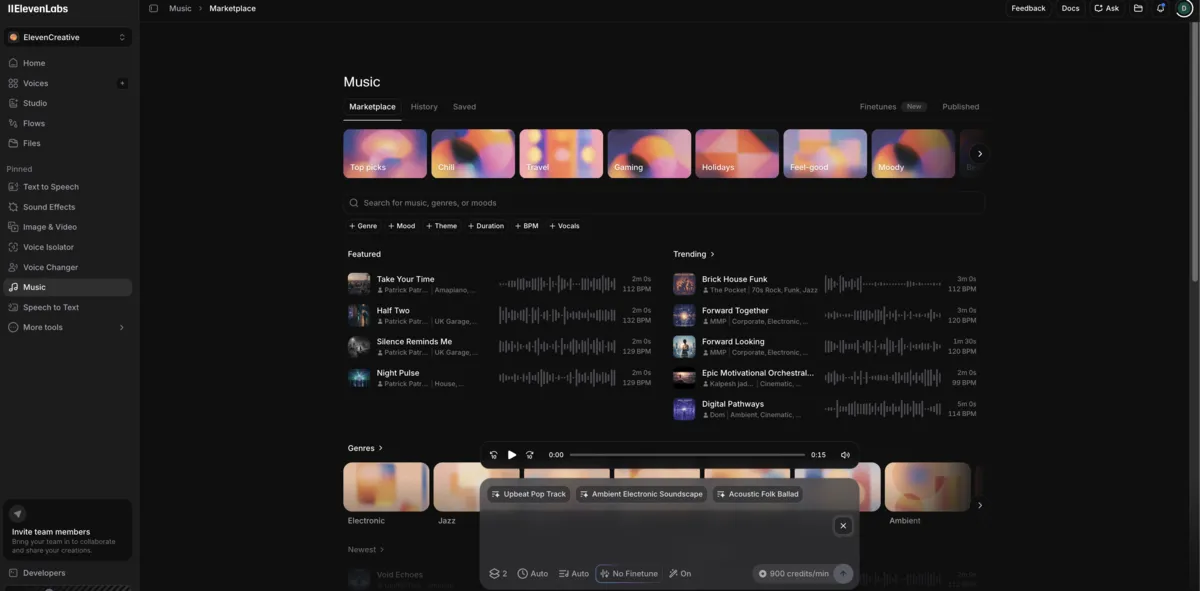
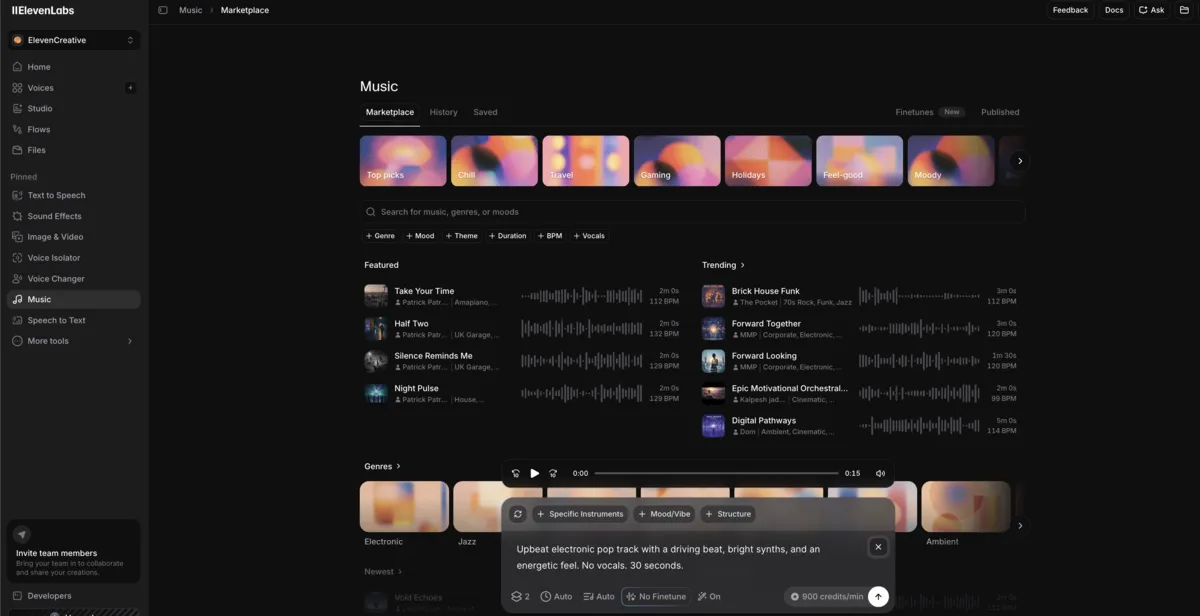
Create royalty-free tracks in any genre. Commercial use included on paid plans.
Try ElevenCreative Music →ElevenLabs shipped a lot between spring and summer 2026. These are the changes that matter to someone deciding on ElevenCreative today.
ElevenCreative changes announced by ElevenLabs between April and June 2026
| Update | Date | What it changes |
|---|---|---|
| ElevenMusic iOS app | April 2026 | A standalone music app for phones, covered in the ElevenMusic launch story on this site |
| Music v2 | May 26, 2026 | Better vocals and arrangement, section-by-section songwriting, regenerate one section without touching the rest |
| Dubbing v2 | May 28, 2026 | The original speaker's tone, pacing and emotion carry into every dubbed language; available inside ElevenCreative |
| Next TTS model previewed | June 2026 | Shown at the ElevenLabs summit in Warsaw with whispering, singing, accent and emotion control; not released yet |
| Flows Agent | June 4, 2026 | Describe a pipeline in the Flows chat panel and the agent builds, connects and runs it |
| Ads Engine | June 22, 2026 | A product area that connects to Google Ads and Meta Ads, pulls existing creatives and localizes text, images and video dubbing across the languages you pick |
The ElevenMusic app is covered in the ElevenMusic launch story. The next text-to-speech model was a stage demo, so nothing in this review’s voice verdict rests on it.
ElevenCreative uses a credit-based pricing system with six public tiers plus Enterprise, checked in September 2026. The free plan gives you 10,000 credits per month (roughly 10 minutes of TTS) with access to most generation tools but no commercial license. Commercial rights start at the $6/month Starter plan.
| Plan | Annual (2 months free) | Monthly |
|---|---|---|
| Free | Annual $0/mo | Monthly $0/mo |
| ||
| Starter | Annual $5/mo billed annually | Monthly $6/mo |
| ||
| Recommended Creator | Annual $18.33/mo billed annually | Monthly $22/mo |
| ||
| Pro | Annual $82.50/mo billed annually | Monthly $99/mo |
| ||
| Scale | Annual $249.17/mo billed annually | Monthly $299/mo |
| ||
| Business | Annual $825/mo billed annually | Monthly $990/mo |
| ||
ElevenLabs bills its V2 Multilingual models at 1 credit per text character, and the Flash and Turbo models at 0.5 to 1 credit per character through the API. Other tools draw from the same pool at their own rates: speech to text 330 credits a minute, music 900 credits a minute, sound effects 200 credits a generation, voice changer and voice isolator 1,000 credits a minute, and dubbing 2,000 to 10,000 credits a minute depending on watermark and Studio options. The pricing calculator on the plans page estimates a monthly total from those rates.
The Creator plan at $22/month is the entry point for serious use: it unlocks Professional Voice Cloning, which is noticeably better than Instant Cloning for production work. The jump to Pro at $99/month is steep, but the 5x credit increase (121k to 600k) makes sense for high-volume production. As of September 2026 the first month of Creator is half price on monthly billing, $11 instead of $22.
ElevenCreative works for solo YouTubers and enterprise marketing teams alike. How much value you get depends on how many of its tools you actually use.
Voiceovers, music, sound effects, and captions for long and short-form content
Episode production, voice cloning, transcription, and full audiobook narration
Batch creative testing across hooks, products, and languages with Flows
Dubbing and localization into 90+ languages while preserving speaker identity
Training videos, explainers, and localized content for multilingual audiences
Build ad content from scratch and generate dozens of variations for A/B testing
Most AI voice tools do one thing well. ElevenCreative bundles voice, music, sound effects, dubbing, and production editing into a single platform. The trade-off is complexity and pricing.
| Feature | ElevenCreative | Murf AI | Descript | Suno |
|---|---|---|---|---|
| Voice Quality | ★★★★★ | ★★★★☆ | ★★★★☆ | N/A |
| Music Generation | ★★★★★ | N/A | N/A | ★★★★★ |
| Video Editing | ★★★★☆ | N/A | ★★★★★ | N/A |
| Dubbing/Localization | ★★★★★ | ★★★☆☆ | ★★★☆☆ | N/A |
| Automation (Flows) | ★★★★★ | N/A | N/A | N/A |
| Languages | 70+ | 30+ | 23 | 50+ |
| Starting Price | $6/mo | $19/mo | $24/mo | $10/mo |
| Free Plan | 10k credits | 10 min/mo | 1 hour | 10 songs/day |
| Best For | All-in-one creation | Enterprise voice | Video editing | Music creation |
The comparison above is intentionally simplified. Each tool has strengths in its core area. ElevenCreative’s advantage is consolidation: instead of paying for Murf (voice) + Suno (music) + Descript (editing) separately, you get all three categories covered in one subscription with shared credits. For a deeper look at how ElevenLabs stacks up in voice generation specifically, see the best AI voice generators 2026 comparison.
Generate voiceovers, music, and sound effects from a single workspace. Free plan available.
Try ElevenCreative Free →ElevenCreative works across multiple platforms:
| Platform | Description |
|---|---|
| Web (elevenlabs.io) | Full access to all generation tools, Studio, Flows, and templates |
| iOS & Android App | Generate and refine voiceovers, sound effects, and other audio on mobile |
| API & SDKs | Integrate voice, music, SFX, dubbing, and transcription into your own pipeline |
ElevenCreative is an AI creative platform by ElevenLabs for generating, editing, and localizing audio and video content. It brings together text-to-speech, music generation, sound effects, voice cloning, dubbing, image generation, and video production in a single workspace. Studio provides a timeline editor for production, and Flows offers a node-based pipeline builder for automation.
ElevenCreative has a free plan with 10,000 credits per month (roughly 10 minutes of TTS). The free plan includes access to most generation tools, 3 Studio projects, and standard voices. However, the free tier does not include commercial rights. Commercial licensing starts at the $6/month Starter plan.
Yes. ElevenCreative offers two voice cloning options. Instant Cloning requires less than a minute of sample audio and is available on the Starter plan ($6/month). Professional Cloning, which requires 30+ minutes of recordings and produces high-fidelity multilingual results, is available starting at the Creator plan ($22/month). Cloned voices can speak across all 70+ supported languages.
ElevenLabs provides broad commercial licensing for outputs generated using its native models on paid plans. Music rights differ by plan: ElevenLabs publishes a Music Commercial Rights table in its music terms, and film, TV, game and large advertising uses are the cases to check there first. Commercial rights vary by subscription tier. Free plan outputs are for personal use only.
ElevenCreative offers a free plan ($0, 10k credits) and five paid tiers: Starter ($6/month, 30k credits), Creator ($22/month, 121k credits), Pro ($99/month, 600k credits), Scale ($299/month, 1.8M credits), and Business ($990/month, 6M credits). Enterprise pricing is custom. Annual billing gives two months free, so Creator works out at $18.33 a month and Pro at $82.50.
ElevenCreative is the content creation platform for generating and editing audio and video. ElevenAgents is a separate product for building conversational AI voice agents, such as customer service bots, phone systems, and interactive voice applications. ElevenAPI provides developer access to the underlying models. Each product has its own pricing.
Ads Engine is a product area ElevenLabs added to ElevenCreative on June 22, 2026. It connects to Google Ads and Meta Ads accounts, pulls in the ads already running with their performance data, and localizes them across the languages you select by translating text, adapting images and dubbing video with the original speaker's voice and delivery.
ElevenCreative consolidates voice, music, sound effects, dubbing, and video editing into a single platform that works. v3 TTS leads the category in voice quality, and Flows is an automation layer no competitor offers.
 Featured 15 min read
 Best AI voice generators for 2026: ElevenLabs, Murf AI, and Speechify tested and Fliki compared on voice quality, cloning, free tiers, and pricing from $6/mo.
Read Article → 23 min read
 Best AI music generators for 2026: ElevenLabs, Suno, Soundraw, AIVA tested with one prompt. ElevenLabs wins on quality; Suno's free plan no longer downloads.
Read Article → 9 min read
 I cloned my voice with ElevenLabs. Here's how it compares with the free, MIT-licensed Chatterbox and OpenVoice V2 on access, cloning limits and licensing.
Read Article →