Upsampler AI Review 2026: 6 Upscale Models From 0.25 Credits
Upsampler AI Review 2026: Six Upscale Models, Two Approaches
Upsampler AI is a browser-based image upscaler rated 4.3/5 in my testing. Image Upscale now offers six models split into Precise and Creative approaches, priced from 0.25 to 1 credit per megapixel, with pay-as-you-go credits from 4 cents each and no subscription required. It scored 8–9/10 across AI art, photos, illustrations, and document upscaling tests, and is safe to use with standard web-based processing.
Upsampler is an AI-powered image upscaling platform that goes beyond simple resolution increase. Its Image Upscale tool is built around six models in two approaches, Precise and Creative, and promises to add genuine detail, not just larger pixels. But how does it compare to alternatives, and is it worth it?
I ran four different image types through Upsampler to give you an honest assessment.
Key Takeaways
- Six upscale models across two approaches: Precise (P Image Upscale, Seed VR 2 Large, GAN) and Creative (Flux, Stable Diffusion, Krea 2)
- Up to 4K/8K resolution output with genuine detail enhancement
- Works for photos, AI art, anime, game assets, and text-heavy images
- Also includes old photo restoration, AI image generation, and separate video generation and upscaling tools
- Best for: Enhancing AI-generated images and upscaling for print
What Is Upsampler AI?
Upsampler is an online AI image upscaler that adds genuine detail rather than just enlarging pixels. Image Upscale offers six models split into Precise and Creative approaches, runs in the browser, costs as little as 4¢ per credit with no subscription required, and supports output up to 8K resolution.
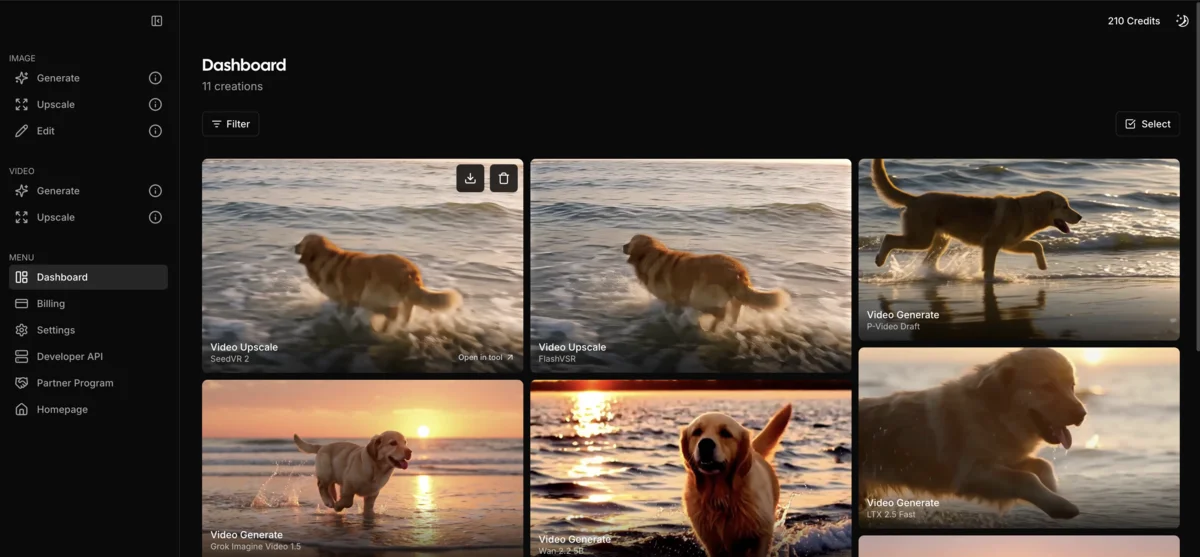
Upsampler is an online AI tool that upscales and enhances images. Unlike traditional upscaling (which just makes pixels bigger), Upsampler uses AI to intelligently add detail, improve textures, and enhance quality.
Image Upscale is a model picker rather than a mode switch. The six models split into two approaches: Precise, which stays faithful to the source, and Creative, which regenerates detail more freely.
Upsampler's image upscale models as listed in the app in September 2026
| Model | Approach | Speed | Credits/MP | Best For |
|---|---|---|---|---|
| P Image Upscale | Precise | Very fast | 0.25 | Default and Recommended; fast, hyperrealistic results |
| GAN | Precise | Fast | 0.25 | Traditional GAN upscaling, faithful results, same low cost as P Image Upscale |
| Seed VR 2 Large | Precise | Fast | 0.5 | The larger ByteDance Seed VR 2 variant, with better detail per the vendor |
| Flux | Creative | Average | 1 | Regenerates detail for AI art; formerly Smart Upscale |
| Stable Diffusion | Creative | Average | 1 | Adds detail while keeping composition; formerly Dynamic Upscale |
| Krea 2 | Creative | Not listed | 1 | Natural, photographic look |
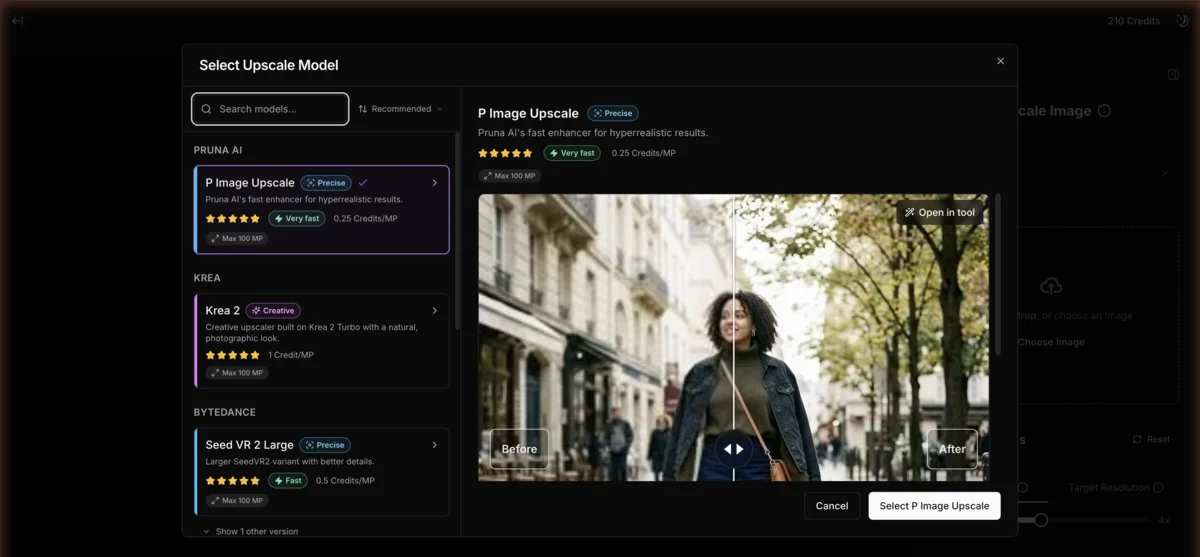
Only two of the six carry a history label in the app: Flux is marked “Formerly known as Smart Upscale,” and Stable Diffusion is marked “Formerly known as Dynamic Upscale.” Upsampler doesn’t say which model replaced the old Precise Upscale, so I won’t guess.
Additional Features:
- Old photo restoration (remove scratches, colorize)
- Generative fill (fix imperfections, add content)
- AI image generation (using Flux, GPT-4o, Imagen, Recraft V3, Ideogram)
- Video generation (18 models) and video upscaling (4 models), covered in our Upsampler AI video generator review
How Much Does Upsampler AI Cost?
Upsampler uses a credit-based pricing model with four tiers: Starter (pay-as-you-go at 4¢/credit), Pro ($15/month for 1,000 credits), Premium ($30/month for 2,300 credits), and Business ($95/month for 8,000 credits). Plan credits reset each billing cycle while purchased credits never expire, and P Image Upscale and GAN are the cheapest of the six upscale models at 0.25 credits per megapixel.
Upsampler uses a credit-based system. You can subscribe for monthly credits or pay-as-you-go.
| Plan | Monthly | Credits | Extra Credits |
|---|---|---|---|
| Starter | Monthly $0 | Credits 0 | Extra Credits 4¢ |
| Pro | Monthly $15 | Credits 1,000 | Extra Credits 1.5¢ |
| Premium | Monthly $30 | Credits 2,300 | Extra Credits 1.3¢ |
| Business | Monthly $95 | Credits 8,000 | Extra Credits 1.2¢ |
Credit Usage by Task
| Task | Credits Used |
|---|---|
| P Image Upscale | 0.25 credits per megapixel of output |
| GAN | 0.25 credits per megapixel of output |
| Seed VR 2 Large | 0.5 credits per megapixel of output |
| Flux | 1 credit per megapixel of output |
| Stable Diffusion | 1 credit per megapixel of output |
| Krea 2 | 1 credit per megapixel of output |
| Image Generation | 1-22 credits per image (varies by model) |
| Image Edit | 1-22 credits per image (varies by model) |
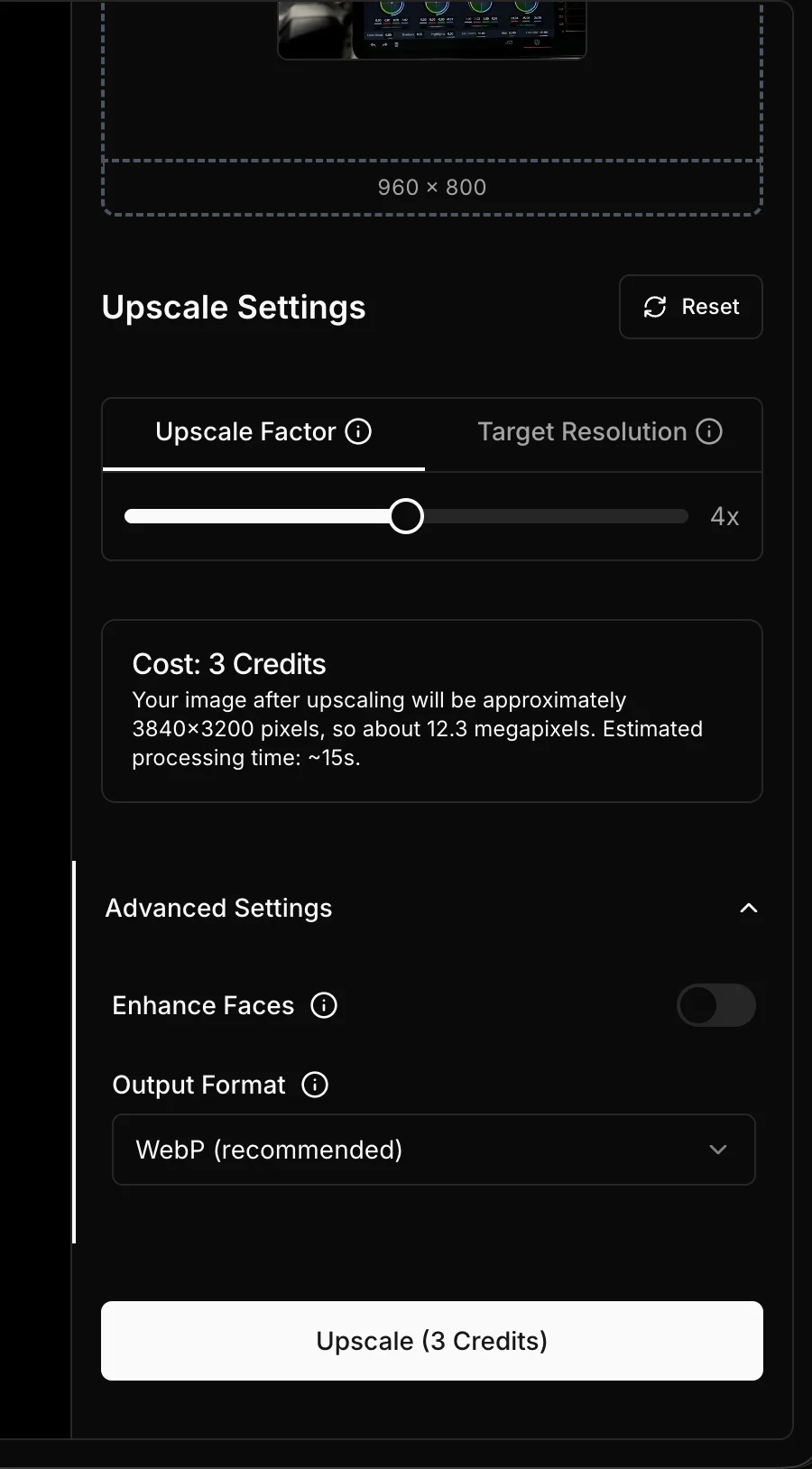
I loaded a 960 by 800 image at 4x on P Image Upscale, and the cost box showed 3 credits for a 3840 by 3200 output, about 12.3 megapixels, with an estimated 15 seconds of processing. The same job on Flux or Krea 2 would run about 12 credits at 1 credit per megapixel.
Upsampler’s free plan includes no monthly credits, but you can purchase credits at 4¢ each (they never expire). This is great for occasional use—upscaling a few images costs less than $1. For regular use, the Premium plan at $30/month includes 2,300 credits and cuts extra credits to 1.3¢, and Business is the cheapest per credit at 1.2¢.
How Good Is Upsampler’s Image Quality?
Upsampler scored 8–9 out of 10 across all four tests I ran, including AI art portraits, anime illustrations, old photo scans, and text-heavy documents. Smart Upscale produced the most impressive results on AI-generated images, adding realistic skin pores and hair strands that didn’t exist in the original.
These tests ran when the app still called the options Smart, Dynamic and Precise. The Precise approach today covers P Image Upscale, Seed VR 2 Large and GAN, and I haven’t re-run the photo test on that group.
Flux, formerly Smart Upscale (AI-Generated Image)
Test: Midjourney portrait
Result: Remarkable improvement in skin texture and eye detail. The AI added subtle pores, hair strands, and fabric weave that didn’t exist in the original. The image became genuinely more realistic, not just larger.
Score: 9/10 for AI art enhancement
Stable Diffusion, formerly Dynamic Upscale (Digital Illustration)
Test: Anime-style illustration
Result: Lines became sharper, and the AI added gradient details in shading areas. Colors became more vibrant. Some composition elements were slightly altered (as advertised—Dynamic “forces” new details).
Score: 8/10 for illustrations (use Precise if you need exact preservation)
Precise Upscale (Real Photo)
Test: Old family photo scan
Result: Clean upscaling without distortion. Facial features preserved accurately. Noise reduced, slight sharpening applied. The photo looked cleaner and printable, without the AI “reimagining” anything.
Score: 9/10 for photo preservation
Text-Heavy Image Test
Test: Document scan with small text
Result: Using Precise Upscale, text remained legible and wasn’t distorted. Smart and Dynamic modes at low creativity also worked. At high creativity levels, some letter distortion occurred.
Score: 8/10 (use Precise for text)
Pros
- Genuinely adds detail, not just larger pixels
- Excellent for enhancing AI-generated images
- Pay-as-you-go option - no subscription required
- Purchased credits never expire - use at your own pace
- Old photo restoration with colorization
- Works online - no software to install
- Six upscale models on one balance, from 0.25 credits per megapixel
Cons
- Dynamic Upscale (now Stable Diffusion) altered composition slightly in my testing
- Processing time varies based on queue
- Higher resolutions consume more credits
- Learning curve to choose the right model
- The Creative models cost four times the cheapest Precise model per megapixel
How Does Upsampler Compare to Topaz Gigapixel and Other Upscalers?
Upsampler’s key advantage over Topaz Gigapixel ($99 one-time), Let’s Enhance (from $9/month), and waifu2x (free) is its Creative models (Flux, Stable Diffusion, Krea 2), which actively add new detail to AI-generated images rather than just preserving existing pixels. It’s browser-based with flexible pay-as-you-go pricing, while Topaz requires a desktop app.
| Feature | Upsampler | Topaz Gigapixel | Let’s Enhance | waifu2x |
|---|---|---|---|---|
| Best For | AI art + photos | Photos | Photos | Anime |
| Add Details | ✅ Creative models | ⚠️ Limited | ⚠️ Limited | ❌ No |
| Preserve Original | ✅ Precise models | ✅ Yes | ✅ Yes | ✅ Yes |
| Online | ✅ Browser | ❌ Desktop app | ✅ Browser | ✅ Browser |
| Free Tier | ✅ Free no-signup tools | Trial only | ✅ Limited | ✅ Unlimited |
| Pricing | From $15/mo (or 4¢/credit) | $99 one-time | From $9/mo | Free |
Verdict: Upsampler excels at enhancing AI-generated images where you want to add detail. For traditional photo upscaling where accuracy is paramount, Topaz Gigapixel (one-time purchase) or waifu2x (free for anime) may be better values.
What Is Upsampler Best Used For?
Upsampler excels at enhancing AI-generated art from tools like Midjourney and Stable Diffusion, preparing images for large-format print, improving game textures, and restoring old photographs. Video upscaling is a separate credit-based tool (see the video generator review), and high-volume batch work burns through credits quickly; text-heavy documents should stick to the Precise models.
✅ Excellent For:
- AI art enhancement - Make Midjourney/Stable Diffusion images more realistic
- Print preparation - Upscale images for large-format printing
- Game asset improvement - Enhance textures and sprites
- Old photo restoration - Fix damage and colorize
- Product photography - Enhance detail for e-commerce
⚠️ Use with Caution:
- Text-heavy documents - Stick to the Precise models (P Image Upscale, Seed VR 2 Large, GAN)
- Exact preservation needs - Dynamic Upscale (now Stable Diffusion) altered composition slightly in my testing
- High-volume processing - Credits can run out quickly
❌ Not Ideal For:
- Long video jobs on a tight budget - The video tools bill per second of output
- Real-time processing - Queue times vary
- Free tools with no sign-up - A free daily allowance covers basic image and video upscaling, old photo restoration and colorizing; paid credits start at 4¢
How to Get the Best Results from Upsampler
To get optimal results from Upsampler, match the model to your content type: P Image Upscale or GAN for faithful photo work, Seed VR 2 Large when you want the larger ByteDance model’s extra detail, and Flux, Stable Diffusion or Krea 2 when you want the upscaler to regenerate detail on AI art or illustrations. Start at lower creativity settings and upscale in stages for large enlargements.
-
Choose the right model:
- P Image Upscale or GAN = faithful photos, documents, fast and cheapest
- Seed VR 2 Large = the larger ByteDance variant with better detail
- Flux, Stable Diffusion or Krea 2 = AI art and illustrations that should gain new detail
-
Start at lower creativity - You can always increase. High creativity may over-process.
-
Upscale in stages - For massive upscales (8x+), consider doing 2x, then 4x for better results.
-
Use high-quality sources - Better input = better output. Clean up noise before upscaling.
-
Check small areas first - Preview face and text areas before committing credits.
Final Verdict
Upsampler delivers genuine AI enhancement, not just pixel multiplication. The six-model system, split into Precise and Creative approaches, gives more control than a three-mode switch ever did, and the results on AI-generated images are particularly impressive.
A standout feature is the flexible pricing model. Unlike competitors requiring monthly subscriptions, Upsampler offers pay-as-you-go at 4¢ per credit with no expiration—ideal for occasional users who don’t want recurring charges. For regular users, the Pro plan ($15/mo for 1,000 credits) offers excellent value. Heavy users enhancing AI art for print or professional work will find the Premium or Business plans worth the investment.
If you’re upscaling AI-generated images or need to add detail (not just resolution), Upsampler is among the best options available.
FAQ
Is Upsampler free to use?
Upsampler offers a flexible pay-as-you-go model at 4¢ per credit with no subscription required—purchased credits never expire. This is great for occasional upscaling where a few images costs less than $1. For regular users, subscriptions start at $15/month for 1,000 credits with reduced per-credit rates.
What upscale models does Upsampler offer?
Upsampler's Image Upscale tool runs six models split into two approaches. Precise stays faithful to the source: P Image Upscale (0.25 credits per megapixel, the default), Seed VR 2 Large (0.5 credits), and GAN (0.25 credits). Creative regenerates more detail: Flux, Stable Diffusion, and Krea 2, each at 1 credit per megapixel.
Can Upsampler upscale video?
Yes. Upsampler added a video upscaler with four models (SeedVR 2, FlashVSR, RTX VSR and GAN) that outputs up to 4K, plus an 18-model video generator, both paid per credit. Both are covered in our Upsampler AI video generator review.
How does Upsampler compare to Topaz Gigapixel?
Topaz Gigapixel is a one-time purchase desktop app that excels at photo upscaling. Upsampler is online-based and better at adding creative detail to AI art. For pure photo accuracy, Topaz may be better. For AI art enhancement, Upsampler excels.
What resolution can Upsampler output?
Upsampler supports up to 4K-8K resolution depending on the source image and your settings. Higher resolutions consume more credits.
Does Upsampler work for anime and illustrations?
Yes. The Creative models, Flux, Stable Diffusion and Krea 2, add detail and vibrancy to anime and digital illustrations. Stable Diffusion, the renamed Dynamic Upscale, is built to add detail while keeping the original composition, per Upsampler's own description. The Precise models hold the original linework more closely.
Is Upsampler AI safe to use?
Yes, Upsampler is a legitimate browser-based tool that processes images through standard web encryption. It operates as a commercial SaaS product with published pricing and a registered business. Your uploaded images are processed server-side for upscaling and are not used to train AI models.
What happened to Smart, Dynamic and Precise Upscale?
The three modes became a model picker. Flux is the app's current label for the former Smart Upscale, and Stable Diffusion is the former Dynamic Upscale, per Upsampler's own descriptions. The Precise approach now holds three models: P Image Upscale, Seed VR 2 Large, and GAN.
Which Upsampler upscale model should I use?
Based on Upsampler's own labels and prices: P Image Upscale is the default, the cheapest, and the fastest for faithful photo work at 0.25 credits per megapixel. Seed VR 2 Large is the larger ByteDance variant with better detail, at 0.5 credits. Flux or Stable Diffusion suit AI art or illustrations where you want the upscaler to add detail. Krea 2 aims for a photographic look. All three Creative models cost 1 credit per megapixel.