
Upsampler AI Review 2026: 6 Upscale Models From 0.25 Credits
Upsampler AI now runs 6 upscale models, 0.25 to 1 credit/MP, after renaming Smart and Dynamic. A 12.3MP job cost 3 credits. Pay as you go, no subscription.
Read Article →
Upsampler’s video generator is worth trying if you want to test premium AI video models without five separate subscriptions. It is not worth it if you lean on one model and want that on a flat monthly plan instead of a metered balance.
Upsampler’s AI video generator is a browser tool that turns text or a reference image into video using third-party models such as MiniMax, Kling, Grok, Seedance, Veo and LTX. It costs 0.4 to 17 credits per second of output, with credits starting at 4 cents each on the no-subscription Starter plan and dropping to 1.2 cents on Business.
Compare 18 AI video models on one credit balance. No subscription, and purchased credits never expire.
Try Upsampler →Upsampler is an independent pay-per-credit workspace that gives access to other companies’ AI video models through one interface and balance, rather than building a model of its own. The generator lists 18 models, among them MiniMax H3, Kling 2.5 Pro, Grok Imagine Video, Seedance 2.5, Veo 3.1, Runway Gen 4.5, Wan 2.2 and LTX 2.5, priced 0.4 to 17 credits per second.
There is no subscription requirement: buy credits, from 4 cents each on Starter, and spend them on whichever model fits the job. The video tools share an account and balance with Upsampler’s original product, an AI image upscaler; our Upsampler image review covers the upscaler, generator and editor on the image side.
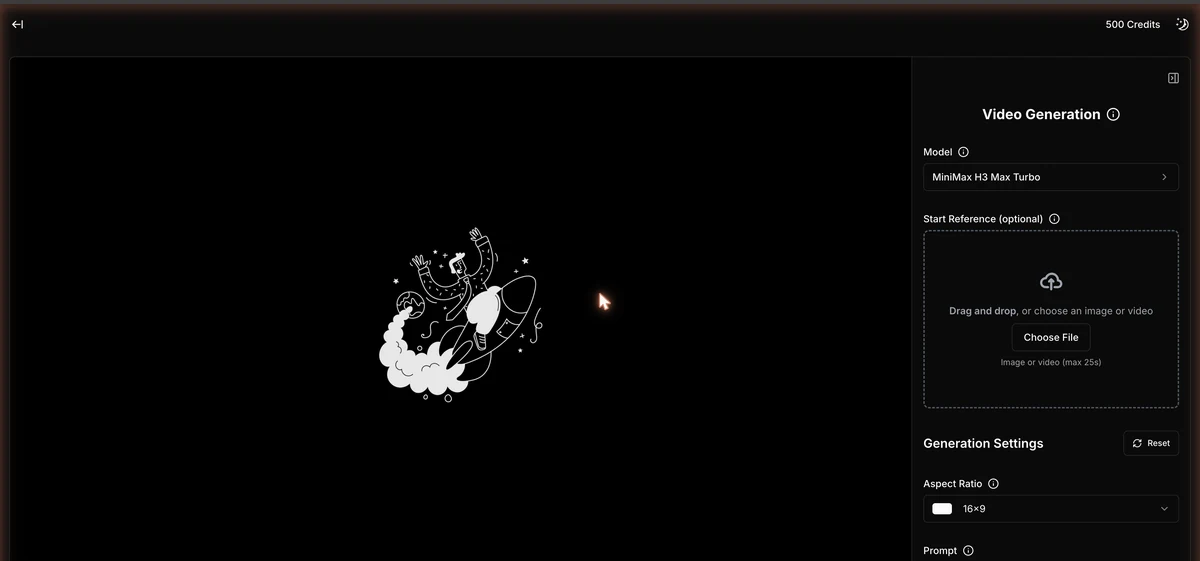
Generating a clip takes seven steps: pick one of the 18 models, optionally add a start image or a video up to 25 seconds, write the prompt, set aspect ratio and duration, read the cost box, confirm the spend, and download the MP4. The app default returned a 5-second clip within a minute.
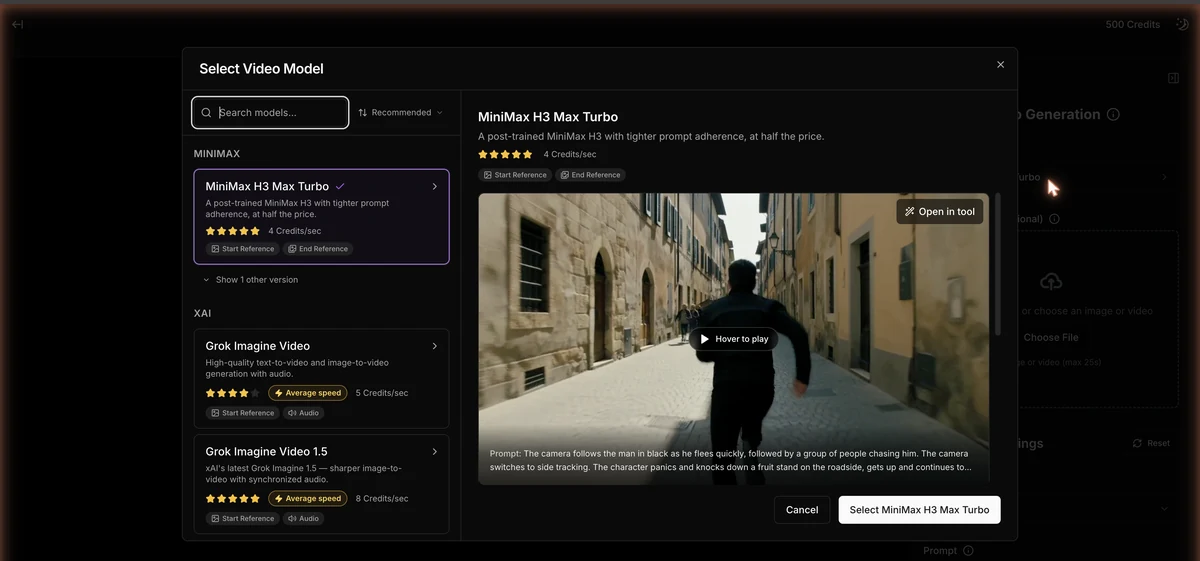
Cards show a rating out of five, a speed tag, credits per second, and chips for Start Reference, End Reference and Audio.
Accepts an image, or a video up to 25 seconds, for image-to-video. Skip it to generate from the prompt alone.
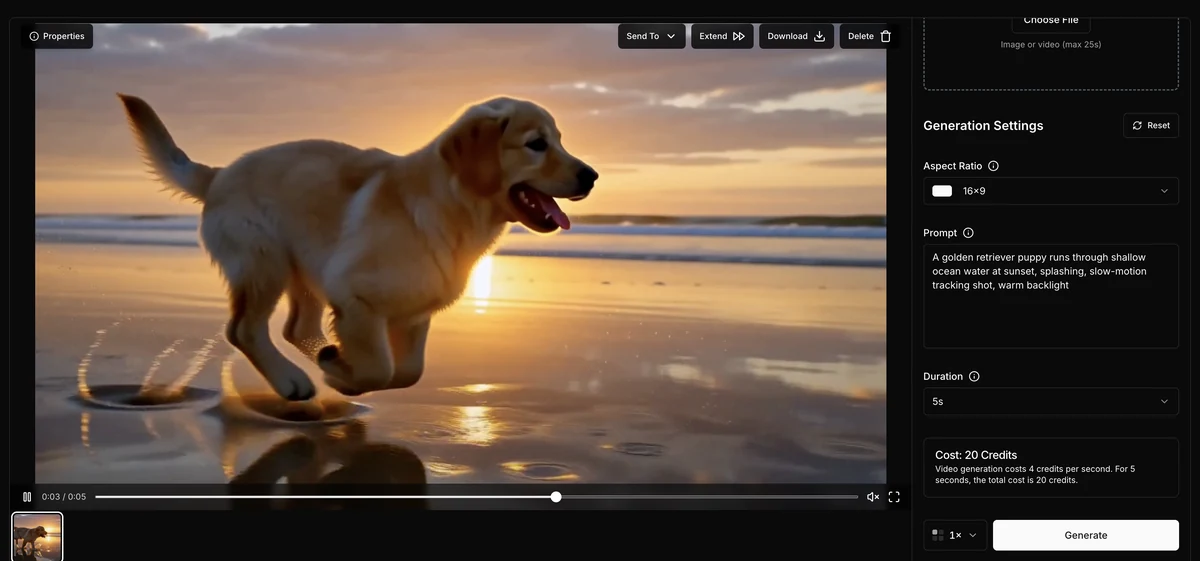
A plain text description of the scene, camera movement and lighting.
Ratios run 1:1, 4:3, 3:4, 16:9, 9:16 and 21:9. Duration depends on the model: MiniMax H3 Max Turbo 5-15 s, LTX 2.5 Fast up to 20.
A line reads: ‘Video generation costs N credits per second. For X seconds, the total cost is Y credits.’
A dialog appeared before the 20, 30, 35, 40 and 55-credit jobs; the 2- and 5-credit jobs started with no confirmation step.
The result view offers Properties, Send To, Extend, Download as MP4, and Delete. Clicking an earlier result reapplies its model and settings to the panel, so check the cost box again before you generate.
Upsampler offers 18 video models on one balance, priced from 0.4 credits a second for Wan 2.2 5B up to 17 for Seedance 2. The families on the compare page are MiniMax, Grok, Wan, LTX, P-Video, Seedance, Kling, Runway and Veo. The picker groups them by lab, with a search box, a Recommended sort, a rating on every card and a preview clip for whichever model is selected.
The 10 below cover the cheapest, the priciest and the best-known, sorted by price per second.
10 of Upsampler's 18 video models, cheapest to priciest per second.
| Model | Credits/s | Rating | Speed | Audio | Notes |
|---|---|---|---|---|---|
| Wan 2.2 5B | 0.4 | Very fast | No | 480p, Elo 949 (#72/80) | |
| P-Video Draft | 1 | Very fast | Yes | 4x faster draft previews | |
| LTX 2.5 Fast | 3 | Very fast | Yes | 720p, up to 20 s | |
| MiniMax H3 Max Turbo | 4 | Average | No | App default, 768p, up to 15 s | |
| Kling 2.5 Pro | 7 | Slow | No | Elo 1197 (#25/80), start+end frame | |
| Grok Imagine Video 1.5 | 8 | Average | Yes | Elo 1328 (#4/74), image-to-video with lip-sync | |
| Veo 3.1 | 10 (no audio) / 15 (audio) | Average | Optional | Elo 1198 (#24/80) | |
| Seedance 2.5 | 11 | Slow | Yes | Served at 480p, start+end frame | |
| Runway Gen 4.5 | 12 | Slow | No | Elo 1213 (#12/80) | |
| Seedance 2 | 17 | Average | Yes | 720p, Elo 1267 (#4/80) |
Video generation costs 0.4 to 17 credits per second of output. Credits cost 4 cents each on the $0 Starter plan. Pro at $15 a month includes 1,000 credits, Premium at $30 includes 2,300 and Business at $95 includes 8,000, with extra credits at 1.5, 1.3 and 1.2 cents. Plan credits reset each billing cycle; purchased credits never expire.
Upsampler’s pricing page lists no annual option. Every plan, including Starter, includes API access and a commercial-use licence.
| Plan | Monthly Price |
|---|---|
| Starter | Monthly Price $0/mo |
| |
| Pro | Monthly Price $15/mo |
| |
| Premium | Monthly Price $30/mo |
| |
| Business | Monthly Price $95/mo |
| |
Each plan also raises the concurrency cap: 2 jobs at once on Starter, rising to 4 on Pro, 6 on Premium and 15 on Business. The minimum top-up is $10, which buys 250 credits at the Starter rate, and buying credits is the only way to fund a Starter account, which carries no allowance of its own.
A 5-second clip from MiniMax H3 Max Turbo (4 credits a second) costs 20 credits: 80 cents at the Starter rate of 4 cents a credit, 24 cents on Business at 1.2 cents. A 5-second clip from Seedance 2.5 (11 credits a second) costs 55 credits, $2.20 at the Starter rate.
The minimum top-up is $10 for 250 credits, about 12 five-second clips from the default model. Purchased credits never expire, so nothing is lost if you pause for a few months.
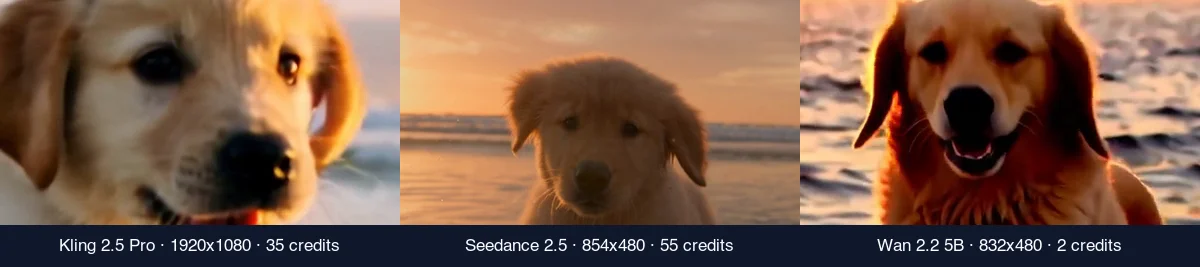
Start Creating with Upsampler →The same prompt produced eight very different clips. Only Kling 2.5 Pro came back at full 1920x1080; Seedance 2.5 cost the most at 55 credits and still arrived at 854x480. For this test I bought 500 credits on a Starter account and ran one prompt at 16:9 with no reference image.
The prompt never changed: “A golden retriever puppy runs through shallow ocean water at sunset, splashing, slow-motion tracking shot, warm backlight.” Results below come from the downloaded MP4 files and the metadata inside them. See how I test for the general approach.
MiniMax H3 Max Turbo, Upsampler’s app default, was the best of the batch. It was ready within a minute and came closest to the prompt, tracking shot and splashes included. Background on the model family is in our Hailuo 3.0 coverage.
All eight test clips from the same prompt: length, credits and what stood out.
| # | Model | Length | Credits | Output | Notes |
|---|---|---|---|---|---|
| 0 | Free tool, LTX 2.5 (no account) | 3 s | 0 | 768x512, 24 fps, 887 KB, AAC audio, no watermark | No account needed |
| 1 | MiniMax H3 Max Turbo | 5 s | 20 | 1344x768, 24 fps, 5.5 MB, audio present though listed silent | App default and the value pick |
| 2 | Seedance 2.5 | 5 s | 55 | 854x480, 24 fps, 4.7 MB, AAC audio | 480p is the ceiling for this model here |
| 3 | Grok Imagine Video 1.5 | 5 s | 40 | 1280x720, 24 fps, 2.5-3.0 MB, AAC audio | Finished before Seedance despite queuing later |
| 4 | Kling 2.5 Pro | 5 s | 35 | 1920x1080, 24 fps, 13 MB, no audio stream | Only clip delivered at full 1080p; largest file |
| 5 | LTX 2.5 Fast | 10 s | 30 | 1280x720, 25 fps, 5.4 MB, audio very quiet | 10 s cost less than 5 s of Grok |
| 6 | Wan 2.2 5B | 5 s | 2 | 832x480, 16 fps, 1.0 MB, no audio | No confirmation dialog; queued behind two running jobs |
| 7 | P-Video Draft | 5 s | 5 | 1920x1088, 24 fps, 8.3 MB, AAC audio | No confirmation dialog; full-HD file for 5 credits |
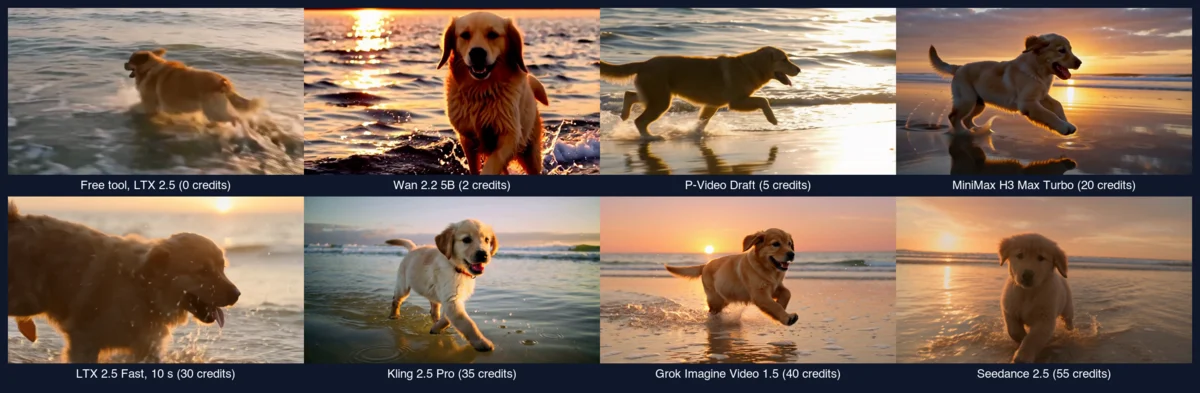
Only Kling 2.5 Pro delivered full 1920x1080. Seedance 2.5, the most expensive clip of the batch at 55 credits, came back at 854x480 and ignored the tracking shot, sending the puppy straight at the camera instead, and it was still rendering 90 seconds after the cheaper Grok and MiniMax jobs had finished. At the other end, Wan 2.2 5B looked exactly like a 2-credit clip, with blown highlights and smeared fur at 16 frames per second, while P-Video Draft surprised me with a full-HD file for 5 credits, soft but fine for previews. Grok Imagine Video 1.5 ran three times because clicking an earlier result in the filmstrip silently reapplies its model and settings; three runs of the same prompt gave three different dogs, so budget for a regenerate or two.
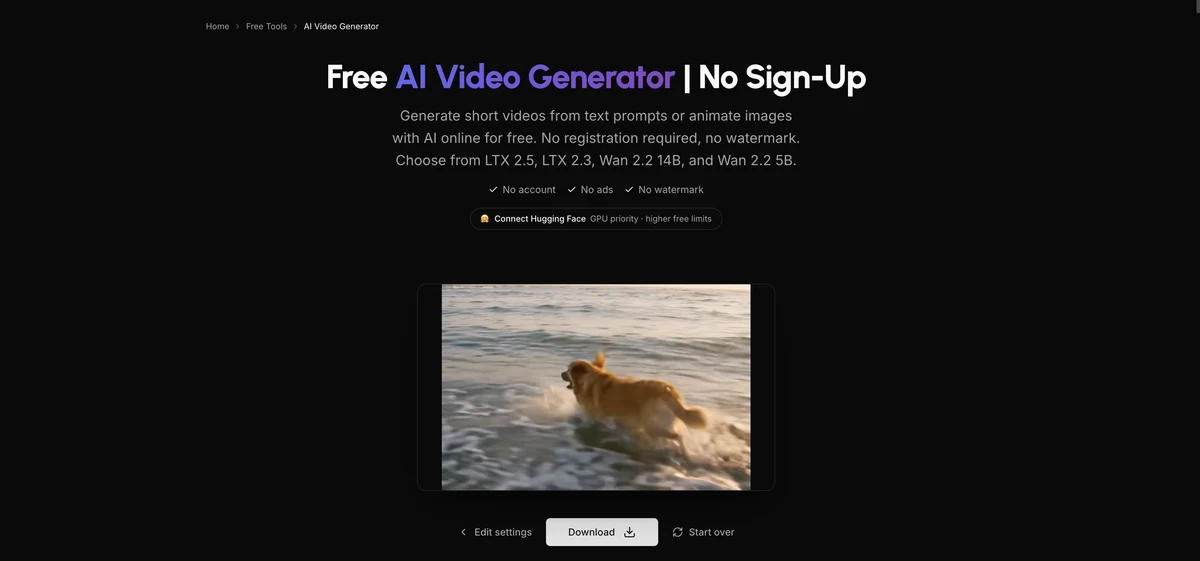
Yes. A free, no-signup video generator runs alongside the paid one, built on four models: LTX 2.5, LTX 2.3, Wan 2.2 14B and Wan 2.2 5B. It works without an account or a watermark, and the free LTX 2.5 clip came back at 768x512. Upsampler does not publish the daily allowance, though a Hugging Face account raises it.
Before a clip appears, the free tool runs a “Running a safety check on the result” step, then shows Download and Start over buttons. The daily limit is not shown anywhere until you hit it. LTX 2.5 is open-weights, and our LTX-2.5 coverage has the background on it.
There is also a free video upscaler (GAN only), capped at 10 seconds of input, 720p and 50 MB per file, with no account or watermark.
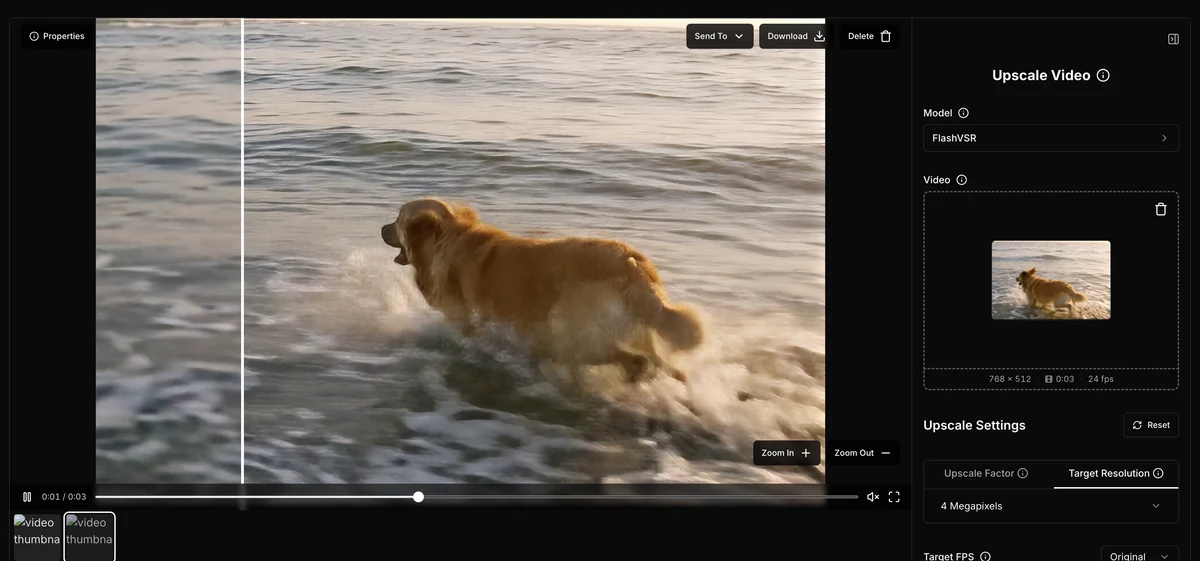
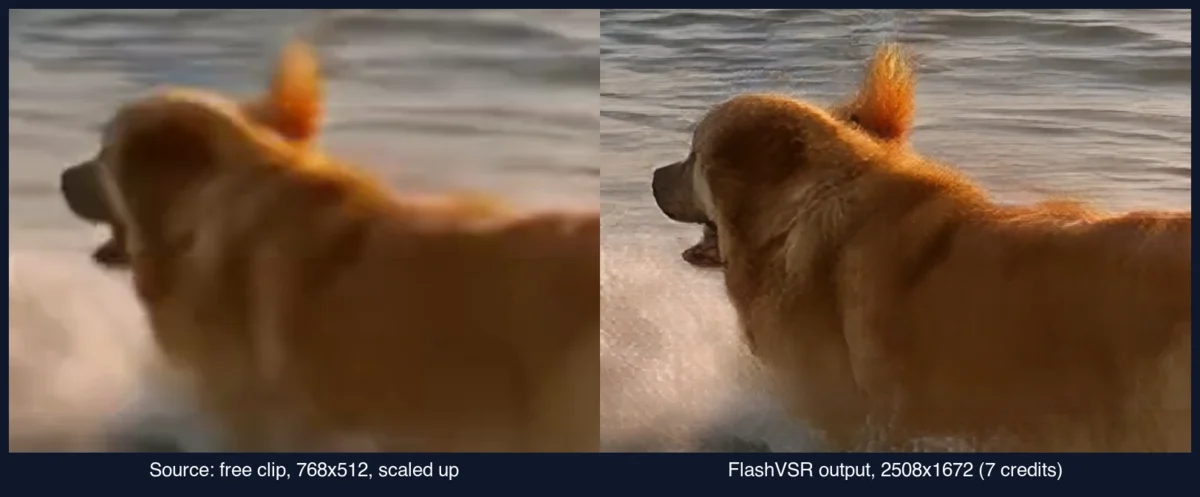
The Upsampler video upscaler runs four models priced 0.1 to 2.5 credits per megapixel-second, and it adds real detail rather than just resizing. A 3-second 768x512 clip came back at 2508x1672 through FlashVSR for 7 credits, with fur and water visibly crisper and a slightly waxy finish on the coat.
Upscaling is priced by the megapixel instead of the second, across four models: FlashVSR (the default, 0.5 credits/MP-s, up to 3 min, 4.2 MP output), SeedVR 2 (2.5 credits/MP-s, for degraded footage, up to 1 min, 4.2 MP), RTX VSR (0.1 credits/MP-s, deterministic sharpening, up to 5 min, 8.3 MP) and GAN (0.2 credits/MP-s, up to 5 min, 8.3 MP, prone to flicker on tricky footage).
Settings are a factor slider (2.5x default) or a target resolution, plus a target FPS you can keep or change. Uploads accept MP4, WebM or MOV up to 180 seconds.
I ran the same 3-second free LTX 2.5 clip through two of the four models. FlashVSR’s default 2.5x factor was quoted at 4 credits and about 70 seconds; I picked the 4-megapixel target instead, quoted at 7 credits and about 2 minutes, and the finished file came back at 2508x1672 with the audio track intact. The job was still running 11 minutes later and took roughly a quarter of an hour in all, so treat the estimate as a floor.
The same clip through SeedVR 2 cost 16 credits at the 2-megapixel target (the 4-megapixel target was quoted at 32) and came out at 1764x1176 after about 8 minutes against a 2-minute quote. Its confirmation dialog steers you toward Preview Upscale first, which upscales only a short excerpt you choose so you can check the model and settings before paying for the full length; on this clip the preview was 6 credits. The same dialog warns that long clips can take a few hours. Both upscaled files were about a tenth of a second shorter than the source.
Total spent across every test in this review, generation and upscaling combined, was 290 credits of the 500 bought, and 80 of those went on the two accidental Grok repeats.
Most limits come from the model, not the plan. Clip length runs 2 to 20 seconds on LTX 2.5 Fast and 5 to 15 on MiniMax H3 Max Turbo, a Start Reference can be up to 25 seconds, and upscaler uploads up to 180. Concurrency depends on the plan: Starter runs 2 jobs at once and queues up to 25 more.
Upsampler suits anyone who wants to compare models on the same prompt before settling on one, or who needs a premium model occasionally without another subscription. A 5-second clip from the default MiniMax H3 Max Turbo costs 20 credits, about 80 cents at the Starter rate. The free tools cover quick, no-commitment drafts.
Where Upsampler's video tools are not the best fit.
Kling AI and Runway sell subscriptions to their own models only. Upsampler resells Kling 2.5 Pro at 7 credits a second and Runway Gen 4.5 at 12, the same models those companies sell directly, alongside 16 others on one balance. A 5-second Kling clip costs 35 credits, $1.40 at the Starter rate.
A dedicated subscription is simpler once you have settled on a model; Upsampler makes more sense while still deciding. See our Kling AI review for Kling alone, or our best AI video generators comparison for the wider field.
Upsampler's video generator is worth trying if you want to compare AI video models before settling on one. Eighteen models on one balance, a free no-signup generator and an upfront cost box add up to a useful way to shop around. The zero-credit Starter plan and a few under-resolution models are the trade-offs.
Upsampler's main video generator runs on paid credits from 4 cents each. A separate free, no-signup generator runs LTX 2.5, LTX 2.3, Wan 2.2 14B and Wan 2.2 5B with no watermark, and its daily allowance is not published.
Starter includes zero monthly credits, so a purchase is required before generating with any paid model. Only 2 jobs run at once with the rest queued (Pro 4, Premium 6, Business 15); clip length, resolution and audio vary by model.
Maximum length depends on the model: LTX 2.5 Fast runs up to 20 seconds, the longest available; MiniMax H3 Max Turbo, the app's default, runs 5 to 15. A Start Reference for image-to-video can run up to 25 seconds.
Yes, the Start Reference field takes an image, or a video up to 25 seconds, as the starting point for image-to-video. Several models, including Kling 2.5 Pro and MiniMax H3 Max Turbo, also support a start and end frame.
Yes, with four models: FlashVSR (the default, 0.5 credits per megapixel-second), SeedVR 2 (2.5, for degraded footage), RTX VSR (0.1) and GAN (0.2). Uploads are capped at 180 seconds, and a free GAN upscaler handles 10 seconds at 720p with no account.
Upsampler publishes its terms, a privacy policy and a US business address in Wilmington, Delaware, and its terms require users to be 18 or over. Pricing is public for all four plans, and every plan, Starter included, carries a commercial-use licence. The video tools share one account and balance with the image tools covered in our Upsampler image review.
 Featured
 Upsampler AI now runs 6 upscale models, 0.25 to 1 credit/MP, after renaming Smart and Dynamic. A 12.3MP job cost 3 credits. Pay as you go, no subscription.
Read Article → 15 min read
 Kling 3.0 makes video and audio in one pass. Free accounts get 66 credits a month; paid plans run $6.99 the first month, then $8.80/mo ($6.60 annual).
Read Article → 21 min read
 InVideo, Synthesia, Synthesys, Fliki and Runway compared on output, pricing and free tiers. Every free option carries a watermark or a usage cap.
Read Article →