
ElevenCreative Review 2026: 10 Free Minutes, Then $6/Mo
ElevenCreative gives you 10,000 free credits a month, then $6 to $99. Studio, Flows, Music v2 and Dubbing v2 reviewed, plus where the credit system bites.
Read Article →
An AI voice generator turns typed text into spoken audio with neural text-to-speech, and voice cloning makes that speech sound like a specific person. In 2026, ElevenLabs gives the most natural voices from $5 a month on annual billing ($6 monthly) and clones a voice from under a minute of audio, Murf Studio is the better fit for teams making training and presentation voiceovers from $19 a month on annual billing ($29 monthly), and Speechify is the pick for listening to documents rather than producing narration.
Great fit for: product educators, podcast teams, customer support leaders, and influencers who want to scale narration without burning studio hours.
AI voice generation is the technology that converts written text into spoken audio using artificial intelligence. Unlike the robotic, monotone computer voices of the past, modern AI voices use deep learning to produce speech with natural intonation, emotion and pacing. ElevenLabs’ v3 model covers 70+ languages and Murf’s Gen2 voices cover 35+.
Today’s AI voice technology encompasses two main categories:
Text-to-Speech (TTS): Converting written text into spoken words using pre-trained AI voice models. You type text, choose a voice, and generate audio instantly.
Voice Cloning: Creating a custom AI voice model that replicates a specific person’s voice. After training on voice samples, which can be as short as a few seconds on open-source models and up to a few hours for a professional clone, the AI can speak any text in that person’s voice.
Quality has improved a lot. Listen closely and you can still tell, but for audiobooks, e-learning, video narration and podcasts most audiences accept the result.
A creator plan runs $5 to $22 a month: ElevenLabs Starter is $6 monthly or $5 on annual billing, Creator is $22 or $18.33 annual. A voice actor costs $200 to $500 or more per finished hour. A 10-minute script renders in minutes, and revisions cost nothing beyond credits or hours.
Knowing where AI voices fit keeps you from paying for the wrong plan.
Neural text-to-speech works in four stages: text analysis, phonetic conversion, prosody modeling and audio synthesis. Voice cloning adds one more step, training the model on a voice sample. That sample can be as short as about 5 seconds on open-source zero-shot models, or as long as 3 hours for a professional clone.
A short look at how the technology works, before the tools.
Modern AI voices use neural networks trained on massive datasets of human speech. Here’s the simplified process:
Text Analysis: The AI analyzes your text to understand:
Phonetic Conversion: Text is converted to phonemes (basic speech sounds)
Prosody Modeling: The AI determines:
Audio Synthesis: Neural networks generate the actual audio waveform that sounds like human speech
Voice cloning goes further, creating a custom voice model:
Voice Sampling: Record the target voice (from about 5 seconds on open-source zero-shot models to 3 hours for a professional clone)
Feature Extraction: AI analyzes the recording for unique characteristics:
Model Training: Neural network learns to replicate the voice
Synthesis: The trained model can speak any text in the cloned voice
Three tools cover most needs in 2026. ElevenLabs gives the most natural narration, with a free plan and paid plans from $6 monthly or $5 on annual billing. Murf Studio suits team voiceovers with its built-in video timeline, from $29 monthly or $19 annual. Speechify is for listening to documents, at $29 monthly or $139 a year. The table shows how they differ.
Plans and prices read from each vendor's pricing page in September 2026.
| Tool | Free plan | Cheapest paid plan | Voice cloning | Best for |
|---|---|---|---|---|
| ElevenLabs | 10,000 credits a month (about 10 minutes), no commercial license | Starter $6 monthly or $5 on annual billing | Instant cloning on Starter, professional cloning on Creator ($22 monthly) | Narration, audiobooks, YouTube, anything where naturalness matters |
| Murf Studio | 10 minutes once, no downloads, no commercial rights | Creator $29 monthly or $19 on annual billing | Enterprise-only, 1 to 2 hours of studio recordings | Team voiceovers for training, presentations and e-learning |
| Speechify | Basic voices up to 1.5x speed | Premium $29 monthly or $139 a year | Not the focus of the product | Listening to documents, PDFs and web pages |
Best for: The most natural voices; audiobooks, YouTube narration, podcasts, long-form content
Strengths:
Pricing: Billed in credits, not minutes: 1 credit per character on the Multilingual v2 model, 0.5 to 1 credit per character on the Flash and Turbo models through the API.
Ideal Uses: Audiobooks, podcasts, YouTube narration, video essays, e-learning
Best for: Teams producing training videos, presentations and e-learning; brand-consistent voiceovers
Strengths:
Pricing: Billed in hours, not credits.
Ideal Uses: Corporate presentations, explainer videos, training modules, ads
Best for: Reading documents, PDFs, web pages and books aloud, with mobile apps and a browser extension
Strengths:
Pricing:
Ideal Uses: Personal productivity, accessibility, studying
If you want to use Speechify for narration instead of listening, the Speechify voiceover tutorial walks through that setup.
Descript folds AI voices and a voice clone made from about a minute of audio into its text-based audio and video editor, which makes sense if you already edit podcasts there. Chatterbox and OpenVoice V2 are open-source models that clone a voice from about five seconds of audio and run on your own hardware for free; Chatterbox was preferred over ElevenLabs by 63.75% of listeners in a blind test, covered in the free voice cloning guide and ElevenLabs vs Chatterbox. For a longer shortlist, see best AI voice generators and best text-to-speech tools.
Recommendation: ElevenLabs for the best quality-to-price ratio and the generous free tier, Murf Studio for team production of presentations and training, and Speechify if you mainly want to listen rather than publish.
The free plan gives you 10 minutes of generation to test the 200+ voices and the editor. Downloads and commercial rights start on Creator at $19 a month on annual billing.
Try Murf AI Free →Six steps take a script to an exported file: prepare the text, pick a voice from ElevenLabs’ 10,000+ or Murf Studio’s 200+, tune speed and pauses, fix pronunciation, generate and listen through, then polish the audio. Each step shows the screen you will meet on ElevenLabs or Murf Studio, and the free plans cover the whole run-through.
AI voices work best with well-prepared text: use proper punctuation, a conversational tone and phonetic spelling for tricky words.
AI voices read what you give them, so the script does most of the work.
Script Formatting:
Good: "Welcome to this tutorial. Today, we're exploring AI voice generation."

Bad: "Welcome to this tutorial today we're exploring AI voice generation"
Key Principles:
Do:
Don’t:
Script Example:
Before:
"AIvoicegeneration has revolutionized content production allowing creators to produce audiobooks podcasts and videos without expensive voice actors or recording equipment its changed everything"

After:
"AI voice generation has revolutionized content production.

It allows creators to produce audiobooks, podcasts, and videos... without expensive voice actors or recording equipment.

It's changed everything."Match the voice to your content type, audience and brand, then test several candidates before committing.
Voice choice changes how the message lands.
Voice Selection Criteria:
1. Match Content Type:
2. Consider Demographics:
3. Brand Alignment:
Testing Voices:
Most platforms let you preview voices. Use this process:
ElevenLabs’ library holds 10,000+ voices you can filter by language, use case and style. Murf Studio’s picker holds 200+ voices with use-case filters, and its MultiNative voices switch language mid-script.

Adjust speed, pitch, pauses and emotion using each platform's own controls rather than full SSML.
Modern AI voice tools offer controls to adjust speech delivery:
What the controls are called: ElevenLabs’ settings panel has Speed, Stability, Similarity, Style Exaggeration and a Speaker Boost switch, plus the model choice (Multilingual v2 or v3). Murf Studio has speed and pitch per block, pauses, and on the Business plan Emphasis, Variability and Say It My Way, where you record your own reading of a line so the voice copies your pace and intonation.
Speed/Pace:
Pitch:
Pauses: Punctuation first: commas (short), full stops (medium), paragraph breaks (long). On ElevenLabs’ v2 models, add <break time="1.5s" /> for a fixed pause, up to 3 seconds; the v3 model does not support break tags, so use punctuation and ellipses there. On Murf Studio, type [pause 1s] between words for a pause of 0.1 to 5 seconds.
Emotion: ElevenLabs v3 reads bracketed audio tags such as [excited], [whispers], [sarcastic] and [crying]. Murf gives each voice a set of styles (conversational, promo and so on) instead of tags.
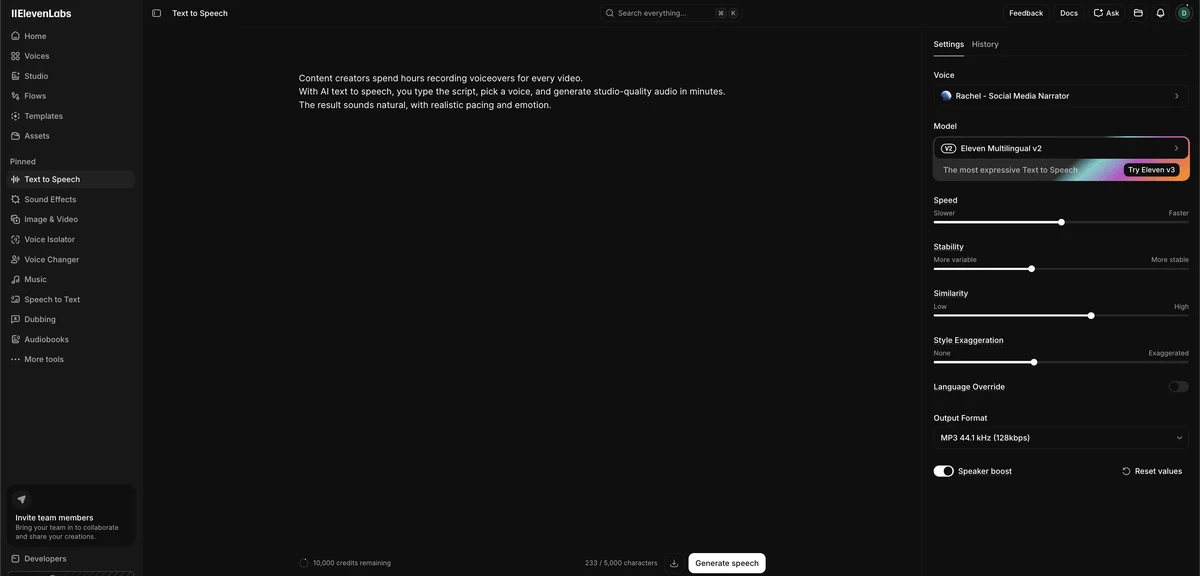
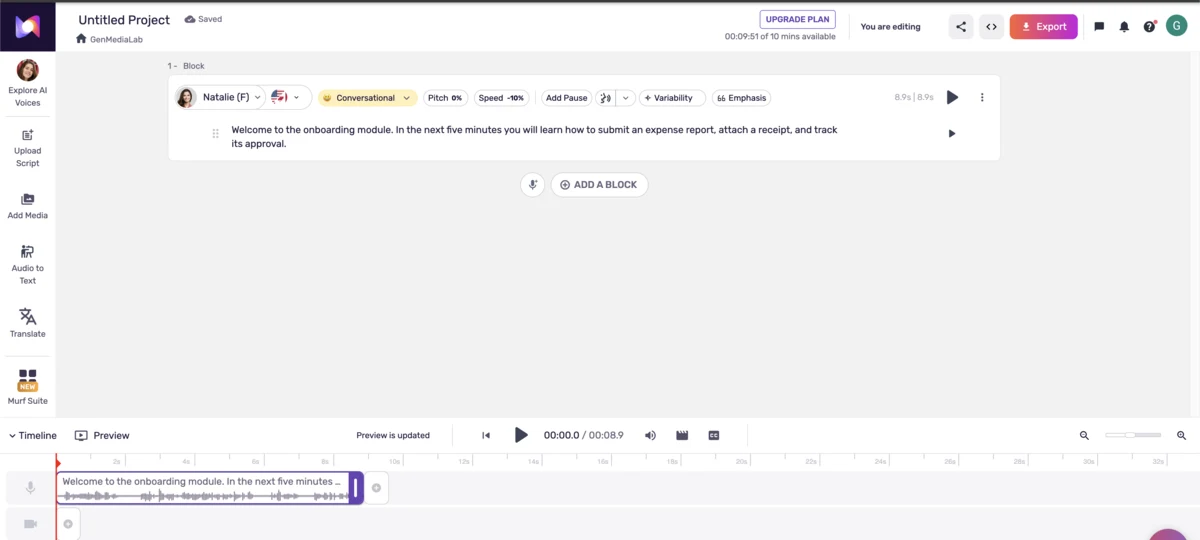
AI voices sometimes mispronounce words, so use phonetic spelling or your platform's pronunciation tools to fix them.
AI voices sometimes mispronounce words. Here’s how to fix it:
Phonetic Spelling:
If the AI says “data” as “day-ta” but you want “dah-ta”:
Common Pronunciation Issues:
| Word | Default AI | Phonetic Fix |
|---|---|---|
| GIF | ”jif” or “gif” | Spell it out: “G-I-F” |
| SQL | ”sequel” or “S-Q-L” | Choose phonetic: “sequel” or “ess-cue-ell” |
| URL | ”ural” or “U-R-L” | Use: “U-R-L” or “web address” |
| Data | Varies | ”dah-ta” or “day-ta” |
Name Pronunciation:
For difficult names, use phonetic spelling:
Platform-Specific Tools:
<phoneme> tags on the Flash v2 model (CMU Arpabet is the more predictable alphabet); on v3, write the IPA transcription between slashes directly in the text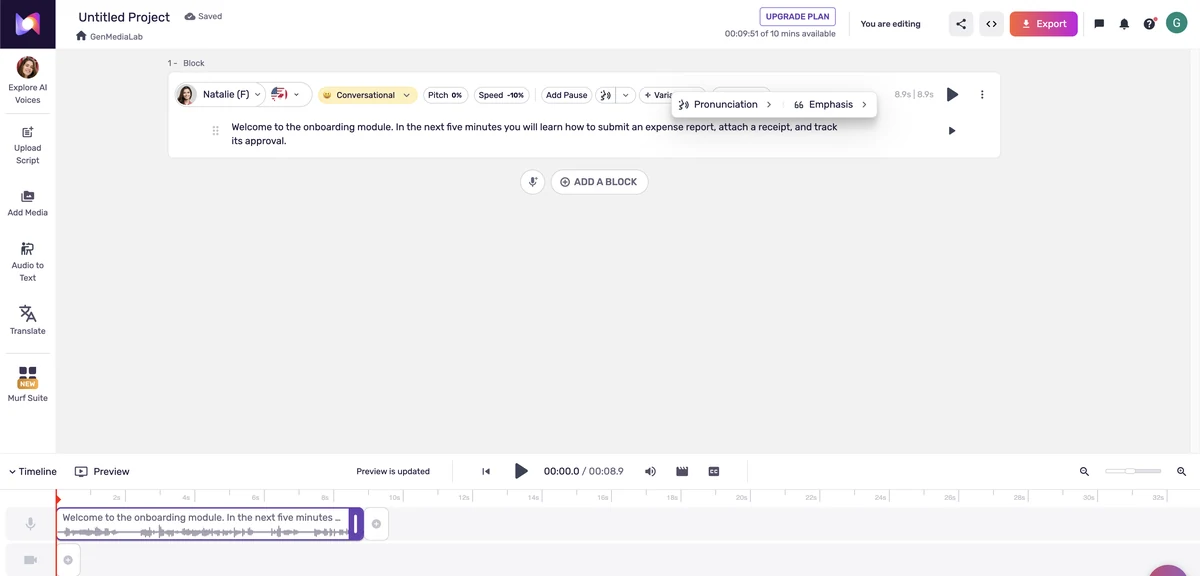
Run through a pre-generation checklist, generate the audio, then critically listen for mistakes before publishing.
Time to create your audio:
1. Final Pre-Generation Checklist:
2. Generate Audio:
ElevenLabs outputs MP3 at 44.1 kHz and 128 kbps on the standard plans, with 192 kbps and 44.1 kHz PCM through the API on Pro. Murf Studio exports MP3, WAV, FLAC and video, but only on paid plans, since the free plan cannot download.
3. Critical Listening Review:
Listen with fresh ears (take a break before reviewing if possible):
Listen for:
Review Techniques:
4. Iterate and Improve:
If you find issues:

For professional results, normalize volume, trim silence and apply gentle compression before exporting.
For professional results, consider light post-production:
In Audacity (Free) or Adobe Audition (Pro):
Simple Post-Processing Workflow:
ElevenLabs Instant Voice Cloning works from under a minute of audio on the $6 Starter plan ($5 annual). Professional Voice Cloning needs 30 minutes to 3 hours of audio on Creator, $22 monthly. Murf only clones voices on Enterprise, from 1 to 2 hours of studio recordings. Open-source Chatterbox and OpenVoice V2 clone from about 5 seconds.
Voice cloning creates a digital copy of a specific voice - yours or someone else’s (with permission).
Good Reasons to Clone:
Not Recommended:
Step 1: Record Voice Samples
Recording Requirements:
Audio requirements as documented by each platform, September 2026.
| Platform | Audio needed | Plan | Notes |
|---|---|---|---|
| ElevenLabs Instant Voice Cloning | Under a minute; 1 to 2 minutes recommended, more than 3 can hurt | Starter, $6 monthly or $5 on annual billing | Ready in minutes; the clone speaks every supported language |
| ElevenLabs Professional Voice Cloning | 30 minutes to 3 hours | Creator, $22 monthly or $18.33 on annual billing | Trains for roughly 3 to 6 hours; your own voice only, with a verification recording |
| Murf Studio | 1 to 2 hours of studio recordings | Enterprise only, quoted by sales | No self-serve cloning on Free, Creator or Business |
| Chatterbox / OpenVoice V2 (open source) | About 5 seconds | Free, runs on your own hardware | Zero-shot: no training step, lower stability than a trained clone |
Environment:
Equipment:
Recording Technique:
What to Read:
Most platforms provide suggested scripts covering all phonetic sounds. If creating your own:
Step 2: Upload and Process
Step 3: Test and Refine
Generate test audio with varied content
Listen critically for:
If quality is insufficient:
Step 4: Use Your Cloned Voice
Once satisfied, your cloned voice works like any AI voice:
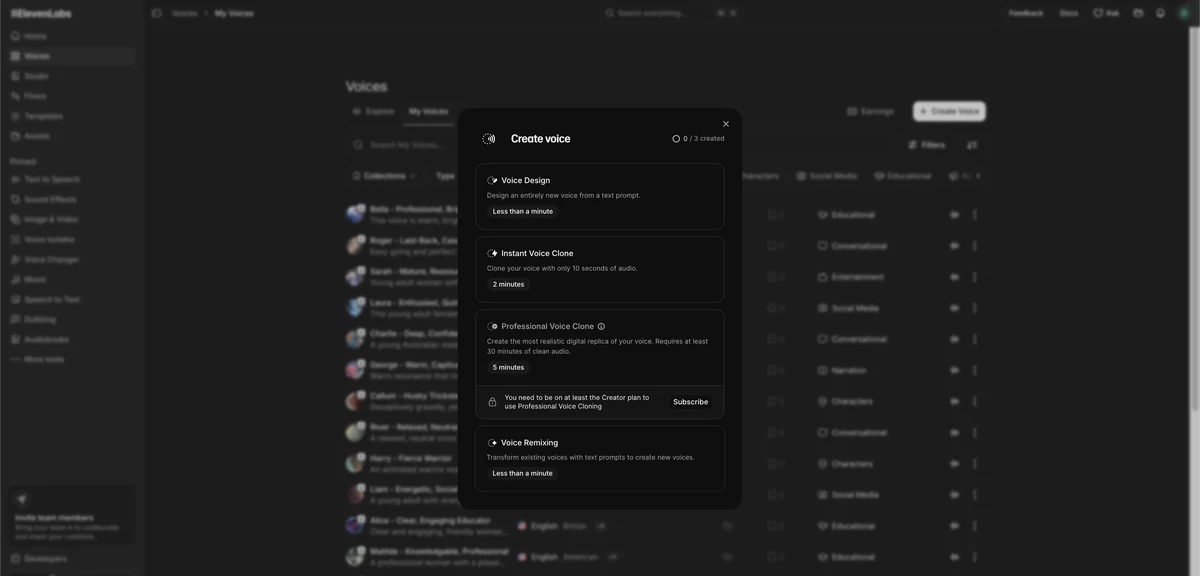
Ethical and Legal Considerations: Voice cloning technology is powerful and can be misused. Only clone voices you have explicit permission to clone. Many platforms require identity verification for voice cloning to prevent fraud and deepfakes. Always use AI voices responsibly and consider including disclaimers when publishing AI-generated voice content.
Five techniques cover most of the gap: markup, emotion, multi-voice scripts, pacing and layering in human recordings. ElevenLabs’ v3 model reads bracketed audio tags like [excited], while its v2 models accept break tags up to 3 seconds. Murf Studio uses [pause 1s] markers, adjustable from 0.1 to 5 seconds.
Once the basics work, these techniques improve the result.
ElevenLabs and Murf Studio each use their own light markup rather than full SSML.
| Control | ElevenLabs | Murf Studio |
|---|---|---|
| Pause | <break time="1.5s" /> on v2 models, up to 3 seconds; v3 uses punctuation and ellipses | [pause 1s], from 0.1 to 5 seconds |
| Emphasis | Capital letters and punctuation; audio tags on v3 | Emphasis tool on a text block (Business plan) |
| Pronunciation | Dictionaries (.PLS or TXT), <phoneme> tags on Flash v2, IPA between slashes on v3 | Per-word Pronunciation panel; saved lists are Enterprise-only |
| Emotion | Audio tags such as [whispers], [excited], [sarcastic] | Voice styles per voice; Say It My Way on Business |
| Speed | Speed slider | Speed per block |
Full SSML, with prosody, say-as and rate tags, belongs to the cloud speech APIs from Google, Amazon and Microsoft, which are developer products rather than editors.
ElevenLabs’ v3 model reads bracketed audio tags, while Murf relies on per-voice styles instead:
Emotion Tags:
[excited] This is the most amazing product launch!
[sad] Unfortunately, we have to share some difficult news.
[whispers] Here's a secret nobody else knows yet.
Subtle Emotion:
For dialogues or conversations:
Dialogue Format:
[Voice1 - Professional Female]: Welcome to our podcast!
[Voice2 - Casual Male]: Thanks for having me on.
[Voice1 - Professional Female]: Now for today's topic.
Applications:
Silence is powerful for comprehension:
Where to Add Pauses:
Example:
"Our revenue increased by 300% last quarter. [2 second pause]

Let me repeat that. [1 second pause] Three. Hundred. Percent.

[1.5 second pause] Here's how we did it..."Combine AI voices with human recordings strategically:
Hybrid Approach:
Benefits:
Five uses come up most: audiobooks, YouTube narration, e-learning, podcast fixes and product demos. ElevenLabs fits narration and cloning work, while Murf Studio fits demos and training videos with its built-in timeline. The free tiers, 10,000 ElevenLabs credits a month and 10 Murf minutes once, are enough to test each workflow before you pay.
Challenge: Traditional audiobook production costs $3,000-10,000 per book.
AI Voice Solution:
Best Practices:
Challenge: Consistent video uploads require hours of recording and editing voiceovers.
AI Voice Solution:
Best Practices:
Challenge: Frequent content updates make traditional voice recording unsustainable.
AI Voice Solution:
Best Practices:
Challenge: Inconsistent recording quality, time-consuming post-production.
AI Voice Solution (ElevenLabs Instant Voice Cloning):
Best Practices:
Challenge: Creating professional video narration quickly for product launches.
AI Voice Solution (Murf Studio):
Best Practices:
An audiobook costs $66 to $99 in AI plans, against $5,300 to $12,000 with a voice actor. A YouTube channel posting four 10-minute videos a month costs $220 to $228 a year in AI credits, against $4,800 to $12,000 with an actor. Fifty hours of corporate training costs $792 on Murf Business, against $10,000 to $20,000 with an actor.
The figures below use the September 2026 prices from the tools section.
Professional Voice Actor:
AI Voice (ElevenLabs):
ROI: 98%+ cost savings
Professional Voice Actor:
AI Voice (ElevenLabs Creator or Murf Creator):
ROI: 95%+ cost savings
Professional Voice Actor:
AI Voice (Murf Business):
ROI: 92%+ cost savings
When Human Voice Actors are Worth It:
When AI Voices Excel:
Eight mistakes come up again and again. Three cost the most listening time: picking the wrong voice for the content, leaving out pauses the script needs, and skipping the full listen-through before publishing. The other five matter too, but these three are the ones listeners notice first.
Mistake: Choosing energetic, casual voice for medical training content
Solution: Match voice formality, energy, and tone to your content and audience
Mistake: Running sentences together without breathing room
Solution: Use punctuation deliberately; add pauses with ellipses or paragraph breaks
Mistake: Publishing content with mispronounced key terms
Solution: Listen to 100% of generated audio; use phonetic spelling for difficult words
Mistake: Emphasizing every other word makes nothing stand out
Solution: Reserve emphasis for truly critical points; let natural delivery carry most content
Mistake: Choosing voice based on 10-second sample, finding issues after generating hours
Solution: Test voices with full paragraphs from your actual content before committing
Mistake: Creating audio that works with headphones but not laptop speakers
Solution: Test on multiple devices; ensure clarity across playback scenarios
Mistake: Publishing raw AI-generated audio with harsh starts/ends
Solution: Light editing in Audacity: trim silence, normalize volume, polish rough edges
Mistake: AI voice for emotional storytelling that requires authentic human connection
Solution: Understand limitations; use human voices where genuine emotion matters
Disclose AI narration on anything public. Clone a voice only with written permission from its owner, since platforms verify identity before allowing it. Commercial rights start on paid plans only: ElevenLabs’ $6 Starter plan and Murf’s Creator plan both include them, but neither free tier does.
Four rules keep you out of trouble:
When to Disclose AI Voices:
Disclosure Examples:
Never clone a voice without:
Platform Verification:
Understand licensing:
Positive uses:
Best practices:
Most of what was “coming soon” a year ago has shipped: voice clones from 60 seconds of audio (xAI) or 3 seconds (Alibaba’s Qwen), an open-source model that beat ElevenLabs in blind tests, real-time conversational voice with latency around 0.2 seconds, and speech-to-text with word error rates under 3%.
Four weeks take you from testing to a repeatable workflow. Start on the free tiers: 10,000 ElevenLabs credits a month, or 10 Murf minutes once with no downloads. Subscribe only after a 200 to 300 word test script sounds right on the voice you picked.
A four-week plan:
Week 1: Exploration
Week 2: Selection and Setup
Week 3: First Real Project
Week 4: Optimization
10,000 free credits a month is enough to try a dozen voices with your own script before you pay for a plan. Commercial use and voice cloning start at $5 a month on annual billing.
Try ElevenLabs Free →Not on the current models. ElevenLabs' v3 model and Murf's Gen2 voices sound natural enough for audiobooks, e-learning and video narration; trained ears still catch flat spots on long emotional passages.
Yes, YouTube allows monetization of content with AI-generated voices. However, the content itself must be original and valuable. Simply using an AI voice to read public domain text or scrape content won't be monetizable. Create original scripts and valuable content.
Voice cloning is legal when you have permission. You can clone your own voice freely. Cloning someone else's voice requires their explicit consent. Reputable platforms require identity verification to prevent unauthorized voice cloning and deepfake creation.
About 5 seconds for open-source zero-shot models such as Chatterbox, under a minute (1 to 2 minutes recommended) for ElevenLabs Instant Voice Cloning, 30 minutes to 3 hours for ElevenLabs Professional Voice Cloning, and 1 to 2 hours of studio recordings for Murf's Enterprise clones. Varied, clean audio beats a longer monotone recording.
ElevenLabs' v3 model covers 70+ languages and its cloned voices speak all of them. Murf covers 35+ languages with MultiNative voices that switch language mid-script.
Generally, no. AI voices are synthesized audio, not recordings of copyrighted performances. However, check your platform's terms regarding commercial use and whether you hold rights to the output. Paid plans typically grant you full commercial rights.
For many applications like e-learning, audiobooks, and YouTube videos, AI voices are sufficient and cost-effective. However, for content requiring subtle emotional nuance, character acting, or high-budget productions where authenticity is paramount, professional voice actors remain superior.
Use phonetic spelling ('dah-ta' instead of 'data'), use your platform's pronunciation dictionary, or add phoneme or IPA notation where the model supports it. ElevenLabs saves dictionaries as .PLS or TXT files, and Murf Studio adjusts one word at a time from the editor.
ElevenLabs' free plan is the most useful free option: 10,000 credits a month, about 10 minutes of speech, with downloads but no commercial license. Murf's free plan gives 10 minutes once and no downloads, so it only works for testing. Speechify's free plan reads documents with basic voices up to 1.5x speed.
Entry plans run $5 to $29 a month in 2026. ElevenLabs Starter is $6 monthly or $5 a month on annual billing, Creator $22 or $18.33 annual; Murf Creator is $29 monthly or $19 on annual billing; Speechify Premium is $29 monthly or $139 a year. Higher tiers ($99 on ElevenLabs Pro, $99 on Murf Business) add credits or hours rather than features most creators need.
Yes, on paid plans. ElevenLabs includes a commercial license from the $6 Starter plan up; Murf includes commercial rights from the Creator plan up. Both free plans exclude commercial use, and Murf's free plan does not allow downloads at all.
AI narration is now an ordinary production tool. ElevenLabs, Murf Studio and Speechify cover the three common cases: publishing narration, producing team voiceovers, and listening to documents. Human voice actors still win where the performance is the product.
The key to success is understanding the tools, preparing quality scripts, choosing appropriate voices, and knowing when to use AI versus human voices. Start experimenting with the free tiers, learn the techniques, and you’ll quickly discover how AI voice technology can transform your content production.
 Featured 17 min read
 ElevenCreative gives you 10,000 free credits a month, then $6 to $99. Studio, Flows, Music v2 and Dubbing v2 reviewed, plus where the credit system bites.
Read Article → 16 min read
 Murf AI review 2026: 200+ voices, Studio editor, Falcon 2 API and Dub. Creator is $29 monthly or $19 annual; the free plan gives 10 minutes, no downloads.
Read Article → 12 min read
 How to clone your voice with AI free using Chatterbox and OpenVoice V2, plus ElevenLabs Starter at $6/month as the cheapest paid path that works.
Read Article → 15 min read
 Best AI voice generators for 2026: ElevenLabs, Murf AI, and Speechify tested and Fliki compared on voice quality, cloning, free tiers, and pricing from $6/mo.
Read Article →