
LALAL.AI Review 2026: 10 Free Minutes, No Downloads
LALAL.AI's free tier gives 10 minutes and previews but blocks downloads. Paid starts at €6.75/mo for 10 stem types. Most songs finish in under a minute.
Read Article →
In this LALAL.AI tutorial, you’ll learn how to separate vocals, drums, bass, guitars, piano, synth, strings and wind from any song using AI. The default engine is v6 Andromeda, with v5 Perseus and v4 Orion still selectable in Settings. The process takes under 60 seconds per track, works with MP3, WAV, FLAC, and video files, and produces clean isolated tracks from your browser, desktop app, or phone.
Whether you want to create karaoke tracks, remix songs, sample instruments, or practice along with isolated parts, this step-by-step guide covers everything from basic vocal removal to advanced multi-stem separation. For how the paid tool holds up against a free browser splitter, read LALAL.AI vs Vocal Remover.
The free Starter tier gives you 10 minutes of processing and a preview of every stem, so you can hear the separation before paying for anything.
Try LALAL.AI Free →You need three things: a LALAL.AI account, an audio or video file, and a paid plan if you want to keep the results. Signup is free and takes no card. The free Starter tier gives you 10 minutes of processing and a 200MB upload ceiling, but it only plays previews back to you. Downloads start on Lite.
Free to create - no credit card required for signup
MP3, WAV, FLAC, MP4 - any song or recording you want to separate
Starts at €6.75/month (annual) - free accounts can only preview
LALAL.AI’s Lite plan costs €8.99/month, or €6.75/month billed annually, with 90 Fast Queue minutes per month. Pro costs €17.99/month, or €13.5/month billed annually, with 250 Fast Queue minutes and offline processing with Lyra, LALAL.AI’s local separation model that runs on your own hardware with no uploads.
The stem picker offers 11 separation options, from the plain vocal and instrumental split through drums, bass and piano to guitars, synthesizer, strings and wind. Guitars pulls every guitar in the track into one stem, acoustic or electric. Each option runs as its own pass, so a four-stem breakdown means four separate jobs.
| Stem Type | What It Extracts | Best For |
|---|---|---|
| Vocal and Instrumental | Singing/rapping from backing track | Karaoke, remixes |
| Voice and Noise | Speech from background sounds | Podcast cleanup |
| Drums | Full drum kit (kick, snare, hi-hats) | Sampling, practice |
| Bass | Bass guitar and low frequencies | Bass practice, remixes |
| Piano | Piano and keyboard sounds | Transcription, practice |
| Guitars | Every guitar in the track, acoustic or electric, in one stem | Fast guitar removal without picking a type |
| Electric Guitar | Electric guitar specifically | Guitar practice |
| Acoustic Guitar | Acoustic guitar parts | Acoustic arrangements |
| Synthesizer | Synths and electronic sounds | EDM production |
| Strings | Orchestral string sections | Classical sampling |
| Wind | Brass and woodwind instruments | Jazz arrangements |
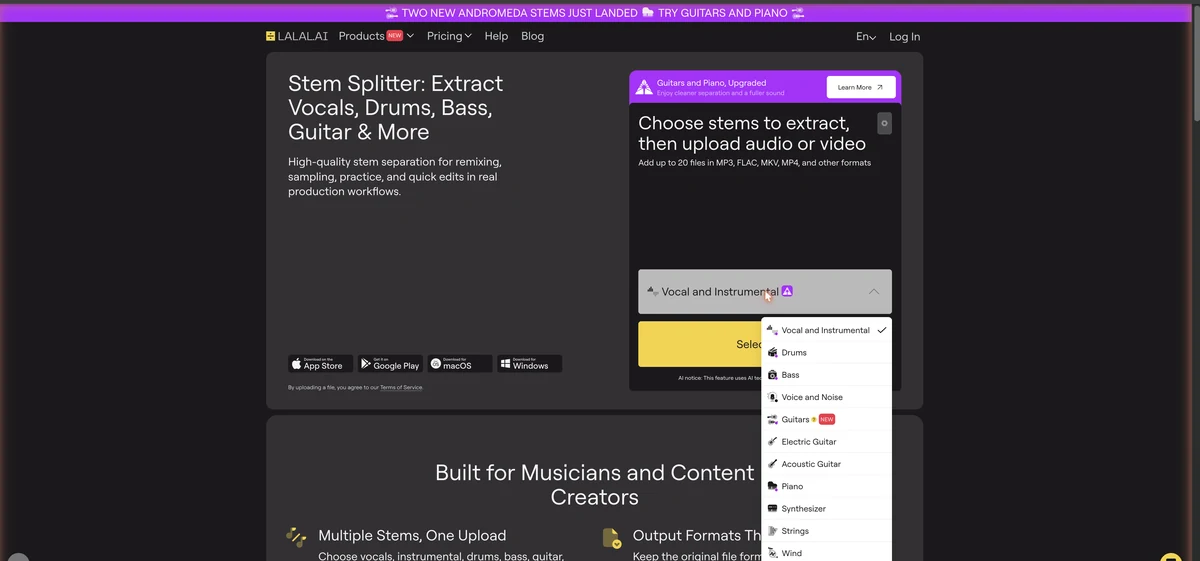
Two Files Per Separation: Each separation produces the isolated element AND everything except that element. Vocal/instrumental separation gives you both an acapella AND a karaoke version.
Six steps: prepare a high-quality source file, upload it with the stem type selected, set the neural network and processing options, preview the 30-second sample, split the file in full, then download the stems. A typical three- or four-minute song finishes in 15 to 60 seconds on the Fast Queue.
Quality in = quality out. The better your source, the cleaner your separation.
| Format | Quality | Expected Results |
|---|---|---|
| WAV/FLAC (lossless) | ★★★★★ | Best results - cleanest separation |
| 320kbps MP3 | ★★★★☆ | Very good - minimal artifacts |
| 256kbps MP3 | ★★★☆☆ | Good - some artifacts possible |
| 128kbps MP3 | ★★☆☆☆ | Acceptable - noticeable artifacts |
File Size Limit: Free accounts can upload files up to 200MB. Paid accounts up to 2GB. A typical 4-minute WAV file is about 40MB, so this is rarely a limitation.
Choose your platform and upload your audio or video file
LALAL.AI accepts MP3, OGG, WAV, FLAC, AIFF, AAC, and M4A audio files, plus AVI, MP4, MKV, MOV, and M4V video files. Paid plans can batch-process up to 20 files in a single upload.
Configure neural network and processing options for best results
Click the gear icon at the top right of the upload box to access advanced options: neural network, noise cancelling level, enhanced processing, and vocal reverb and echo reduction.
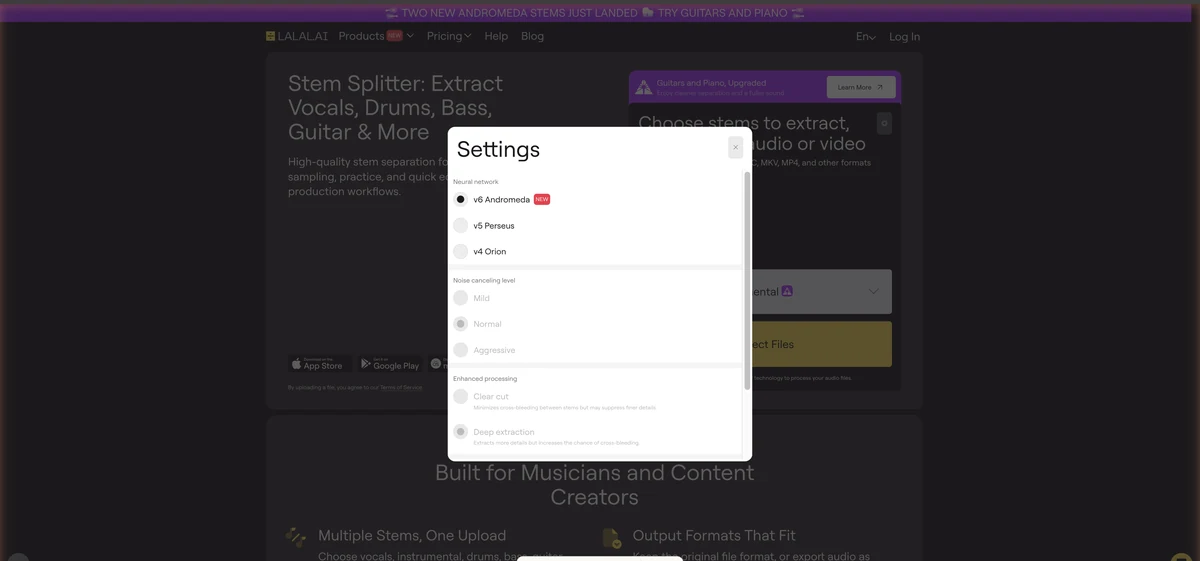
| Engine | Best For | Recommendation |
|---|---|---|
| v6 Andromeda (default) | Vocals, instrumental, drums, bass, piano, guitars | Start here; guitars and the rebuilt piano arrived in August 2026 |
| v5 Perseus | Synth, strings, wind; alternative for any stem | Switch here if Andromeda's split sounds off |
| v4 Orion | Legacy results for older material | Occasional use |
Lynx, a separate voice-isolation network, powers the Voice and Noise stem and Voice Cleaner.
Choose Mild, Normal, or Aggressive depending on how much background noise the source has. Aggressive removes more noise but can affect voice quality on cleaner recordings.
Minimizes bleed between stems. Cleaner but may lose detail. Best for karaoke tracks and sampling.
Captures more detail but may have slight bleed. Best for remixing when you want every nuance.
If the original has reverb:
Preview every stem before you spend minutes on the full split
In the isolated vocal:
In the instrumental:
If results are poor:
Preview Tip: Focus on the chorus and busiest sections. These are where separation is most challenging. If those sound good, the rest likely will too.
Satisfied with the preview? Time to process the complete track
Get your separated audio files
Once processing completes:
original_name_vocals.mp3 - Isolated vocalsoriginal_name_no_vocals.mp3 - Instrumental/karaoke versionNote: Download requires a paid plan. Free accounts can only preview results.
You know the settings that matter now. Upload a track, pick a stem type, and listen to what v6 Andromeda pulls out of it.
Continue with LALAL.AI →The four jobs people bring to a stem splitter are karaoke tracks, remix material, drum samples, and podcast cleanup. Each one pairs a stem type with an Enhanced Processing setting. Clear Cut when bleed between stems is what would ruin the result; Deep Extraction when you want every nuance kept.
Upload song → Select 'Vocal and Instrumental' → Clear Cut → Download instrumental stem
Upload → 'Vocal and Instrumental' → Deep Extraction + De-Echo → Import vocals to your DAW
Upload → Select 'Drums' → Deep Extraction → Chop and sample in your sampler
Upload audio → 'Voice and Noise' → Aggressive noise canceling → Clean dialogue
| Instrument | Stem to Select | What You Get |
|---|---|---|
| Bass practice | Bass | Track without bass - play along on your bass |
| Guitar practice | Electric or Acoustic Guitar | Guitar-less track to jam with |
| Drum practice | Drums | Drumless track for practice sessions |
| Piano practice | Piano | Piano-less backing track |
LALAL.AI separates one element per pass, so a four-part breakdown means running the same file four times and picking a different stem type each round. Every pass charges minutes equal to the file length, and every pass hands back two files: the isolated stem and everything else.
| Pass | Stem Type | What You Get |
|---|---|---|
| 1st | Vocal and Instrumental | Acapella + karaoke track |
| 2nd | Drums | Isolated drums + drumless version |
| 3rd | Bass | Isolated bass + bassless version |
| 4th | Piano (if present) | Isolated piano + pianoless version |
Credit Usage: Each pass uses minutes equal to file length. A 4-minute song separated into 4 types uses 16 minutes total. The Pro plan’s 250 Fast Queue minutes handles roughly 60 full songs with 4-stem separation each.
Start from a lossless source, leave v6 Andromeda selected for vocals, drums, bass, piano and guitars, and switch to v5 Perseus for synth, strings and wind. Clear Cut buys you separation at the cost of detail; Deep Extraction does the reverse. De-Echo is worth enabling on anything with reverb.
Highest quality source + v6 Andromeda + De-Echo + Clear Cut mode
Deep Extraction mode + v6 Andromeda for drums, bass, piano and guitars (v5 Perseus for synth, strings and wind) + accept slight vocal remnants + lossless source
Clear, punchy drums separate best. Electronic drums are cleanest; live drums may have bleed
| Genre | Recommended Engine | Processing Mode | Notes |
|---|---|---|---|
| Pop | v6 Andromeda | Clear Cut | Best overall results |
| Rock | v6 Andromeda | Deep Extraction | Preserves guitar textures |
| Electronic/EDM | v5 Perseus (synth) / v6 Andromeda (vocals) | Clear Cut | Clean synth separation |
| Hip-Hop | v6 Andromeda | Clear Cut + De-Echo | Clarity for vocal samples |
| Classical | v5 Perseus (strings, wind) | Deep Extraction | Complex orchestral separation |
| Jazz | v5 Perseus (instruments) | Deep Extraction | Natural acoustic sounds |
| Problem | Cause | Solutions |
|---|---|---|
| 'Watery' or phased vocals | AI artifacts from complex separation | Try different neural network; use higher quality source; try Deep Extraction |
| Thin instrumental | Aggressive vocal removal took frequencies | Use Deep Extraction mode; apply EQ in DAW; try v5 Perseus |
| Drums bleeding into vocals | Transient sounds hard to separate | Use Clear Cut mode; apply transient reduction in post; accept minor bleed |
| Processing takes very long | High server load or long file | Use Fast Queue for priority; process off-peak hours; split long files |
Lite runs €6.75/month on annual billing with 90 Fast Queue minutes. Pro is €13.5/month with 250 minutes, the VST plugin, and Lyra offline processing.
Get Started with LALAL.AI →LALAL.AI gives you rights to the processed audio, but you don't gain copyright to the original music. For covers, remixes, or samples, you still need appropriate licenses or permissions from the copyright holders.
Free accounts get 10 minutes of processing with preview capability. You can listen to separated stems but cannot download them. Paid plans start at €6.75/month (annual) for unlimited Relaxed Queue processing.
Each stem separation type uses the full song length in minutes. A 4-minute song separated into vocals AND drums uses 8 minutes (4 for each separation type).
Both produce identical quality. Fast Queue processes immediately but has monthly minute limits. Relaxed Queue waits for server availability (usually 5-15 minutes) but is unlimited on paid plans.
Yes. Upload MP4, MKV, or AVI files directly. LALAL.AI extracts the audio, processes it, and returns separated audio tracks.
v6 Andromeda is the default and covers vocals, instrumental, drums, bass, piano and guitars. Switch to v5 Perseus for synthesizer, strings and wind, or when an Andromeda split doesn't sound right. v4 Orion stays available for older material, and Lynx handles the Voice and Noise stem automatically.
LALAL.AI and Demucs (by Meta) take different approaches. LALAL.AI offers 11 separation options, apps for web, desktop and mobile, and processing that needs no setup. Demucs is free and open-source but requires local installation and only separates into 4 stems (vocals, drums, bass, other). For most users, LALAL.AI's convenience and broader stem selection make it the better choice.
A typical 3-4 minute song processes in 15-60 seconds on the Fast Queue. The Relaxed Queue (unlimited on paid plans) typically takes 5-15 minutes depending on server load. Processing time increases with longer files and higher-quality source formats.
Now that you can separate stems:
Try different music styles to understand AI capabilities and limitations
Create a consistent process for your specific use case
Import stems into your production software for creative work
Pro plan includes VST for direct DAW integration
Understanding Audio Source Separation — Academic introduction to how AI stem separation works
iZotope: Guide to Audio Separation — Industry perspective on stem isolation technology
 Featured 9 min read
 LALAL.AI's free tier gives 10 minutes and previews but blocks downloads. Paid starts at €6.75/mo for 10 stem types. Most songs finish in under a minute.
Read Article → 10 min read
 LALAL.AI separates 11 stem options from €6.75/mo on its Andromeda engine. Vocal Remover is free, now with a 4-stem splitter. Which one fits your work?
Read Article →