
InVideo AI Review 2026: Agent Two Tested, Plans From $20
I ran a script through InVideo's Agent Two on a free account: good stock picks, then the 10 free credits ran out. Plans from $20 to $150/mo.
Read Article →
Opus Clip turns long-form videos into short, platform-ready clips using multimodal AI that analyzes speech, visuals, and emotion. With 16 million creators on the platform and plans starting at $15/month, it is the most widely used AI video clipping tool in 2026. ClipAnything, its latest model, handles any genre from podcasts to sports highlights, not just talking-head content. The tool is fast and the virality scoring is useful for prioritizing clips, but per-minute billing and a restrictive free plan limit its value for high-volume creators. **
Opus Clip is an AI video repurposing platform built by Opusclip Inc. in San Francisco. The company raised roughly $68 million in funding and crossed $20 million in annual recurring revenue by early 2026. The idea is simple: upload a long video, and the AI identifies the most engaging moments, cuts them into short clips, adds captions, reframes for vertical formats, and scores each clip on predicted performance.
The main difference between Opus Clip and competitors like Submagic or Vizard is the breadth of its AI model. Most clipping tools only work well with talking-head content like podcasts and interviews. Opus Clip’s ClipAnything engine uses visual, audio, and sentiment analysis to handle vlogs, sports highlights, gaming footage, documentaries, and even music videos. You can type a natural-language prompt like “find the moment where they argue about pricing” and ClipAnything will surface the right segment. For a head-to-head against Vizard and Submagic, see our best AI video clippers comparison; for a broader comparison of AI video tools, see our best AI video generators 2026 roundup.
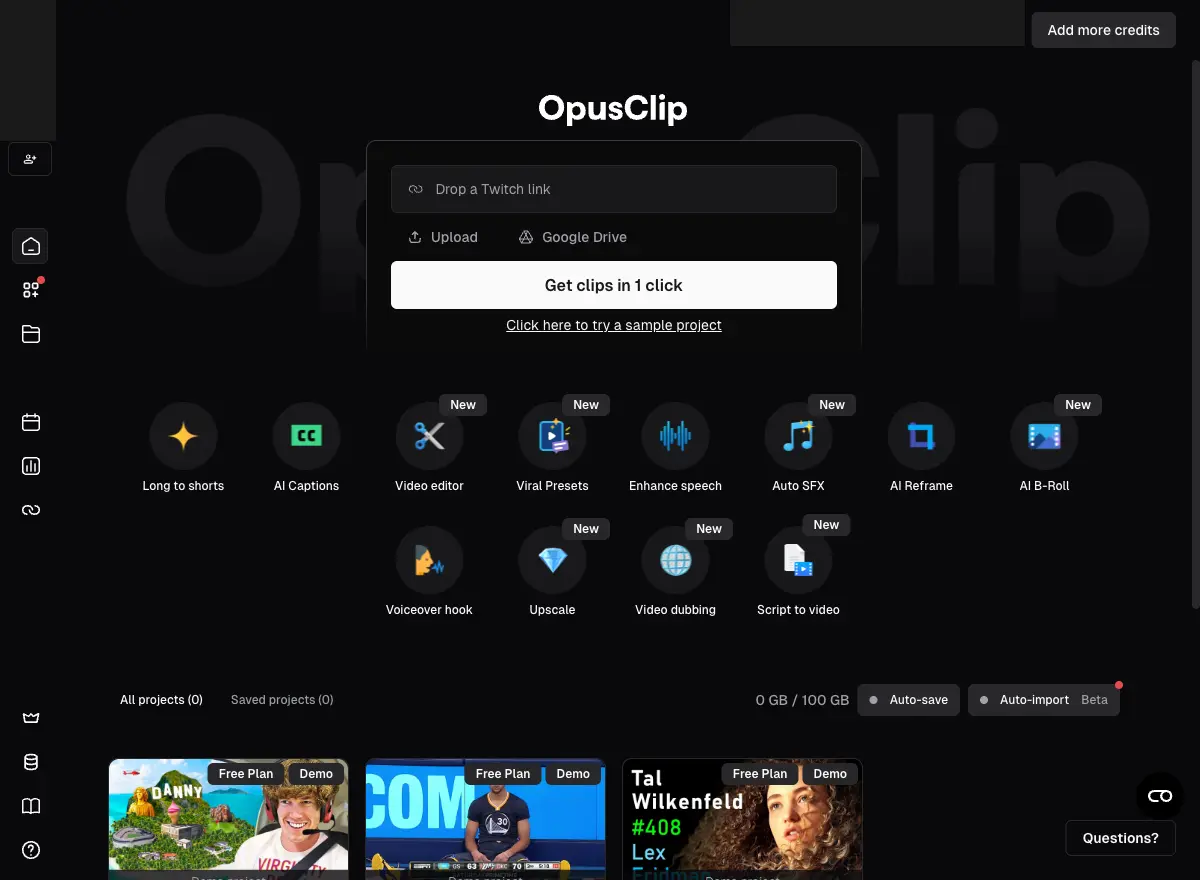
The workflow is simple enough that first-time users can get clips within minutes of signing up.
Paste a URL or upload a file up to 10GB
Opus Clip accepts video from YouTube, Google Drive, Vimeo, Zoom, Twitch, Rumble, Facebook, LinkedIn, Twitter, Loom, Riverside, StreamYard, and direct file uploads. The Pro plan adds auto-import from verified YouTube accounts, meaning new uploads get clipped automatically without manual intervention.
ClipAnything identifies the best moments using multimodal cues
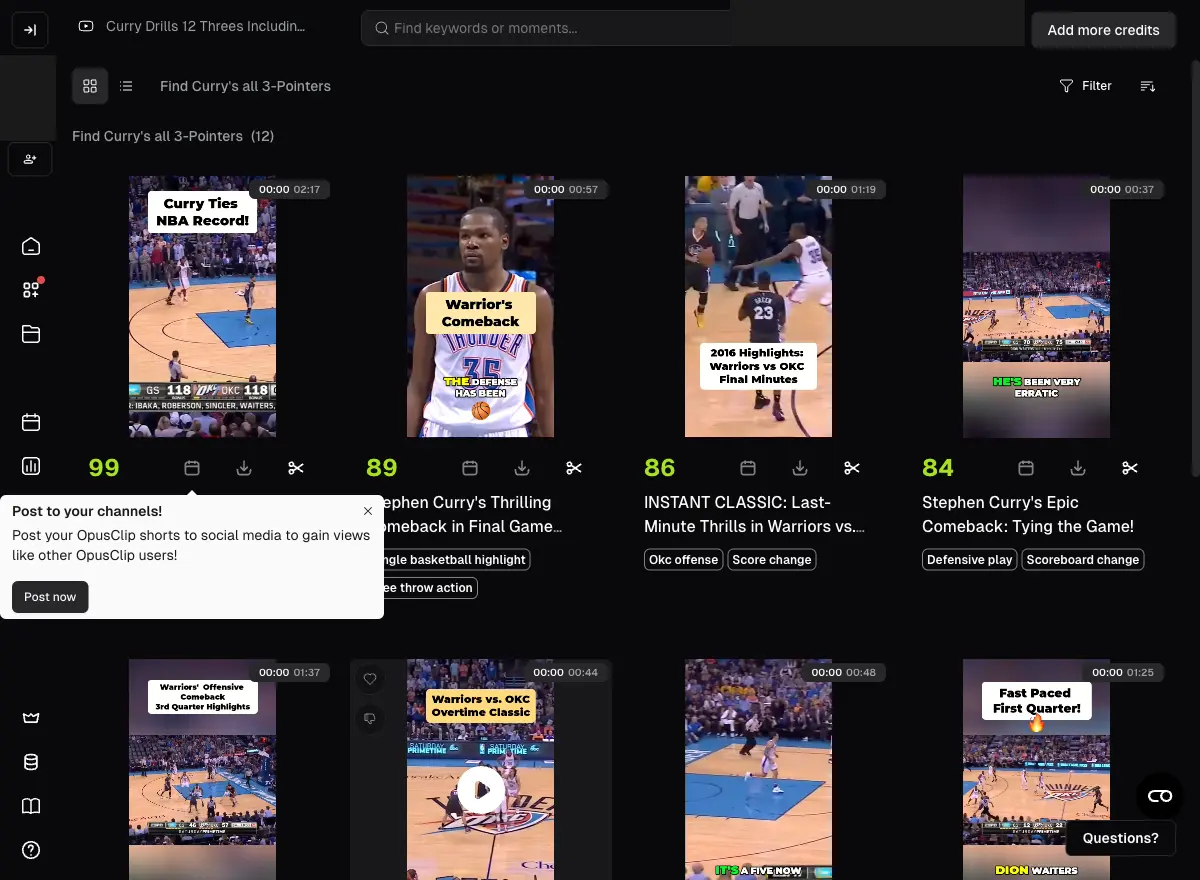
The AI processes the video through visual understanding (objects, actions, text overlays), audio analysis (speech, laughter, emotional sounds), and sentiment detection (emotional peaks, surprise, tension). Each identified moment gets scored on hook strength, pacing, and topic coherence. The process generates 10-20 clips from a typical hour-long video in under 10 minutes.
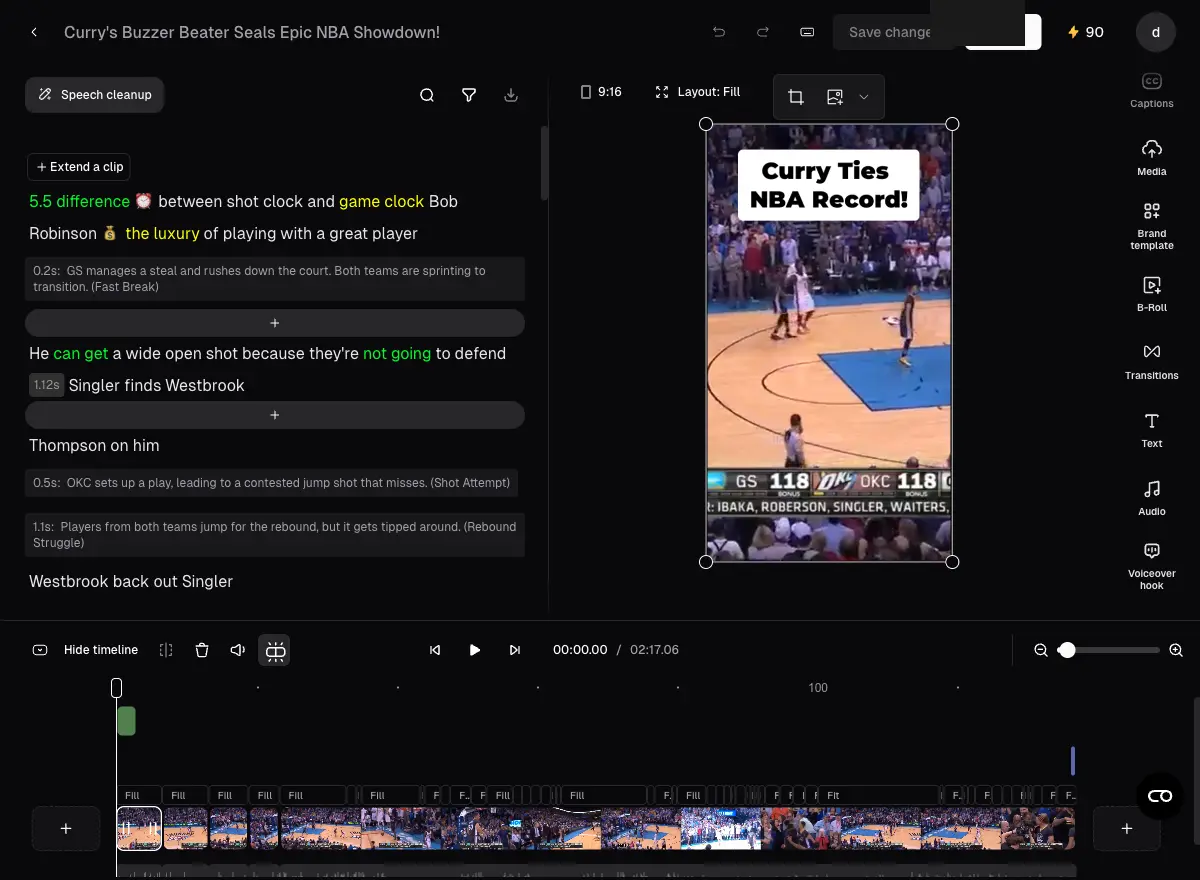
Adjust clips, captions, and reframing in the built-in editor
Each clip appears with its virality score (0-100), auto-generated captions, and AI reframing applied. The editor lets you trim boundaries, customize caption styles, adjust the reframe tracking, add B-Roll from the Pexels library, insert transitions, and apply brand templates. Pro users can export the timeline to Adobe Premiere Pro or DaVinci Resolve via XML.
Post directly to 6 platforms or download
The social scheduler handles YouTube Shorts, TikTok, Instagram Reels, LinkedIn, Twitter, and Facebook. You can schedule a full month of posts in a single session. The AI also generates titles, descriptions, and hashtags for each clip. Alternatively, download as MP4 at up to 1080p (4K on Pro with scheduling).
Multimodal AI clipping that works on any video genre. Uses visual, audio, and sentiment cues to identify engaging moments.
97%+ accuracy across 25+ languages with customizable templates, emoji highlights, and keyword emphasis.
Each clip gets a 0-100 score predicting engagement potential based on hook strength, pacing, and topic relevance.
ReframeAnything tracks moving subjects and automatically crops to 9:16, 1:1, or 16:9 with manual override.
Built-in voice generation, speech enhancement, filler word removal, and background audio cleanup.
Custom fonts, colors, logos, intros, and outros applied to all clips in one click.
Opus Clip maintains two AI models. ClipBasic, available on all plans including free, works best with talking-head videos where speech drives the content. ClipAnything, available on Starter and above, is the multimodal model that understands visual scenes, non-verbal audio (laughter, music, crowd noise), and emotional arcs. For podcasters and interview channels, both models produce comparable results. The difference shows up on content with visual storytelling: vlogs, cooking shows, sports clips, and gaming highlights need ClipAnything to identify the right moments.
Every clip gets a score from 0 to 100 predicting how well it should perform on social platforms. Independent testing shows a moderate positive correlation (roughly 0.41) between the score and actual view counts. The score identifies clips with strong hooks and high-energy delivery reliably. Where it falls short is with quieter, nuanced content: a thoughtful exchange between two guests might get a low score despite being the most shareable moment. The virality score works best as a triage filter rather than a guarantee. High-scoring clips are worth publishing first; low-scoring clips deserve a manual check before discarding.
The Pro plan includes a built-in social scheduler that connects to YouTube, TikTok, Instagram, LinkedIn, Twitter, and Facebook. You can queue clips with auto-generated titles, descriptions, and hashtags, then schedule a full month of daily posts in a single session. The AI tailors metadata for each platform, though the generated copy tends toward generic “engagement bait” phrasing that benefits from manual editing. The scheduler posts at scheduled times without requiring the app to be open.
The Business plan (custom pricing) includes API access supporting 50 concurrent projects, webhooks, and source files up to 10 hours long. Opus Clip also offers an MCP (Model Context Protocol) connector for integration with AI agent workflows. For agencies processing content at scale, the API pricing is negotiated separately from standard credit packs.
| Plan | Monthly | Annual (per month) |
|---|---|---|
| Free | Monthly $0/mo | Annual (per month) $0/mo |
| ||
| Starter | Monthly $15/mo | Annual (per month) $15/mo |
| ||
| Recommended Pro | Monthly $29/mo | Annual (per month) $14.50/mo |
| ||
| Business | Monthly Custom | Annual (per month) Custom |
| ||
One processing credit equals one minute of uploaded source video, regardless of how many clips the AI generates. A 60-minute podcast costs 60 credits whether you export 5 clips or 50. This means the free plan (60 credits) can only handle one hour-long video per month. Unused credits on monthly billing expire after 60 days. Annual Pro billing pools 3,600 credits across the year, which provides more flexibility for creators with variable output schedules.
Trim dead air and intros from source videos before uploading. Every minute of source footage consumes a credit, including silent sections the AI will skip anyway. A 90-minute podcast with 15 minutes of pre-roll effectively wastes 15 credits.
Get 60 minutes of AI video clipping per month. No credit card, no commitment. See how ClipAnything handles your content before upgrading.
Start Clipping with Opus Clip →Turn one long video into 10+ platform-ready clips. ClipAnything finds the best moments from podcasts, vlogs, sports, and more.
Get Started with Opus Clip →Opus Clip fits a specific workflow. If you produce long-form content and need to distribute short clips across social platforms consistently, it removes the biggest bottleneck: finding and editing those clips manually. Podcasters, YouTubers with weekly uploads, marketing agencies managing multiple client channels, and media companies repurposing interviews are the core audience.
It does not fit if you need to create videos from scratch. Opus Clip cannot generate footage from text prompts, build slideshows from scripts, or produce AI avatar videos. For those workflows, InVideo (text-to-video through its Agent Two chat agent, from $20/month) or Fliki (text-to-video with 2,000+ AI voices) are better choices.
Opus Clip alternatives compared as of July 2026
| Tool | Best For | Starting Price | Key Difference |
|---|---|---|---|
| Submagic | Caption styling and visual polish | $19/mo | Better animated captions, weaker clip extraction |
| Vizard | Teams and transcript-based editing | $29/mo | Better collaboration features, 4K export, subtitle translation |
| Descript | Text-based video editing | $24/mo | Edit video by editing text, stronger for podcasters who also edit |
| CapCut | Free manual editing | Free | No AI clip extraction, full manual control |
| Ssemble | Budget high-volume clipping | $7.50/mo | Per-video pricing instead of per-minute |
If your main bottleneck is finding clips inside long recordings, Opus Clip is the strongest tool. If your bottleneck is making those clips look polished (captions, B-Roll, sound effects), Submagic does that better. Many creators use both: Opus Clip for extraction, Submagic for finishing. For a more in-depth look at how AI tools help with content repurposing, see our faceless YouTube channel guide.
Opus Clip is the best tool for turning long-form video into short-form clips in 2026. ClipAnything's multimodal AI understands content beyond speech, and the virality scoring saves hours of manual review. The per-minute pricing and restrictive free plan hold it back from a higher score, but for anyone producing weekly long-form content, the time savings justify the cost.
For anyone producing weekly long-form video content like podcasts, webinars, or YouTube videos, Opus Clip saves 2-4 hours per episode in manual clipping and editing time. The Pro plan at $14.50/month (annual billing) is cost-effective compared to hiring a human editor at $20-50 per short clip. It is less compelling if you only produce 1-2 videos per month or if you need a full video creation tool rather than a repurposing tool.
Opus Clip offers a permanent free plan with 60 processing minutes per month. No credit card is required. Free plan limitations include watermarked exports, 9:16 aspect ratio only, 3-day clip storage expiry, and no access to the editor, virality score, or social scheduler. New accounts receive a 7-day Pro trial with 90 credits for testing the full feature set.
Testing data shows a moderate positive correlation (approximately 0.41) between the virality score and actual view performance. The score reliably identifies clips with strong hooks and high-energy delivery. It is less effective at identifying value in quieter, nuanced content like thoughtful interview exchanges. The score works best as a sorting filter for prioritizing which clips to publish first, not as a prediction of guaranteed performance.
No. Opus Clip only repurposes existing video footage. It cannot generate new videos from text prompts, scripts, URLs, or PowerPoint presentations. For text-to-video creation, platforms like InVideo (which generates clips with Seedance, Kling 3.0, VEO 3.1 and Runway Gen-4.5) or Fliki (with 2,000+ AI voices and blog-to-video conversion) are designed for that workflow.
Projects and clips are deleted from Opus Clip servers 3 days after cancellation, regardless of remaining credits. This policy applies to your entire library including processed clips, edited endpoints, and caption customizations. Download every clip you want to keep before cancelling. Multiple Trustpilot reviewers report discovering this policy only after cancellation, as the UI does not display a pre-cancellation warning.
It depends on your primary bottleneck. Submagic is better for animated captions and visual polish on clips you have already cut. Vizard is better for teams needing collaboration features, 4K export, and transcript-based editing. Descript is better if you prefer editing video by editing text. CapCut is the best free option for manual clip selection and editing. Ssemble offers similar AI clipping at roughly one-quarter the per-clip cost with per-video pricing.
 Featured 14 min read
 I ran a script through InVideo's Agent Two on a free account: good stock picks, then the 10 free credits ran out. Plans from $20 to $150/mo.
Read Article → 15 min read
 I made a 48-second video on Fliki's free plan. 2,000+ voices on paid plans, 3 free credits a month, Standard from $28/mo. Pricing and verdict.
Read Article → 21 min read
 InVideo, Synthesia, Synthesys, Fliki and Runway compared on output, pricing and free tiers. Every free option carries a watermark or a usage cap.
Read Article →