
InVideo AI Review 2026: Agent Two Tested, Plans From $20
I ran a script through InVideo's Agent Two on a free account: good stock picks, then the 10 free credits ran out. Plans from $20 to $150/mo.
Read Article →
Fliki turns a script, a blog post or a slide deck into a narrated stock-footage video with subtitles. It suits marketers and faceless YouTube channels that already have the words. On the free plan, it turned my 115-word script into a 48-second video. Standard costs $28/month, or $16.80/month billed yearly under the current 40%-off offer.
Fliki is a browser-based text-to-video tool founded in 2021 in Delaware, USA. Fliki reports 14 million+ users. You give it a script, a blog post link, a PowerPoint or just an idea, and it voices the text, matches stock footage to each line, adds subtitles and music, and hands you a finished video.
Runway and Kling AI generate new footage from a prompt. Fliki mostly builds videos from its stock library of 10 million+ assets and puts an AI voiceover on top. Premium adds AI video clips and photo avatars, but they’re an extra on top of the stock library. You give up originality and get speed, and for most marketing videos I think that’s a fair trade. If you want the wider picture, my roundup of the best AI video generators 2026 covers the whole category.
I wrote a short explainer script for this test, about 115 words on keeping houseplants alive through winter: water less, move them closer to the light, add humidity. That’s short enough for the free plan’s one-minute limit. I asked for stock footage only, since a free account can’t pay for AI-generated clips.
Fliki gives you several ways to start a video. I went with Script to video, which takes your text as written.
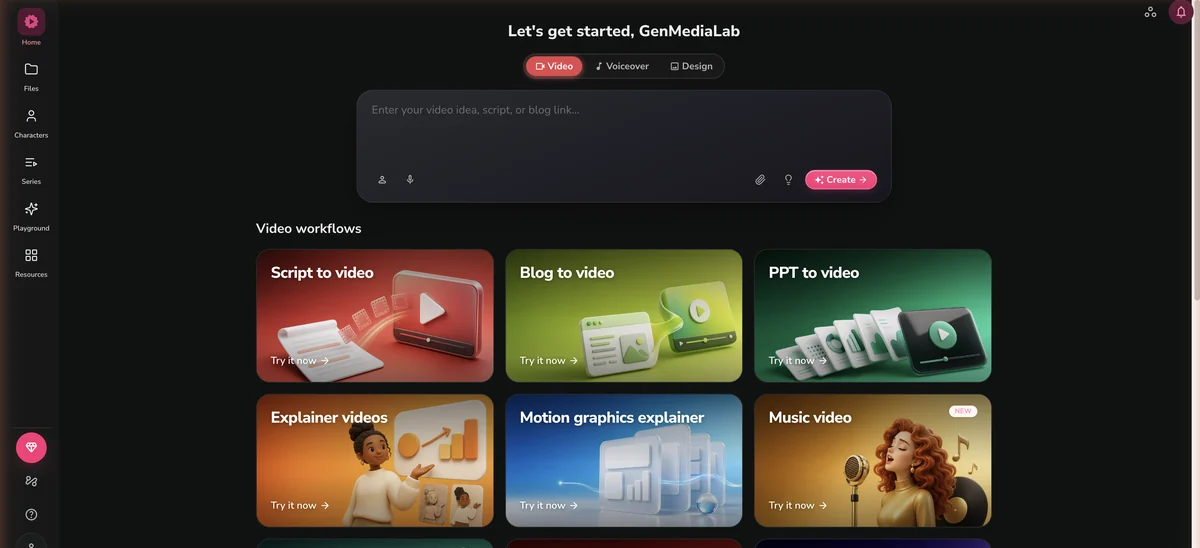
I pasted the script, kept stock footage, and went with an automatic English voice and basic subtitles.
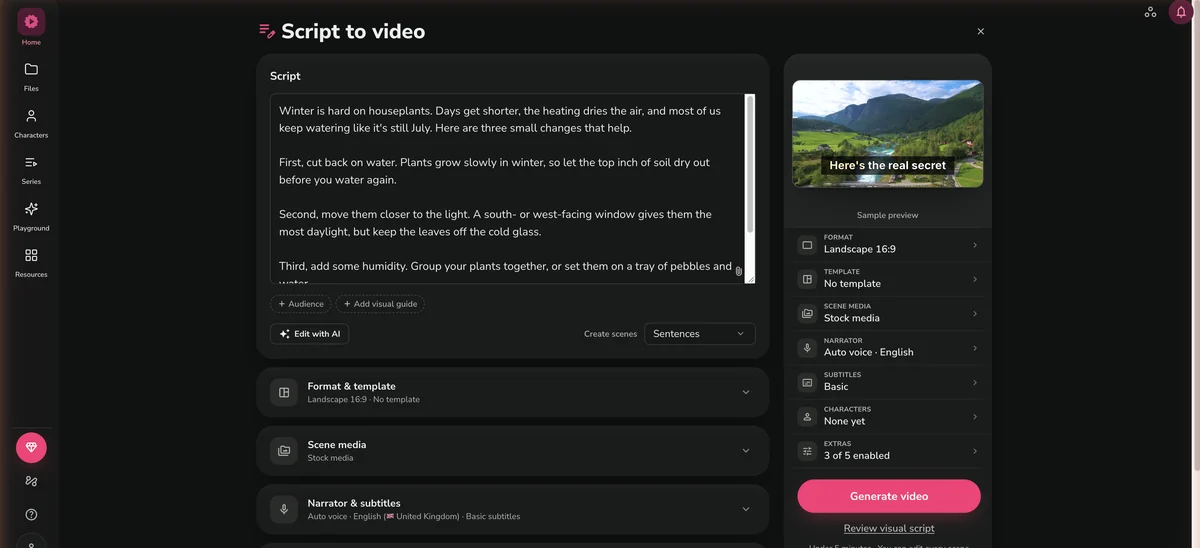
Fliki split the script into ten scenes, one per sentence, and found a clip for every one of them. It warned me the free plan might cut the script short, but all ten sentences made it into a 48-second video. Four scenes came back with a clip that missed, and every one of them had matched a single word rather than the sentence. “First, cut back on water” got a stone wall fountain. Under “the most daylight” it put an empty office window and stayed in that room through the line about keeping leaves off the cold glass, with no plant anywhere in shot. The tray of pebbles and water became a pair of hands wringing a cloth out over a basin. “Do those three things” got a decorated Christmas tree.
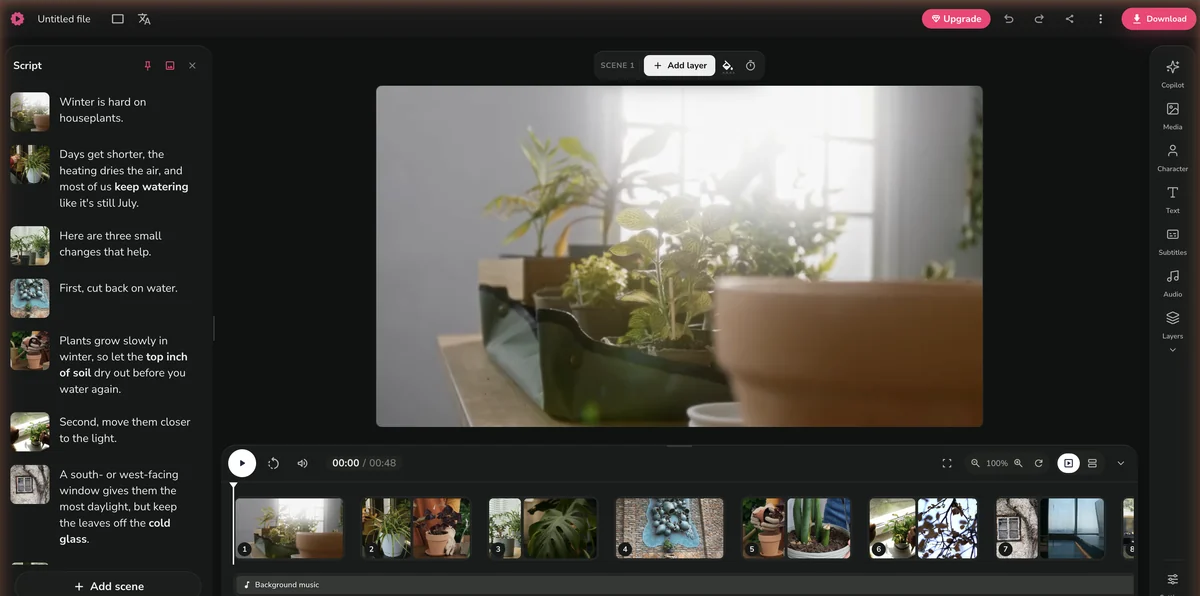
The rest of the clips were on topic, and the word-by-word subtitles were accurate. The export is a 720p MP4 with the Fliki watermark, and the whole video used 0.8 of my 3 monthly credits. Here’s the video as it came out.
For a free plan, that’s a usable draft. On the same script, InVideo’s free account ran out of credits before it could put a video together (more on that in Fliki vs InVideo), so on free plans Fliki is the one that actually finishes a video. One script on free plans is a small test, not a benchmark.
Whatever you start from, every Fliki video goes through the same four steps. If you’re new to this kind of tool, the how to make AI videos guide explains the prompt-to-publish workflow before you commit to any one tool.
Script, idea, blog post link or PowerPoint
The main starting points are a script, an idea, a blog post link or a PowerPoint. Blog to video pulls the key points out of your post and writes a script from them, and PPT to video keeps your slide order and adds narration. There are also workflows for explainers, motion-graphics explainers and music videos, and for editing a recording, using a screen recording or translating a finished video.
Scenes with voiceover, visuals and subtitles
Fliki splits your text into scenes and gives each one a voiceover line, a visual and subtitles. My script came back as ten scenes, one per sentence. The narration, the on-screen text and the visuals are separate layers, so you can edit one without touching the others. Paid plans add the AI Copilot.
Swap clips and fix lines before you export
Next you go through the video one scene at a time, rewriting lines, swapping clips or changing the on-screen text. Swapping a clip takes one click. Changing the text or the voice regenerates the audio and costs credits again, so settle the script before you start tweaking.
Render and download the finished video
Fliki renders the video with your voice and visuals and gives you an MP4. The export uses credits too. Free exports are 720p with a Fliki watermark, and paid plans export at up to 1080p without one.
300 voices on the free plan, 1,000 on Standard and 2,000+ on Premium, in 80+ languages. Standard includes one voice clone, Premium three.
Paste a blog post link and Fliki pulls out the main points and turns them into a narrated video with matching stock footage.
Premium unlocks all of Fliki's AI avatars, plus photo avatars and AI video clips.
Subtitles are generated for you and burned into the video, with styles you can change. You can also export them as SRT.
Translate a finished video into another language, with a new voiceover and subtitles.
Make several videos at once from a spreadsheet, one per row, each with its own script and settings.
The voice library is the main reason to pick Fliki. The free plan has 300 voices in 80+ languages, Standard has 1,000 (500 of them ultra-realistic), and Premium has 2,000+ (1,000+ ultra-realistic). Voice cloning starts on Standard with one cloned voice, and Premium gives you three. The free plan has no cloning.
Fliki charges credits for the voiceover it generates and for the video you export. Change the text or the voice, and it regenerates the audio and charges you again.
On paper, a stock-footage video with AI voiceover costs about 0.5 credits per minute. My 48-second test used 0.8 credits, about twice what that rate works out to, so I’d budget more than the estimate. The free plan gives you 3 credits a month, Standard 180 and Premium 600.
Get the script right before you generate the video. Every change to the text or the voice regenerates the audio and costs credits again, and on the free plan’s 3 credits that adds up fast.
Fliki has a free plan, two paid plans and Enterprise. Paid plans export at up to 1080p, and the free plan stops at 720p.
| Plan | Yearly | Monthly |
|---|---|---|
| Free | Yearly $0/mo | Monthly $0/mo |
| ||
| Recommended Standard | Yearly $16.80/mo $201.60 billed annually, 40%-off offer | Monthly $28/mo |
| ||
| Premium | Yearly $52.80/mo $633.60 billed annually, 40%-off offer | Monthly $88/mo |
| ||
| Enterprise | Yearly Custom | Monthly Yearly billing only |
| ||
In September 2026, Fliki is running a 40%-off offer on yearly billing. That brings Standard to $16.80 a month ($201.60 a year) and Premium to $52.80 a month ($633.60 a year), against $28 and $88 billed monthly. A year of Standard costs about the same as seven months paid monthly, so if you’ll use it longer than that, the yearly plan wins.
For scale, my 48-second test video used 0.8 credits. Standard’s 180 credits a month and Premium’s 600 go a long way on plain stock-footage videos like that. Regenerating the voiceover after edits is what eats into them.
Paste a script and get a narrated video back. The free plan gives you 3 credits a month to try it.
Start Creating with Fliki →Fliki is built around voiceover and stock footage, InVideo around Agent Two and generated clips. Prices as of September 2026.
| Feature | Fliki | InVideo |
|---|---|---|
| Starting price | $28/mo, or $16.80/mo billed yearly (Standard) | $20/mo (Starter) |
| AI voices | 1,000 on Standard, 2,000+ on Premium, 80+ languages; voice cloning from Standard | ElevenLabs voices, videos in 50+ languages |
| Input types | Script, idea, blog post link, PowerPoint | Chat prompt to Agent Two, or your own script |
| AI models | Mostly stock footage; AI video clips on Premium | Seedance (Plus and up), Kling 3.0, VEO 3.1, Runway Gen-4.5 and more |
| Max export | 1080p (720p on the free plan) | 4K export of your own footage |
| Best for | Narrated videos from text you already have | Agent-built videos with generated clips |
| Free plan | 3 credits/month, 720p, watermark, 1-minute videos | Free account with 10 credits that refill weekly |
Fliki and InVideo do different jobs. Fliki turns text you already have (a blog post, a script, a slide deck) into a narrated video. InVideo’s Agent Two plans, writes, voices and assembles a video from a chat prompt, and from the Plus plan ($60/month) it can generate clips with Seedance. On free accounts, Fliki finished my test video and InVideo ran out of credits before the final cut.
If you’re repurposing written content, I’d pick Fliki. If you want generated footage, InVideo is the stronger choice, but budget for Plus. The full side-by-side is in Fliki vs InVideo 2026. There’s also my InVideo AI review, or the Synthesia review if avatars matter most to you.
Fliki's price is Standard billed monthly, or $16.80/mo billed yearly under its September 2026 offer. InVideo Starter costs the same either way.
| Fliki | InVideo | Pictory | Synthesia | |
|---|---|---|---|---|
| Score | 4.3/5 | 4.7/5 | 3.8/5 | 4.7/5 |
| Price | $28/mo | $20/mo | $19/mo | $14/mo |
| Best for | Text-to-video | AI video gen | Blog repurposing | AI avatars |
| Voices | 2,000+ | Built-in | ElevenLabs | 140+ |
| Languages | 80+ | 50+ | 25+ | 140+ |
| Free plan | Yes | Yes | Trial | Yes |
| Voice cloning | Standard | No | No | Enterprise |
Fliki’s AI-generated visuals sometimes come out with gibberish text or fake lettering baked into the image. It’s a problem with the image model, so it only affects AI-generated scenes, not stock footage.
There’s no automatic fix. Swap the affected scenes for stock footage from the library, and if the video is for a client, check every scene before you export.
Fliki is at its best when you already have the words and want a narrated stock-footage video out of them. On the free plan, it turned my 115-word script into a 48-second video with four of its ten scenes off topic, and that used 0.8 of my 3 monthly credits. The voice library is the main draw, from 300 voices on the free plan to 2,000+ on Premium. Standard costs $28/month, or $16.80/month billed yearly under the current offer, and includes one voice clone. It stays at 4.3 because AI-generated visuals can show garbled text and every change to the text or voice costs credits again. If your workflow is scripts in, videos out, Fliki fits. For generated footage or avatar-led videos, look at InVideo or Synthesia.
Yes. Fliki's free plan gives you 3 credits a month, 300 voices in 80+ languages and videos up to one minute long, exported at 720p with a Fliki watermark. It has no commercial rights and no voice cloning. That's enough for a real test. A 48-second video I made on the free plan used 0.8 of the 3 credits. For 1080p without a watermark, plus commercial rights, Standard costs $28/month, or $16.80/month billed yearly under Fliki's 40%-off offer in September 2026.
Fliki charges credits for the voiceover it generates and for the video you export. Changing the text or the voice regenerates the audio and costs credits again. On paper, a stock-footage video with AI voiceover costs about 0.5 credits per minute, but my 48-second test on the free plan used 0.8 credits, so it's worth budgeting more. The free plan includes 3 credits a month, Standard 180 and Premium 600.
It depends on what you're making. Fliki is built for turning text you already have, like a script, a blog post or a slide deck, into a narrated stock-footage video, and it has 1,000 voices on Standard and 2,000+ on Premium. InVideo's Agent Two plans, writes, voices and assembles a video from a chat prompt, and InVideo can generate clips with models such as Kling 3.0 and VEO 3.1, with Seedance from the Plus plan. Fliki Standard costs $28/month, or $16.80/month billed yearly under its September 2026 offer. InVideo Starter is $20/month and Plus is $60/month. On free accounts, Fliki finished my 48-second test video, while InVideo ran out of its 10 free credits before the final cut.
Yes, on a paid plan. Standard and Premium include commercial rights, so you can publish monetized YouTube videos, run them in marketing campaigns or hand them to clients. The free plan has no commercial rights and adds a Fliki watermark to every export.
Only on Premium. Fliki builds most videos from its stock library of 10 million+ assets and puts an AI voiceover on top. AI video clips and photo avatars come with Premium, which costs $88/month, or $52.80/month billed yearly under Fliki's September 2026 offer. For original generated footage, tools like Runway, Kling AI or InVideo (with Seedance on its Plus plan) are a better fit.
Yes. Fliki is a legitimate company, founded in 2021 and headquartered in Middletown, Delaware, USA, and Fliki reports 14 million+ users. I used it on a free account for this review, and you can try it the same way before you pay for anything. Paid plans include commercial rights for the videos you make.
 Featured 14 min read
 I ran a script through InVideo's Agent Two on a free account: good stock picks, then the 10 free credits ran out. Plans from $20 to $150/mo.
Read Article → 21 min read
 InVideo, Synthesia, Synthesys, Fliki and Runway compared on output, pricing and free tiers. Every free option carries a watermark or a usage cap.
Read Article → 12 min read
 Synthesia's free plan is 10 minutes a month with 9 avatars and a watermark. Paid starts at $14/mo for 125+ avatars, no watermark and 160+ languages.
Read Article →