
Best AI Video Generators 2026: Top 5 Compared
InVideo, Synthesia, Synthesys, Fliki and Runway compared on output, pricing and free tiers. Every free option carries a watermark or a usage cap.
Read Article →
Fliki vs InVideo comes down to voice-led stock videos versus a chat agent with generated footage. On free accounts, only Fliki finished my test video. Fliki Standard costs $28/month, or $16.80/month billed yearly under the current offer. InVideo Starter is $20/month, but you need Plus ($60/month) for Seedance.
| Tool | Best For | Price | Rating | Key Feature |
|---|---|---|---|---|
| Best Value Fliki | Marketers & Voiceover Creators | $16.80/mo (yearly offer) or $28/mo | 2,000+ AI voices, script/blog/PPT to video | |
| Top Rated InVideo | YouTube & Social Media Creators | $20/mo (Starter) or $20/mo | Agent Two with Seedance, Kling 3.0, VEO 3.1 |
Paste a script, a blog link or a slide deck and Fliki turns it into a narrated video. The free plan gives you 3 credits a month at 720p.
Give Agent Two a prompt or your own script, and it writes, voices and assembles the video. Plans start at $20 a month.
I wrote a short explainer script, about 115 words on keeping houseplants alive through winter (water less, move them closer to the light, add humidity). That’s short enough for Fliki’s one-minute free limit. I pasted the same text into both tools on free accounts and asked each for stock footage only, because neither free account can pay for generated clips. InVideo’s cheapest Seedance clip costs about 30 credits, and the free account has 10.
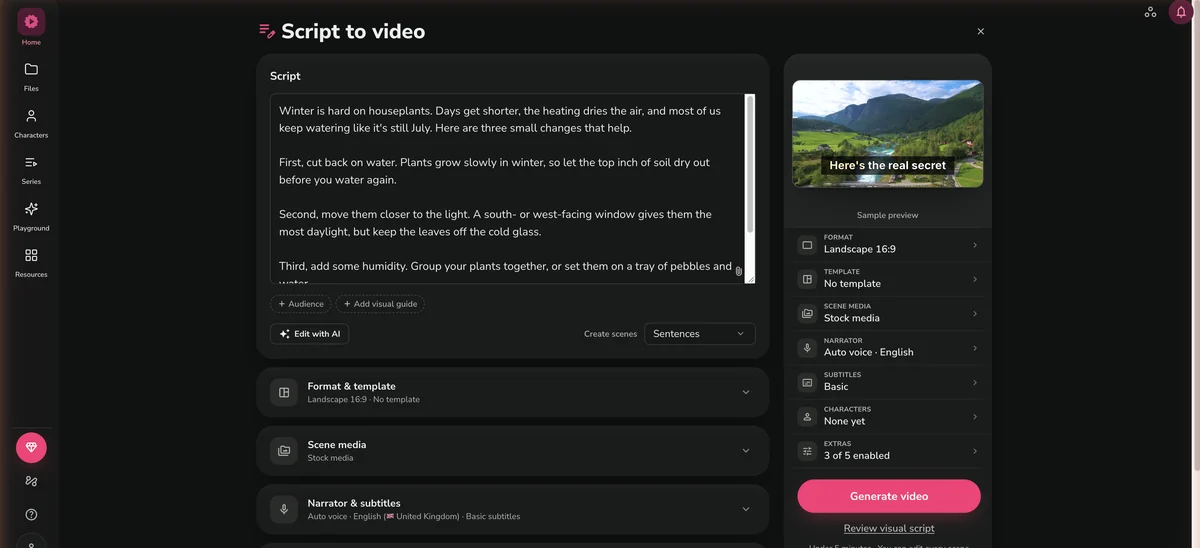
Fliki split the script into ten scenes, one per sentence, and found a clip for every one of them. It warned me the free plan might cut my script short, but all ten sentences made it in. Four scenes came back with a clip that missed, each one matched on a word rather than the sentence. “Cut back on water” got a wall fountain. “The most daylight” got an empty office window that stayed on through the cold-glass line. The tray of pebbles and water got a cloth being wrung out over a basin, and “do those three things” got a Christmas tree. The other six stayed on topic, and the word-by-word subtitles were right.
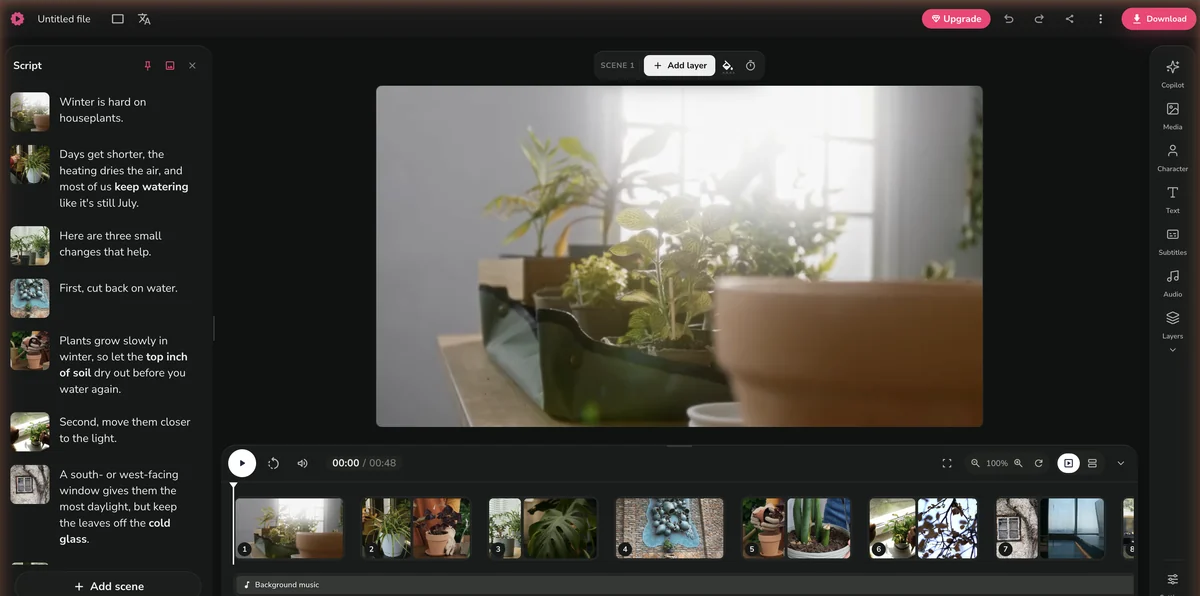
Here’s the video exactly as the free plan exported it, a 720p MP4 with the Fliki watermark. It used 0.8 of my 3 monthly credits.
In InVideo, pasting your own script hands the whole job to Agent Two.
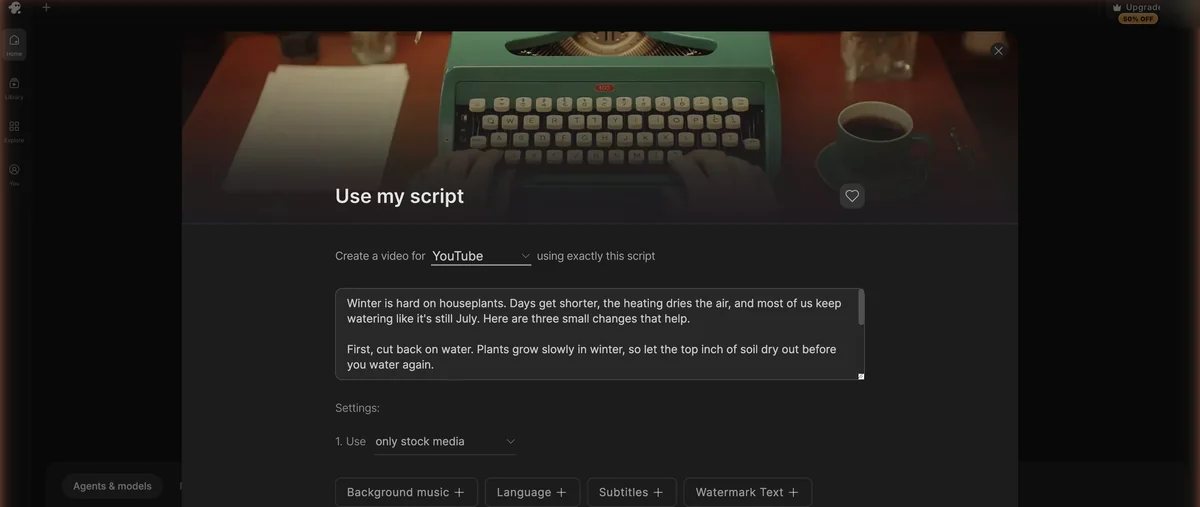
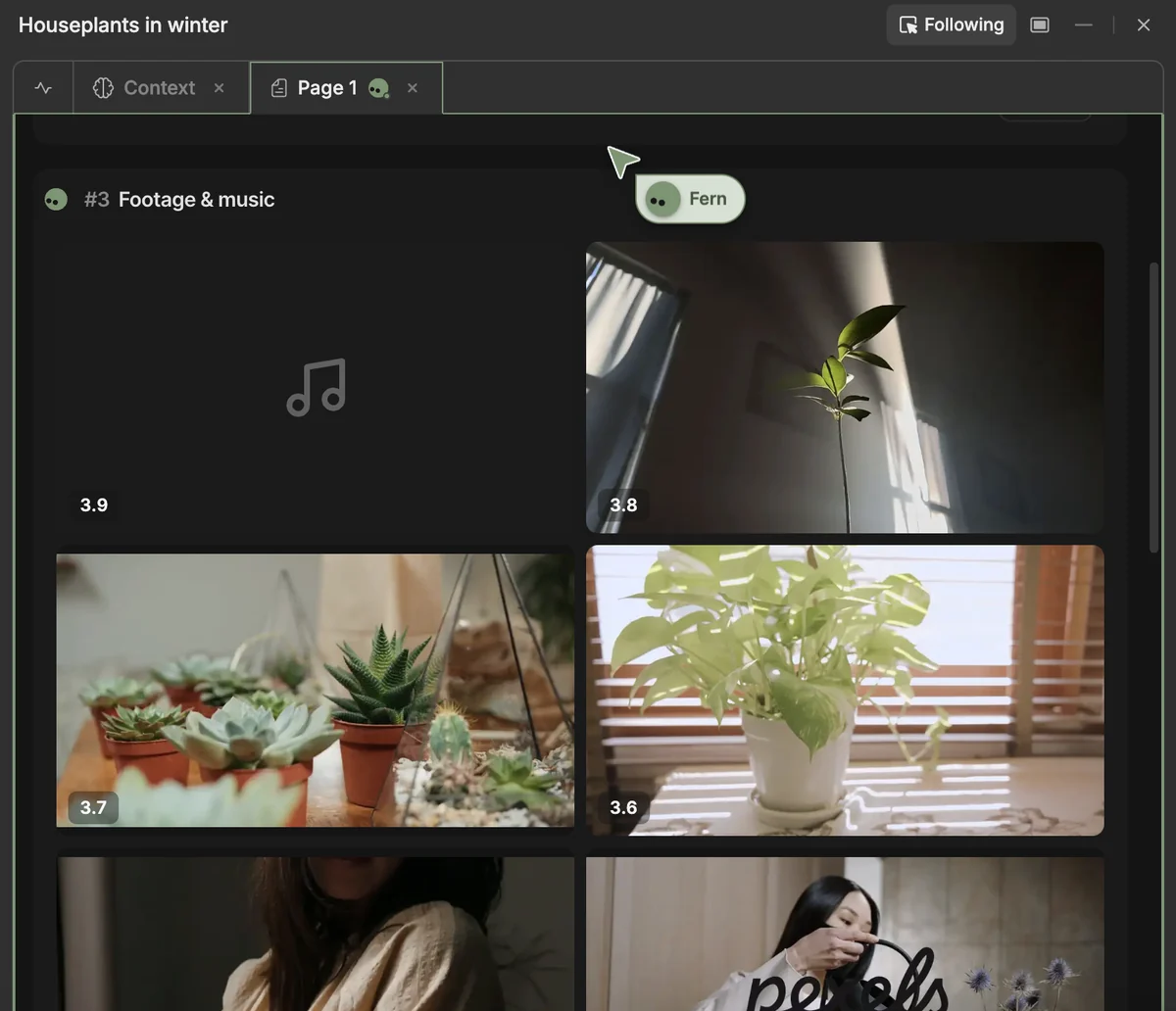
Agent Two recorded the narration with an ElevenLabs voice and went looking for footage. Most of its picks matched, like succulents and a pothos in window light, though a couple of shots of people had nothing to do with plants. Before it could put the final cut together, my 10 free credits ran out, and InVideo asked me to upgrade or wait for the weekly refill. I never got a finished video.
This was one script on free accounts, so it’s a small test, not a benchmark. On free plans, Fliki is the one that actually finishes a video. InVideo’s free account lets you look around and watch the agent get started, but not make anything, and judging what InVideo really produces will take a paid plan.
Fliki turns text into narrated videos. You can start from a script, an idea, a blog post link or a PowerPoint, and there are also routes for explainers, music videos, screen recordings and editing a recording you already have. For the full breakdown, see my Fliki review.
Voices are the reason to pick Fliki. The free plan has 300 in 80+ languages, Standard has 1,000 (500 of them ultra-realistic) and Premium has 2,000+, more than 1,000 of them ultra-realistic. You can clone one voice on Standard and three on Premium.
If the content already exists, you don’t need to write a script. Paste a blog post link or upload a PowerPoint and Fliki builds the video from it, and it can translate a finished video into another language. Standard also adds Make and Zapier, so you can automate video creation, and every paid plan includes AI Copilot.
Up to 2,000+ voices in 80+ languages on Premium. Clone 1 voice on Standard, 3 on Premium
Start from a script, an idea, a blog post link or a PowerPoint
Included on every paid plan, from Standard up. The free plan leaves it out
On paid plans, translate a finished video into another of Fliki's 80+ languages
Connect Fliki to Make or Zapier from the Standard plan to automate video creation
On paid plans, publish straight from Fliki to YouTube without downloading first
Fliki tops out at 1080p on every plan. The free plan exports at 720p with a watermark, caps videos at one minute and gives you 3 credits a month. AI video clips come only with Premium. Edits cost credits too. If you change the text or the voice, Fliki regenerates the audio and charges for it again.
Best For: Marketers, course creators and narrated YouTube channels that want to turn scripts, blog posts or slides into voiced videos in 80+ languages.
InVideo now runs through Agent Two, a chat agent that plans, writes, voices and assembles the video. It replaced the earlier v4 agent, and you get Agent Two Lite on Starter, or Lite, Pro and Ultra from Plus. For the full platform analysis, see my InVideo AI review.
The model library is the main draw. In one app you can make clips with Seedance 2.5 and 2.0, Kling 3.0, Google VEO 3.1, Runway Gen-4.5, Luma Ray 3.2 and several others, images with Nano Banana Pro, GPT Image 2.5, Seedream 5.0 or FLUX, and audio with ElevenLabs and Google Lyria 3. InVideo no longer offers Sora 2, since OpenAI announced the end of Sora on March 24, 2026, closed the app on April 26 and shut the API on September 24.
You don’t have to generate every shot, either. Agent Two can build a video from stock footage with ElevenLabs narration, which is what it started doing with my test script. For faceless YouTube channels, that means you hand over a script and let the agent handle the voice and the footage. You change things by asking in the chat, and when you’d rather do it by hand, there’s a timeline editor with color, audio and 3D tools.
A chat agent that plans, writes, voices and assembles the video. Lite on Starter; Lite, Pro and Ultra from Plus
Seedance, Kling 3.0, Google VEO 3.1, Runway Gen-4.5, Luma Ray 3.2 and more, paid for with credits
Color, audio and 3D tools on every plan, for when you'd rather edit by hand
Edit with your team on every plan: up to 5 seats on Starter, 10 on Plus and 20 on Max
Export your own footage in 4K on every plan
Agent Two creates videos in more than 50 languages
Credits are the catch. Each model costs a different amount, InVideo can change those costs without notice, and unused credits don’t roll over. A 5-second Seedance 2.0 clip at 1080p is about 38 credits, and Starter gets no Seedance at all, only Agent Two Lite. The free account’s 10 credits couldn’t finish my 48-second stock-footage video, and a couple of the stock shots it picked, people with nothing to do with plants, drifted off topic.
Best For: Faceless YouTube and social media creators who want an agent to write, voice and assemble their videos, and who'll pay for Plus to generate footage with Seedance.
Fliki’s paid plans start at $28 a month, or $16.80 a month billed yearly while its 40%-off offer runs. InVideo starts at $20 a month on Starter, and its prices are per seat. The two use credits differently. Fliki spends them on the voiceover and the exported video, so changing the text or the voice costs credits again. InVideo prices each model differently, and a 5-second Seedance 2.0 clip at 1080p costs about 38 credits.
| Plan | Yearly | Monthly |
|---|---|---|
| Free | Yearly $0 | Monthly $0 |
| ||
| Recommended | Yearly $16.80/mo $201.60 billed annually, 40%-off offer | Monthly $28/mo |
| ||
| Yearly $52.80/mo $633.60 billed annually, 40%-off offer | Monthly $88/mo | |
| ||
| Enterprise | Yearly Custom billed annually | Monthly Yearly billing only |
| Plan | Yearly | Monthly |
|---|---|---|
| Yearly $20/mo billed annually | Monthly $20/mo | |
| ||
| Recommended | Yearly $50/mo billed annually | Monthly $60/mo |
| ||
| Yearly $100/mo billed annually | Monthly $150/mo ($135 first month) | |
| ||
There’s no free plan on InVideo’s pricing page, though a free account gets 10 credits a week, and the business plans cost $79 (Team) or $215 (Scale) per seat a month.
Entry-level paid plans compared, September 2026. The two count credits differently, so the credit numbers aren't a like-for-like comparison.
| Metric | Fliki Standard | InVideo Starter | Winner |
|---|---|---|---|
| Monthly billing | $28/mo | $20/mo | InVideo |
| Yearly billing | $16.80/mo ($201.60/yr, 40%-off offer) | $20/mo | Fliki, while the offer runs |
| Credits per month | 180 | 400 | Depends |
| Generated video | AI video clips only on Premium | Other models paid in credits; Seedance from Plus ($60/mo) | InVideo |
| Voices | 1,000 (500 ultra-realistic) and 1 voice clone | ElevenLabs voices | Depends |
| Max resolution | 1080p | 4K for your own footage | InVideo |
| Free option | 3 credits/mo, finished my 48-second test | 10 credits/week, ran out before the final cut | Fliki |
| Automation | Make and Zapier | None listed | Fliki |
InVideo Starter is the cheaper way in if you pay monthly, at $20 against $28 for Fliki Standard. Paying yearly flips it while Fliki’s 40%-off offer lasts, since Standard drops to $16.80 a month and InVideo Starter stays at $20. If you want InVideo to generate footage with Seedance, budget for Plus at $60 a month, or $50 billed yearly.
Paste a script or a blog post link and get a voiced video. Standard drops the watermark and exports at 1080p.
Starter is $20 a month for 400 credits. Plus adds Seedance at 1080p and 4K, from $50 a month billed yearly.
Both tools turn text into a finished video with stock footage and narration. After that they split. Fliki is built around voices and the content you already have, while InVideo is built around an agent and a library of video models.
Features as of September 2026. Fliki comes out ahead on languages, automation and its free plan, InVideo on generated footage and resolution.
| Feature | Fliki | InVideo | Winner |
|---|---|---|---|
| Ways to start | Script, idea, blog post link, PowerPoint, screen recording | Chat prompt, your own script, Product Ads, AI shorts | Depends |
| AI assistant | AI Copilot (paid plans) | Agent Two: Lite on Starter, Pro and Ultra from Plus | Depends |
| Generated video | AI video clips (Premium only) | Seedance, Kling 3.0, VEO 3.1, Runway Gen-4.5 and more, paid in credits | InVideo |
| AI voices | 300 free, 1,000 on Standard, 2,000+ on Premium; 1 to 3 voice clones | ElevenLabs voices | Depends |
| Languages | 80+, plus translation of finished videos | 50+ | Fliki |
| Editing | Scene editor, one scene per sentence | Chat edits plus a timeline editor with color, audio and 3D tools | Depends |
| Max resolution | 1080p (720p on free) | 4K for your own footage; Seedance up to 4K on Plus | InVideo |
| Stock footage | 10 million+ stock media assets | Pexels and Storyblocks clips, plus 100 to 500 premium stock clips/mo | Depends |
| Make/Zapier | Yes, from Standard | None listed | Fliki |
| Free option | 3 credits/mo, 720p, watermark, 1-minute videos | Free account with 10 credits a week | Fliki |
Up to 2,000+ voices in 80+ languages, and you can clone a voice from the Standard plan
Agent Two writes, voices and assembles the video from stock footage or from clips made with Seedance, Kling 3.0 or VEO 3.1
Paste a blog post link or upload a PowerPoint, and Fliki turns it into a narrated video
AI shorts and Product Ads are one click from the home screen, and the timeline editor is there when you want to fine-tune
Voices in 80+ languages, and Fliki can translate a finished video into another language
Product Ads is one of Agent Two's home-screen shortcuts, and Plus adds Seedance clips at 1080p and 4K
Fliki is the one I'd start with if your videos are narration over stock footage. It finished my test video on the free plan, it takes scripts, blog links and slide decks, and Standard costs $16.80 a month billed yearly while the 40%-off offer runs. It tops out at 1080p, and AI video clips need Premium.
InVideo makes more sense if you want generated footage and you're ready to pay for it. Agent Two plans, writes, voices and assembles the video, and Plus gets you Seedance at 1080p and 4K, with Kling 3.0 and VEO 3.1 in the same app. The free account couldn't finish my 48-second test, so I'll hold off on judging its finished videos until I've tried a paid plan.
It depends on the kind of video you make. Fliki is built for narrated videos over stock footage, with up to 2,000+ voices in 80+ languages, and it takes scripts, blog post links or PowerPoints. On free accounts it was the only one that finished my test video. InVideo centers on Agent Two, a chat agent, and on generated footage from Seedance, Kling 3.0 and VEO 3.1, with Seedance starting on the $60-a-month Plus plan.
Yes. Fliki's free plan gives you 3 credits a month and 300 voices in 80+ languages, with videos up to one minute long, exported at 720p with a Fliki watermark. It doesn't include commercial rights or voice cloning. My 48-second test video, made from a 115-word script with stock footage and an AI voice, used 0.8 of the 3 credits.
Not in my test. InVideo has no free plan as such, but a free account gets 10 credits that refill every week. I pasted a 115-word script and asked for stock footage only. Agent Two recorded ElevenLabs narration and picked clips from Pexels and Storyblocks, then the credits ran out before it assembled the final cut. The free account is fine for looking around, but for finished videos, budget for a paid plan, which starts at $20 a month.
Fliki Standard costs $28 a month, or $16.80 a month billed yearly ($201.60) under the 40%-off offer running in September 2026, and Premium is $88 a month or $52.80 billed yearly. InVideo Starter is $20 a month either way. Plus is $60 a month or $50 billed yearly, and Max is $150 a month or $100 billed yearly. InVideo's prices are per seat, and Seedance starts on Plus.
No. OpenAI announced the end of Sora on March 24, 2026, closed the Sora app on April 26 and shut the Sora API on September 24, 2026, and InVideo no longer offers Sora 2. Its Agent Two now works with other video models, including Seedance 2.5 and 2.0, Kling 3.0, Google VEO 3.1, Runway Gen-4.5 and Luma Ray 3.2. Seedance isn't on Starter; Plus includes it at 1080p and 4K.
Both can work, depending on the style of your channel. Fliki suits narrated explainers over stock footage. You paste a script, pick a voice and it matches a clip to each sentence, and on my free account that produced a finished 48-second video. InVideo suits channels that want generated footage, since Agent Two writes, voices and assembles the video and can generate clips with Kling 3.0, VEO 3.1 or, from the Plus plan, Seedance.
 Featured 21 min read
 InVideo, Synthesia, Synthesys, Fliki and Runway compared on output, pricing and free tiers. Every free option carries a watermark or a usage cap.
Read Article → 15 min read
 I made a 48-second video on Fliki's free plan. 2,000+ voices on paid plans, 3 free credits a month, Standard from $28/mo. Pricing and verdict.
Read Article → 14 min read
 I ran a script through InVideo's Agent Two on a free account: good stock picks, then the 10 free credits ran out. Plans from $20 to $150/mo.
Read Article → 22 min read
 Start a faceless YouTube channel with AI tools from $6/mo. Real RPM data by niche, AI voiceovers, video creation, and the new 2027 monetization rules.
Read Article →