
Kling AI 3.0: Native Audio, Storyboards, AI Director
Kling AI 3.0 adds native multilingual audio, multi-shot storyboarding, and AI Director mode. Four new models generate 15-second cinematic clips.
Read Article →
Kling AI is a text-to-video platform by Kuaishou that generates video and synchronized audio in a single pass. Starting at $6.99 for your first month ($8.80/month after, or $6.60/month annual), it earns 4.4/5 in my testing for its audio-visual integration and competitive pricing. Great fit for: content creators, marketers, social media managers, and video producers who need fast, high-quality AI video generation with integrated audio capabilities.
My hands-on testing for this Kling AI review covered the Kling 2.6, O1, and 2.1 models. Since then, Kuaishou has moved the platform into the 3.0 era — Kling 3.0, 3.0 Turbo, and the unified 3.0 Omni, plus native 4K output — so I’ve re-verified the specs, model references, and prices on this page against the live platform in August 2026. Below you’ll find my assessment of video quality, audio generation, pricing, and how Kling stacks up against other top AI video generators. For a direct head-to-head with InVideo, see my Kling AI vs InVideo comparison. The screenshots on this page come from a free Kling account in September 2026, the same session behind my Kling AI tutorial.
Kling AI is an AI video generation platform developed by Kuaishou Technology, one of China’s largest short-video companies with over 700 million users. Its signature feature is generating video and synchronized audio in a single pass.
Kling AI works through a prompt-based workflow. You describe the video you want, select a model (Kling 3.0 for most work, 3.0 Turbo for faster renders, 3.0 Omni for reference-based generation and editing, or the older 2.6), choose quality and duration settings, and generate. Videos render in 30 seconds to 2 minutes on paid plans.
Describe the video you want to create
Be specific about visuals, camera angles, lighting, and style. Include audio direction like “with dramatic music” or “narrated in calm voice.”
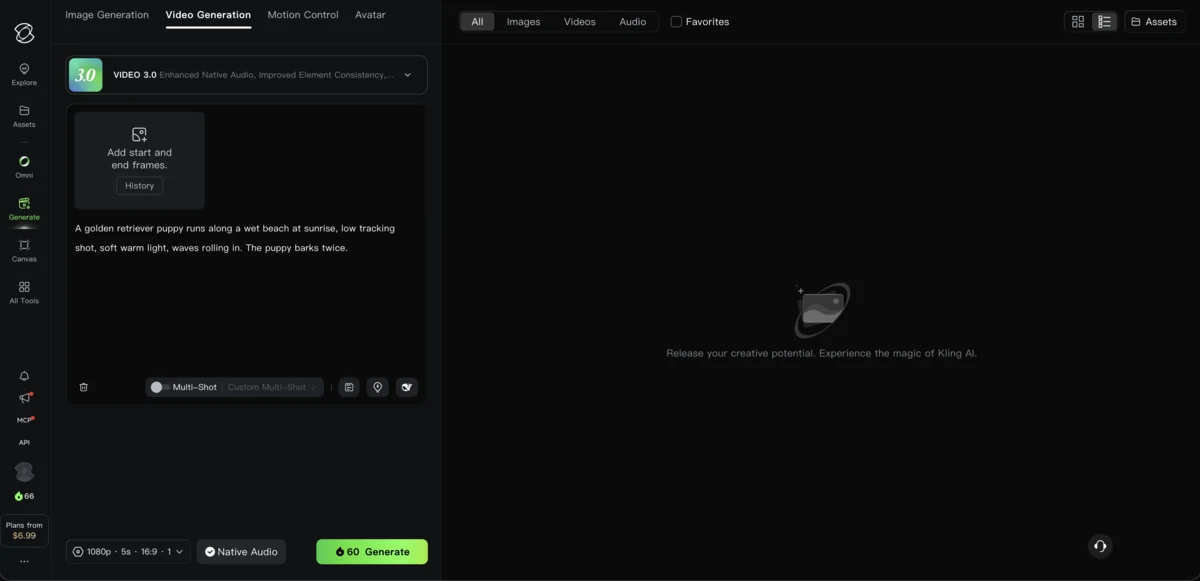
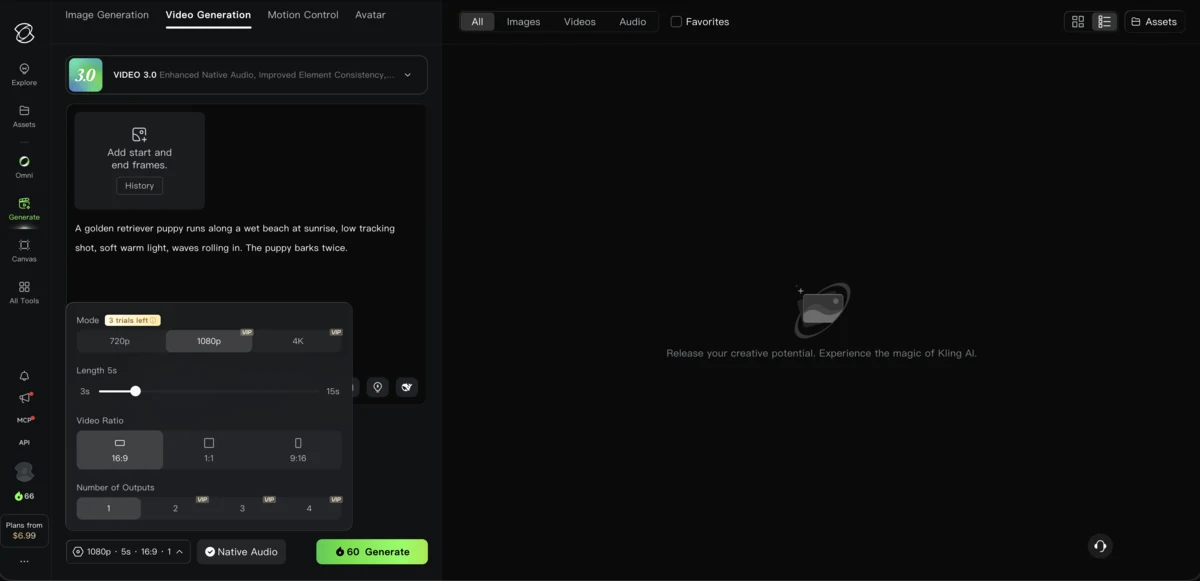
Choose quality level, duration, and aspect ratio
Pick from Kling 3.0 (flagship), 3.0 Turbo (faster), 3.0 Omni (reference-based and editing), or the older 2.6. On VIDEO 3.0 the length slider runs from 3 to 15 seconds, in 16:9, 9:16 or 1:1. Free accounts render at 720p; 1080p and 4K are paid modes, with a few trial runs on a free account.
Add voiceover, sound effects, or ambient audio
Kling 3.0 generates synchronized audio automatically, with dialogue in five languages. Specify voice characteristics and ambient sounds in your prompt.
Kling creates your complete video
Your video is generated with perfectly synchronized audio - no manual timing adjustments needed.
Any photo or AI-generated image works
High-quality images with clear subjects produce the best animations.
Explain how you want the image to animate
Use motion keywords like “slowly,” “smoothly,” or “dynamically” for better results.
Watch your static image come to life
Kling adds natural motion while maintaining the original style and quality.
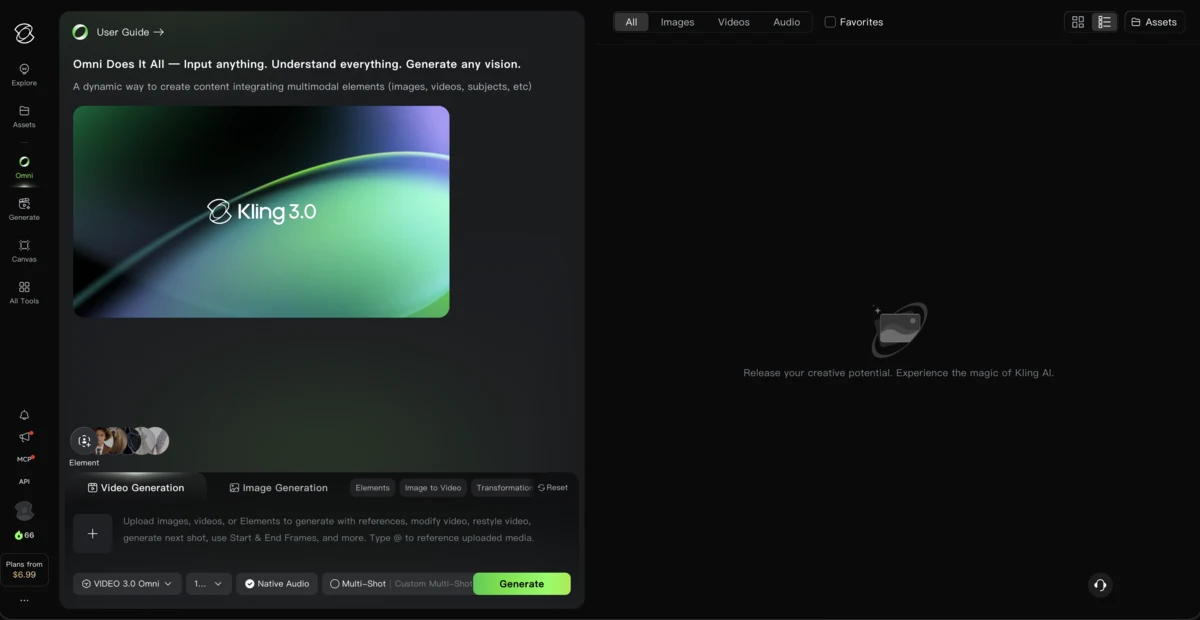
Kling AI’s video generator handles everything from simultaneous audio-visual creation to natural language editing and physics-based motion control. The 3.0 Omni model unifies these capabilities in one engine — up to native 4K output, character consistency, inpainting, and style transformation included. Audio generation spans speech, singing, sound effects, and ambient tracks.
Generate video with speech, narration, singing, sound effects, and ambient audio in one pass
One engine for text-to-video, image-to-video, editing, style transfer, and shot extension
Edit videos by describing changes: 'Remove the person' or 'Change lighting to sunset'
Precise camera paths, subject motion, physics simulation, and motion transfer
Audio Types Supported: Speech, character dialogue, narration, singing, sound effects (impacts, interactions), and ambient audio (environment, atmosphere). Kling 3.0 speaks five languages — English (with American, British, and Indian accents), Chinese, Japanese, Korean, and Spanish — and each character in a scene can use a different one.
Upload 4 reference images to maintain character appearance across multiple shots
Up to native 4K on paid plans, videos up to 3 minutes, multiple aspect ratios
Remove objects or change elements using text commands
Change the visual style of existing footage to match any aesthetic
Generate video and synchronized audio in a single pass. Create complete videos in minutes.
Start Creating with Kling AI Free →Kling AI runs on credits with introductory pricing for the first month. Standard starts at $6.99 for month one, then renews at $8.80/month (660 credits). Pro is $25.99 intro → $32.56 renewal (3,000 credits), Premier is $64.99 intro → $80.96 renewal (8,000 credits), and Ultra is $127.99 intro → $159.99 renewal (26,000 credits). Annual billing avoids the renewal jump entirely — flat 34% off list price. The free Basic plan gives 66 credits a month, claimed when you log in and valid for 31 days. That covers two 5-second clips at 720p, or one with native audio. Free output is watermarked and non-commercial, 1080p and 4K are paid modes, and at busy hours Kling can stop free accounts from submitting new jobs.
| Plan | Yearly (per mo) | Monthly (after intro) |
|---|---|---|
| Basic | Yearly $0 | Monthly $0 |
| ||
| Standard | Yearly $6.60/mo | Monthly $8.80/mo |
| ||
| Recommended Pro | Yearly $24.42/mo | Monthly $32.56/mo |
| ||
| Premier | Yearly $60.72/mo | Monthly $80.96/mo |
| ||
| Ultra | Yearly $119.17/mo | Monthly $159.99/mo |
| ||
Credits depend on the model, resolution, length and audio. This is what the VIDEO 3.0 Generate button showed for a 5-second clip with one output in September 2026:
| VIDEO 3.0, 5 seconds | Without audio | With native audio |
|---|---|---|
| 720p | 30 credits | 45 credits |
| 1080p (paid plans) | 40 credits | 60 credits |
Best Value: The Pro plan ($25.99 first month, then $32.56, or $24.42/month on annual billing) offers the sweet spot of features and credits. You get fast-track generation and 3,000 credits, which covers about 50 five-second 1080p clips with audio, or 75 without.
Kling’s models are also available pay-as-you-go inside Upsampler, where Kling 2.5 Pro was the only one of eight models to output full 1920x1080 in my Upsampler AI video generator review. It is worth a look if you want Kling for occasional clips without a subscription.
I’ve spent a lot of time with Kling AI, and simultaneous audio-visual generation is still the standout, though no longer exclusive: Sora 2 and Google’s Veo 3 generate native audio too. What keeps Kling competitive is the $8.80/month price ($6.60 annual) and the unified 3.0 Omni model. The downsides: audio capped at five languages, monthly credit expiration, no refunds for failed generations, and inconsistent support.
Kling AI fits social media creators, marketing teams, e-commerce brands, and educators who want complete videos with audio out of the box — no post-production needed. It’s a weaker pick if you need audio beyond the five supported languages, can’t tolerate unpredictable render times, or demand the highest possible visual quality.
Complete videos with audio for TikTok, Reels, and Shorts without post-production
Product videos, ads, and promotional content with professional quality
Product showcase videos at scale with consistent quality and style
Explainer videos with voiceover without recording equipment
Also great for content repurposers turning blog posts into videos with narration, and music video creators generating visuals synchronized with audio. If you’re new to AI avatars, the guide to creating AI avatar videos covers the fundamentals.
| Use Case | Why Kling Isn't the Best Fit |
|---|---|
| Audio beyond five languages | Voice generation covers English, Chinese, Japanese, Korean, and Spanish only |
| Support-dependent workflows | Customer support responsiveness is limited |
| Strict deadlines | Queue times can be unpredictable during peak hours |
| Refund expectations | No refund policy for credit usage on failed generations |
| Long-form video | Best suited for short-form content (up to 3 minutes) |
Creators and businesses reach for Kling AI mostly for social media clips, e-learning videos, and e-commerce product demos. The numbers speak for themselves: social media agencies report cutting production time by 75% and slashing costs from $500/month to $26/month after dropping separate voiceover tools.
| Use Case | What They Did | Results |
|---|---|---|
| Social Media Agency | 50+ videos/week with audio generation, eliminated voiceover sessions | 75% time reduction, $500→$26/mo in costs |
| E-Learning Creator | Animated explainers with character consistency and natural language edits | 20 lesson videos in one weekend |
| E-Commerce Brand | 100+ product videos from images with ambient audio and sound effects | $10,000 estimated savings |
Kling AI built its name on generating video and audio in one pass. It no longer stands alone (Sora 2 and Google’s Veo 3 produce native audio too), but Runway and Pika Labs still lean on separate audio tools, and Kling remains the cheapest audio-native platform at $8.80/month (after intro) versus Sora at $20. Runway starts at $12 and Pika at $8, both without built-in sound. The unified 3.0 Omni model and natural language editing are still Kling exclusives.
| Feature | Kling AI | Runway | Sora 2 | Pika Labs |
|---|---|---|---|---|
| Text-to-Video | Yes | Yes | Yes | Yes |
| Image-to-Video | Yes | Yes | Yes | Yes |
| Simultaneous Audio | Yes | No | Yes | No |
| Natural Language Edit | Yes | Limited | Limited | No |
| Unified Model | ✅ 3.0 Omni | No | No | No |
| Character Consistency | Yes | Varies | Yes | Limited |
| Starting Price | $8.80/mo | $12/mo | $20/mo | $8/mo |
Key Differentiator: Kling pairs audio-native generation with the lowest price among platforms that offer it, and 3.0 Omni covers generation, editing, and style transfer under one subscription. For voice customization beyond Kling’s built-in options, tools like ElevenLabs remain popular. For a detailed ranking, see the best AI video generators comparison.
Important Note: While Kling excels at integrated audio, competitors like Sora 2 and Veo 3 may offer superior visual fidelity for certain use cases. Consider what matters most for your projects.
The difference between mediocre and impressive Kling AI output comes down to prompt specificity, credit strategy, and audio direction. Test prompts on 5-second 720p clips first (30 credits each). Once a prompt works, move up to 1080p, audio or longer clips.
If you’re still working out where AI video fits in your process, the how to make AI videos guide covers the full workflow from prompt to published video.
Write effective prompts for better output
Get the most value from your plan
Maximize the unique audio capabilities
Join thousands of creators using Kling AI for complete video production. Start with the free tier.
Get Started with Kling AI →Yes, with limits. Free accounts get 66 credits a month, claimed at login and valid for 31 days: enough for two 5-second 720p clips, or one with native audio. Free output is watermarked, non-commercial and capped at 720p, and the free queue can refuse jobs at busy hours. Paid plans start at $6.99 for the first month (Standard, 660 credits), then renew at $8.80/month; annual billing works out to $6.60/month.
Kling's simultaneous audio-visual generation creates perfectly synchronized sound without manual timing adjustments. While dedicated voice tools like ElevenLabs offer more voice customization, Kling's integrated approach saves significant time for most use cases.
Kling 3.0 generates native audio in five languages: English (with American, British, and Indian accents), Chinese, Japanese, Korean, and Spanish. Each character in a scene can speak a different language with synchronized lip movement. Other languages still require external voice tools in post-production.
Yes, all paid plans (Standard and above) include commercial use rights. The free Basic plan restricts generated content to non-commercial use only.
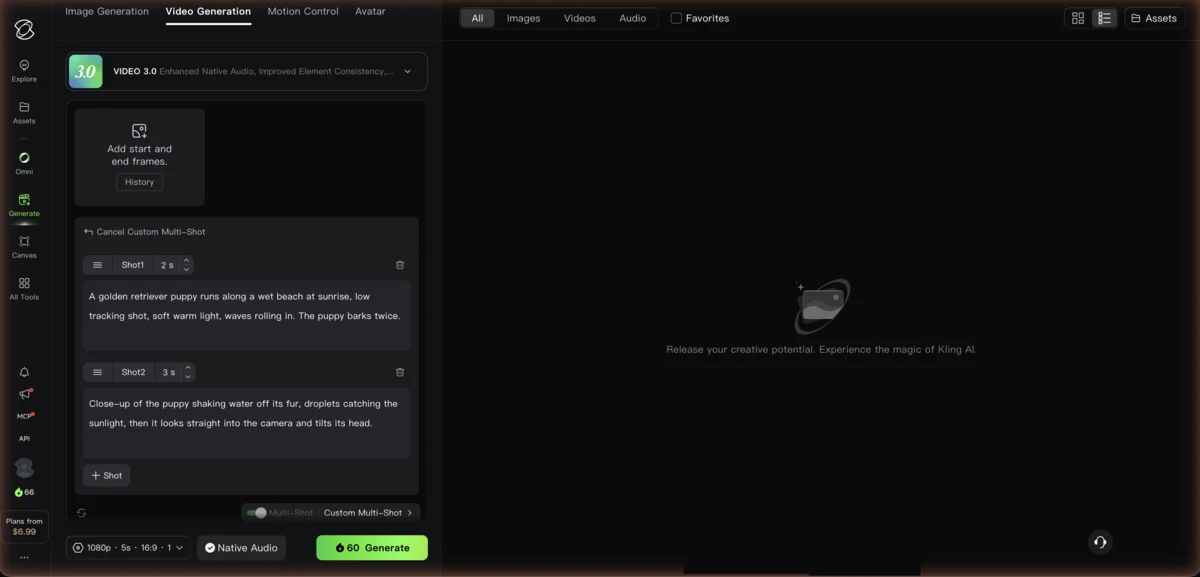
On VIDEO 3.0 each generation runs anywhere from 3 to 15 seconds, and multi-shot storyboarding splits that length into several shots. With the video extension feature on paid plans, you can chain segments into videos up to 3 minutes. Paid plans output up to native 4K.
Kling 3.0 Omni is the unified multimodal model in the Kling 3.0 series. It combines text-to-video, image-to-video, video editing, style transfer, and reference-based generation in a single engine, and it succeeded Kling O1, which pioneered the unified approach. The 3.0 series rolled out in early 2026; 3.0 Turbo and upgraded Omni editing followed in June 2026.
Kling 2.6, the late-2025 generation I originally tested, introduced one-pass audio-video generation and remains available — its voice-control feature is free on paid plans. Kling 3.0, the current flagship series, adds multi-shot storyboarding (up to 6 shots in a 15-second clip), audio in five languages, an AI Director mode, stronger prompt adherence, and, since April 2026, native 4K video output.
No. Subscription credits are valid for 31 days from the day they are issued and do not roll over. Credits you buy separately stay valid for 2 years from the purchase date.
All four generate solid AI video; the differences sit in audio and price. Kling and Sora 2 generate synchronized audio natively, while Runway and Pika Labs need separate audio tools. Kling's unified 3.0 Omni model also covers editing and style transfer in one engine. On price, Kling runs $8.80/month (after intro) vs Sora's $20/month, Runway's $12/month, and Pika Labs' $8/month — and Sora 2 may offer superior visual quality for certain prompts.
Kling AI supports both English and Chinese prompts equally. There is no documented performance difference between the two languages. Success depends on using cinematic terminology, explicit motion descriptions, and clear structural organization — regardless of language. For prompts, use a structure like: [shot type] of [subject] [action], [setting], [camera movement], [lighting], [style].
A 5-second video typically takes 30 seconds to 1 minute. A 10-second video takes 1-2 minutes. During peak usage hours, generation times can stretch to 7-12 minutes, though paid subscribers get priority queue access. Individual clips run up to 15 seconds on Kling 3.0, and the Extend feature lets you chain segments into videos up to 2-3 minutes total.
Yes. Kling generates voice audio and video together in a single pass, with native speech in English, Chinese, Japanese, Korean, and Spanish. For other languages, you would need to add voiceovers in post-production using a dedicated tool like ElevenLabs or Murf AI.
The official Kling AI platform (kling.ai) is legitimate and developed by Kuaishou Technology, a publicly traded Chinese company with over 700 million users. The platform itself is safe to use. However, be cautious of fake Kling AI websites and 'mod APK' downloads circulating online, which have been used to distribute malware. Always access Kling through its official website or app stores. Some users on Trustpilot have reported billing concerns around recurring charges, so review your subscription settings carefully.
Kling AI is worth it if you need video with synchronized audio in a single generation. At $8.80/month after the intro period (or $6.60/month annual), it's the cheapest of the audio-native platforms, and the 3.0 series added native 4K without a price increase. The free plan's 66 monthly credits are enough to try it on a couple of short 720p clips. It's less ideal if you need audio beyond the five supported languages, require guaranteed generation times, or want the absolute highest visual fidelity — Sora 2 or Veo 3 may suit those needs better.
Kling AI pairs strong video generation with synchronized audio in the same pass, and the 3.0 era added native 4K, five-language audio, and multi-shot storyboarding without raising prices.
Strengths: Integrated one-pass audio generation, unified 3.0 Omni model, natural language editing, competitive pricing, commercial use rights, regular model updates.
Weaknesses: Audio capped at five languages, inconsistent customer support, no refunds for failed generations, monthly credit expiration, queue times during peak hours.
 Featured 7 min read
 Kling AI 3.0 adds native multilingual audio, multi-shot storyboarding, and AI Director mode. Four new models generate 15-second cinematic clips.
Read Article → 6 min read
 Kling AI adds native 4K video generation to its 3.0 series, rendering 3840x2160 frames directly without upscaling. Includes $25K short film contest.
Read Article → 21 min read
 InVideo, Synthesia, Synthesys, Fliki and Runway compared on output, pricing and free tiers. Every free option carries a watermark or a usage cap.
Read Article → 15 min read
 Create AI avatar videos with Synthesia and Synthesys: scripting, avatar selection, voice setup, and export tips for business, training, and YouTube.
Read Article →