
Higgsfield AI Review 2026: Free Plan and Ultra Tested
Higgsfield AI review: on the Ultra plan, I ran the same prompts on Kling 3.0, Seedance 2.5 and Veo 3.1 and priced every clip in credits and cents.
Read Article →
Higgsfield vs Kling AI comes down to whether you want Kling on its own or Kling plus everything else. For Kling alone, get it from Kling. Its own app costs less to start, gives you 66 free credits a month, and since October 15 it has Kling 4.0, which Higgsfield doesn’t. For Kling 3.0 next to Seedance, Veo and MiniMax on one bill, it’s Higgsfield. I tried the same prompt on both, and only one of them ran it.
Kling AI is cheaper to start, at $6.99 for the first month and $8.80 after, and of the two it’s the only one with Kling 4.0. Higgsfield starts at $19, but you need Plus at $59 for every model, and what that buys you is Kling 3.0 next to Seedance 2.5, Veo 3.1 and more on one credit balance. Both show you what a clip costs before you run it.
| Tool | Best For | Price | Rating | Key Feature |
|---|---|---|---|---|
| Creators who want many video models on one bill | $19/mo (Starter) or $59/mo for all models | Kling 3.0, Seedance 2.5, Veo 3.1 and more on one credit balance | ||
| Best Value Kling AI | Anyone who wants Kling itself, including Kling 4.0 | $6.99 (first month) or $8.80/mo | Kling 4.0 with native stereo audio, from the free plan up |
The free plan covers Soul 2.0 images and one camera-move effect. Video starts on Starter at $19 a month.
A free account gets 66 credits a month, enough for one 5-second Kling 4.0 clip at 720p.
Higgsfield is an image and video app that puts its own models next to Kling, Seedance, Veo and MiniMax, and you pay for all of them from one credit balance. Its own models are the Soul image line and Genjutsu for video, and there’s a set of camera-move Effects on top. The company raised a $400 million Series B in August 2026 at a $5.4 billion valuation. My full Higgsfield review covers everything I tested on it.
The main reason to use Higgsfield is one balance for a lot of models. Kling 3.0, Seedance 2.5, Veo 3.1 and MiniMax H3 all spend the same credits, so trying a shot on a different model doesn’t mean another app or another subscription. On Ultra, a 5-second 720p clip is 10 credits on Kling 3.0 and 35 on Seedance 2.5, and an 8-second Veo 3.1 clip is 80.
You see what a job costs before you run it, and when a model refuses a prompt, the credits come back on their own. That takes some of the sting out of trying the pricier models.
It’s built for volume, too. Plus runs 6 jobs at a time and Ultra 8, and Ultra’s 3,000 monthly credits can be raised to 6,000 or 9,000, at the lowest cost per credit of any plan. You can use what you make commercially on every plan, free included.
Images are cheap. Soul 2.0, Higgsfield’s own image model, costs an eighth of a credit per image, and a Nano Banana Pro image is 2 credits.
Then there are the tools Kling’s app doesn’t have. Genjutsu, Higgsfield’s own video model, works on a clip you already have. It can swap an object in it or transfer its motion to something else, but it can’t make a video from text. An object swap cost 42 credits and a motion transfer 35. Effects are preset camera moves, such as Earth Zoom.
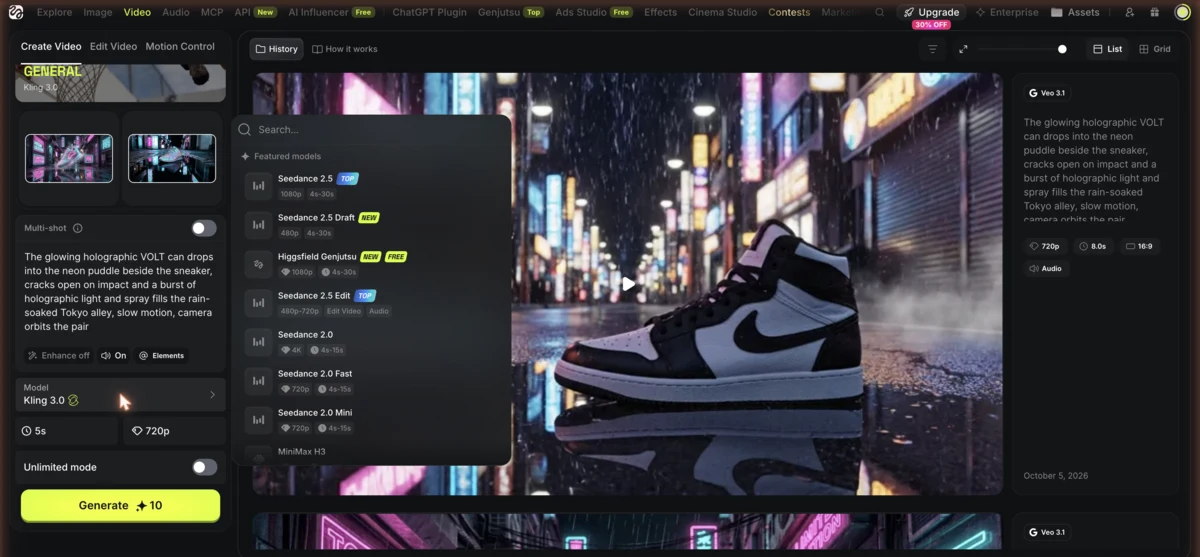
Kling 3.0, Seedance 2.5, Veo 3.1 and MiniMax H3 all spend the same credits
Every job shows its credit cost up front, and refused jobs come back as credits
Higgsfield's own image model, at an eighth of a credit per image
Swaps objects or transfers motion in a video you already have
Preset camera moves such as Earth Zoom
Ultra runs 8 jobs at a time, Plus 6 and Starter 2 video jobs
The free plan won’t get you far with video. It covers images plus one free camera-move effect, and text-to-video asks you to upgrade. Starter ($19) only runs selected models, Kling 3.0 among them, with 270 credits a month, and the full Seedance lineup starts at Plus ($59).
You can’t top up credits without a plan, either. Plan credits reset every month, so anything you don’t spend is gone, and top-up credits last 90 days. And before you upload anything private, know that your content can be used for model training by default on every plan except Enterprise.
Unlimited mode for Kling 3.0 is a separate purchase, even on Ultra, and as of October 21 there’s no Kling 4.0 in the picker at all. Refunds are tight. You get 7 days from your first purchase, only if you haven’t used a single credit, and minus a fee of up to 6%. Renewals aren’t refundable, so make up your mind in the first week.
Best For: Short-form creators who want Kling 3.0, Seedance, Veo and MiniMax on one bill and are ready to pay for Plus.
Kling AI is the video platform from Kuaishou Technology, a Chinese company with over 700 million users on its short-video apps. The current lineup is Kling 4.0, Kling 3.0, 3.0 Omni and 3.0 Turbo, plus Motion Control. Kling 3.0 renders native 4K on paid plans, while 4K and 10-bit HDR on Kling 4.0 are still marked as coming soon. My Kling AI review goes deeper, and my how to use Kling AI tutorial walks you through the app.
Kling 4.0 is the reason to look at Kling’s app right now. It launched on October 15 and makes clips from 3 to 30 seconds in one generation. You can give it up to 10 keyframes and up to 15 references, mixing images, video, subjects and voices, and it generates stereo audio with the clip. It also does 21:9 ultrawide.
And it isn’t locked behind a top plan. Kling 4.0 is on the free plan, so you can try the newest model before you pay anything, as long as one short clip is enough. Paid plans get four outputs per generation instead of one, and Pro and higher take 10% off Kling 4.0.
The price shows on the Generate button before you commit, so there’s no guessing what a clip will cost. Standard, the cheapest paid plan, gets you 660 credits a month, 1080p and 4K, no watermark and commercial use.
Kling 3.0 is still there, and it’s still useful. A 5-second clip costs 30 credits at 720p and 40 at 1080p, or 45 and 60 with native audio. Multi-shot storyboarding splits one generation into up to 6 shots, 3.0 Omni handles reference-based generation and editing, and native audio works in five languages (English, Chinese, Japanese, Korean and Spanish).
Clips from 3 to 30 seconds in one generation, 21:9 ultrawide included
Up to 10 keyframes and up to 15 references: images, video, subjects and voices
Kling 4.0 generates the clip with stereo sound
Kling 3.0 renders native 4K on paid plans
Kling 3.0 splits one generation into up to 6 shots
Motion Control, plus 3.0 Omni for reference-based generation and editing
The free plan is real, but small. You get 66 credits a month, claimed when you log in and valid for 31 days, and every free clip is 720p, watermarked and not for commercial use, with one output per generation. At busy hours, the free queue can turn you away altogether, which gets old fast.
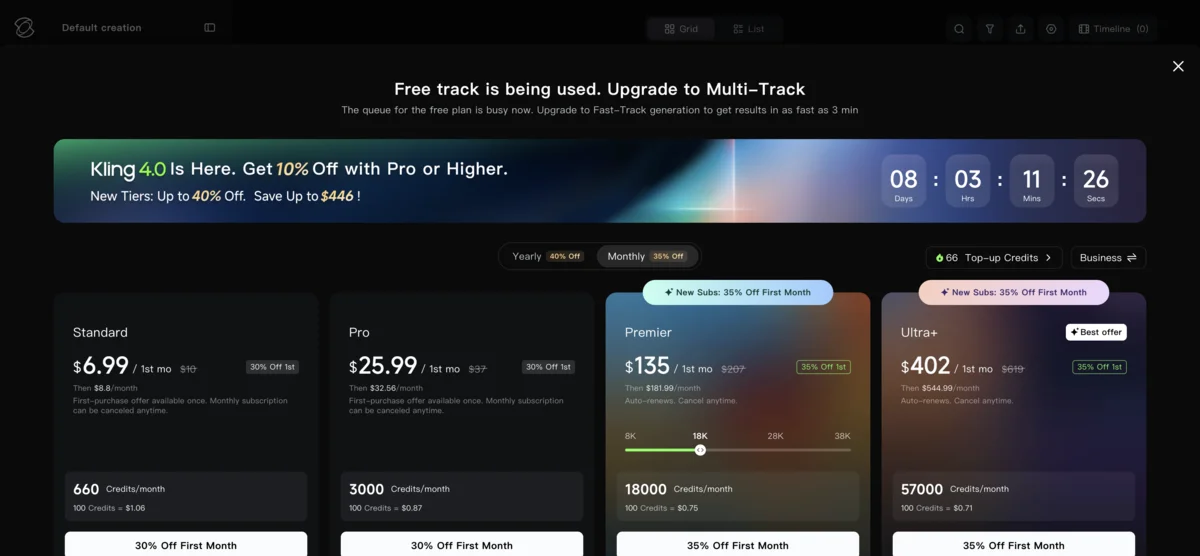
Failed generations aren’t refunded on consumer plans, so a job that breaks still costs you. Plan credits expire every month, though credits you buy separately last two years.
Every plan renews at a higher price than the first month. Standard goes from $6.99 to $8.80, and Pro from $25.99 to $32.56. Native audio only covers five languages, and Kling 4.0 Flash is early access for Ultra+ subscribers on yearly billing only.
Best For: Anyone who wants Kling itself, including Kling 4.0, at the lowest price, starting from a free plan.
In early October I was on Higgsfield’s Ultra plan, and I ran one prompt on Kling 3.0 at 720p and 5 seconds, with audio on and the prompt enhancer off: “A cyclist rides through a deep puddle on a cobbled street at golden hour, water spraying from the front wheel, low tracking shot”. It cost 10 credits, about 43 cents at Ultra’s monthly price.
The first take gave me a convincing splash and a proper low tracking shot. That’s the kind of physics test I’d expect a 2026 model to pass, and it passed.
I learned two more things about Kling 3.0 on Higgsfield in that session. It printed MORINNG when I asked for a cup that says MORNING, and it had an old fisherman say “The tide waits for no one” clearly enough that a transcription tool caught every word. The grids for both are in my Higgsfield review.
On October 21 I opened Kling’s own app on a free account with this month’s 66 credits. Kling 4.0 was already the default model, and a 5-second clip at 720p came to 50 credits. At 1080p it would have been 75, and 10 seconds at 1080p 150, so the free grant buys exactly one short 4.0 clip. Putting the newest model on the free plan is generous, even if it’s one clip a month. On a paid Standard plan, that 50-credit clip comes to about 67 cents.
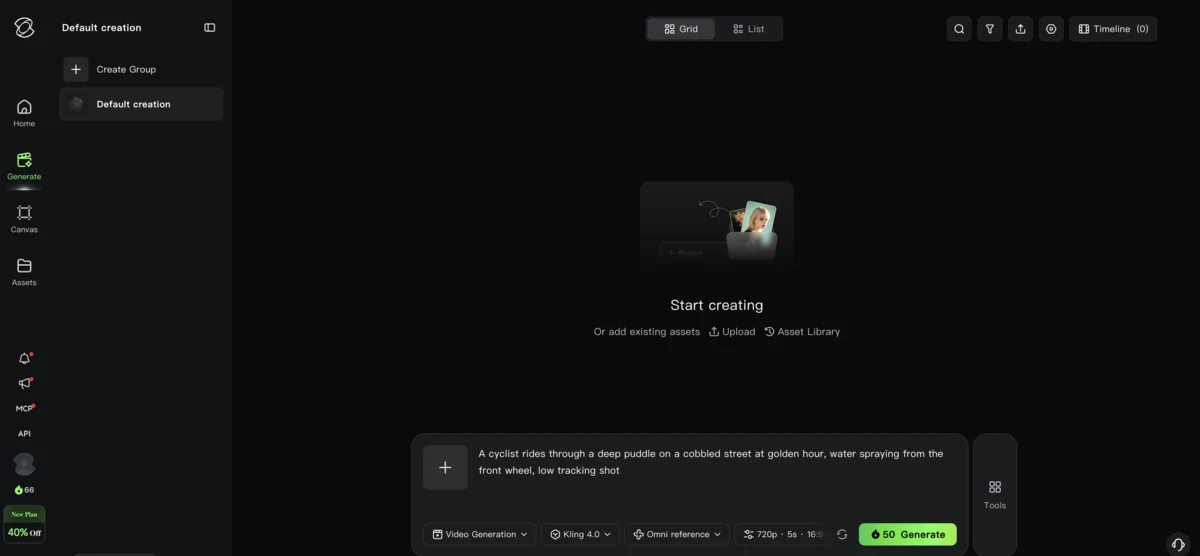
I hit Generate around lunchtime, Poland time, and the free queue turned me away. Free users can’t start new jobs while the system is busy, so it was off-peak or upgrade. I tried again an hour later and got the same screen.
That makes three days since mid-September, September 16, October 7 and now October 21, on which Kling’s free queue has refused every job I sent it, all between late morning and mid-afternoon Poland time. I have never had a free Kling job go through. If you want to try Kling 4.0 without paying, try late in the evening, and if that fails too, the $6.99 first month of Standard is the realistic way in.
So this is half a test: Kling 3.0 made inside Higgsfield, priced and shown, against a Kling 4.0 job that Kling’s free plan priced but wouldn’t run. The same Kling 3.0 is in Kling’s app too, so what the clip shows is the model, not Higgsfield’s rendering of it.
No. As of October 21, Higgsfield’s picker has Kling 3.0, 3.0 Turbo, 3.0 Omni, 2.5, 2.6 and O1. Kling 4.0 launched on October 15 and is only in Kling’s own app, free plan included, at 50 credits for a 5-second 720p clip. Higgsfield had Kling 3.0 soon after that model came out, so check the picker before you decide, but don’t buy a plan for a model that isn’t there yet.
A 5-second 720p Kling 3.0 clip with audio costs about 43 cents on Higgsfield’s Ultra plan and about 60 cents on Kling’s Standard plan. Kling 4.0, only in Kling’s app, is about 67 cents on Standard. The two apps’ credits aren’t worth the same, so after the price lists, the table turns each clip into cents.
| Plan | Annual (per month) | Monthly |
|---|---|---|
| Free | Annual (per month) $0 | Monthly $0 |
| ||
| Starter | Annual (per month) $19/mo | Monthly $19/mo |
| ||
| Recommended | Annual (per month) $47/mo billed annually | Monthly $59/mo |
| ||
| Annual (per month) $99/mo billed annually | Monthly $129/mo | |
| ||
Teams starts at $65 per seat a month, billed annually, and all of Higgsfield’s prices exclude VAT.
| Plan | Annual | Monthly (after intro) |
|---|---|---|
| Basic | Annual $0 | Monthly (after intro) $0 |
| ||
| Recommended | Annual $6.60/mo billed annually | Monthly (after intro) $6.99 first month, then $8.80/mo |
| ||
| Annual $24.42/mo billed annually | Monthly (after intro) $25.99 first month, then $32.56/mo | |
| ||
| Annual $1,490 first year, then $1,639.99/yr | Monthly (after intro) $135 first month, then $181.99/mo | |
| ||
| Ultra+ | Annual $4,457 first year, then $4,902.99/yr | Monthly (after intro) $402 first month, then $544.99/mo |
| ||
Kling has reshuffled its top plans since September. Premier now carries 18,000 credits at $181.99 a month after the first month, and Ultra+ 57,000 at $544.99, while Standard and Pro stayed at $8.80 and $32.56. Paid yearly, Standard comes to $79.20 and Pro to $293.04.
Higgsfield credits valued at the monthly Ultra price ($129 for 3,000), Kling credits at the Standard renewal price ($8.80 for 660). Paying yearly takes both down by about a quarter.
| Clip | Higgsfield (Ultra) | Kling's app (Standard) |
|---|---|---|
| Kling 3.0, 5 s, 720p, with audio | 10 credits, about $0.43 | 45 credits, about $0.60 |
| Kling 3.0, 5 s, 720p, no audio | Not checked (my quote had audio on) | 30 credits, about $0.40 |
| Kling 3.0, 5 s, 4K | 30 credits, about $1.29 | Paid plans only; price not checked |
| Kling 4.0, 5 s, 720p | Not available | 50 credits, about $0.67 |
| Kling 4.0, 10 s, 1080p | Not available | 150 credits, about $2.00 |
A Higgsfield credit is worth far more than a Kling credit, about 4.3 cents on monthly Ultra against about 1.3 cents on Kling’s Standard plan, so ignore the credit counts and read the cents. With audio on, Kling 3.0 is cheaper on Higgsfield: about 43 cents against about 60 in Kling’s app. Turn audio off and Kling’s own price drops to about 40 cents. My 10-credit Higgsfield quote was with audio on, and I didn’t check the price without it.
Those Higgsfield numbers are Ultra’s, and the credit quote changes with the plan. On the free plan, an 8-second 720p Kling 3.0 clip was quoted at about 14 credits. Kling 4.0 is where the comparison stops, because Higgsfield doesn’t sell it. In Kling’s app a 5-second 720p clip is about 67 cents, or about 50 cents on the yearly rate, and 10 seconds at 1080p is about $2.
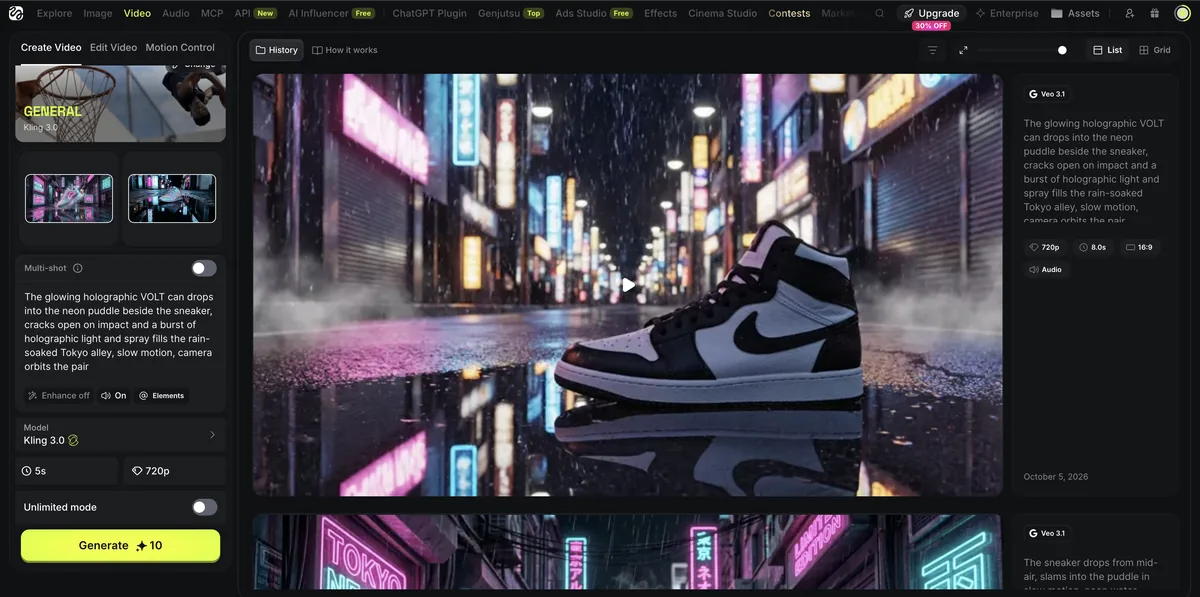
Not as part of the plan. Even on Ultra, Unlimited mode for Kling 3.0 is a separate purchase: $35 for a day, $82 for three days or $158 for seven at up to 1080p, and $110, $257 or $495 for 4K. It runs one job at a time, with clips up to 15 seconds. Plus (annual) and Ultra also include 7-day unlimited windows covering Kling 3.0, but I only tried the paid switch, so I can’t vouch for those.
Per clip, a little, but only once you’re paying a lot. Kling 3.0 was slightly cheaper on Higgsfield’s Ultra plan, about 43 cents for a 5-second clip with audio against about 60 cents on Kling’s Standard plan, or about 33 against 45 paid yearly. To get there, though, you’re paying $129 a month, or $99 paid yearly, and Kling’s $8.80 plan gets you Kling 4.0, which Higgsfield doesn’t sell at any price. If Kling is all you want, go direct. Higgsfield only pays off if you’ll use Seedance, Veo and the rest too.
Plus unlocks every model, including the full Seedance lineup, with 1,200 credits a month for $59, or $47 billed yearly.
Standard gives you 660 credits a month, 1080p and 4K with no watermark, and commercial use. It's $6.99 for the first month, then $8.80.
It mostly comes down to whether you want Kling itself or a lot of models on one bill. For Kling alone, Kling’s app is cheaper, from $6.99 for the first month, and of the two it’s the only one with Kling 4.0. For Seedance, Veo and MiniMax too, Higgsfield’s Plus plan at $59 a month puts them on one balance.
Find what you’re making first, then check the budget and habit questions below it.
Standard is $6.99 for the first month and $8.80 after, and 66 free credits a month cover a test clip before you pay
4.0 is in Kling's app from the free plan up, and it isn't on Higgsfield yet
Kling 3.0, Seedance 2.5, Veo 3.1 and MiniMax H3 from one credit balance, with the price shown before every job
Soul 2.0 images at an eighth of a credit, and Effects presets like Earth Zoom
Kling 3.0 renders native 4K on any paid Kling plan, from $8.80 a month, while 4K on Kling 4.0 is still marked as coming soon
Genjutsu swaps objects or transfers motion onto an existing video
If Kling is the model you're after, its own app wins. It's cheaper to start, the free plan actually makes video, and since October 15 it has Kling 4.0, which Higgsfield doesn't. The catches are the busy-hour refusals on the free plan and renewal prices that are higher than the first month.
Higgsfield is the pick if you want Kling 3.0 next to Seedance 2.5, Veo 3.1 and MiniMax H3 on one bill, and you're ready for Plus. Per clip, its Kling 3.0 on Ultra is a little cheaper than on Kling's own Standard plan, refused jobs come back as credits, and Genjutsu and the Effects presets are things Kling doesn't have. It comes second because the free plan barely touches video, Unlimited mode for Kling 3.0 is a separate purchase even on Ultra, and there's no Kling 4.0 yet.
Per clip, Kling 3.0 was a little cheaper on Higgsfield's Ultra plan than on Kling's own Standard plan, but Higgsfield costs more to get into. On Ultra, a 5-second 720p Kling 3.0 clip is 10 credits, about 43 cents, against 45 credits with audio, about 60 cents, on Kling's Standard plan, and the credit quote changes with the Higgsfield plan. Higgsfield's plans with every model start at $59 a month, while Kling's paid plans start at $8.80, and Kling 4.0 is only in Kling's own app. For Kling alone, go direct. Higgsfield pays off when you use Seedance, Veo and the rest as well.
No, Higgsfield doesn't have Kling 4.0 as of October 21, 2026. Its model picker has Kling 3.0, Kling 3.0 Turbo, Kling 3.0 Omni, Kling 2.5, Kling 2.6 and Kling O1. Kling 4.0 launched on October 15 in Kling's own app, and it's on the free plan too, at 50 credits for a 5-second 720p clip. Higgsfield had Kling 3.0 soon after that model came out, so check its model list before you buy a plan for 4.0.
Not in my experience on Ultra. The Unlimited mode switch for Kling 3.0 was a separate purchase even on that plan: $35 for a day, $82 for three days or $158 for seven, with one job at a time and clips up to 15 seconds. Higgsfield's plan pages also list a 7-day unlimited window that includes Kling 3.0 on Plus (annual) and Ultra. I didn't use that window, so I can't say how it runs.
Kling's own app for Kling itself, Higgsfield when Kling is one of several models you'll use. Pick Kling's own app if Kling is the model you want, and especially if you want Kling 4.0, which is only there. Kling's Standard plan is $6.99 for the first month and $8.80 after, and the free plan's 66 monthly credits cover one short Kling 4.0 clip. Pick Higgsfield if you'll use several models, such as Seedance, Veo and MiniMax, and you're ready for the Plus plan at $59 a month.
Seedance and Kling are video models, and Higgsfield is an app that runs both, so the real choice is which model suits the shot. In my Higgsfield tests, Seedance 2.5 spelled MORNING correctly on a cup where Kling 3.0 wrote MORINNG. But Seedance 2.5 refused an old fisherman saying one line as NSFW, twice, and Kling 3.0 delivered the line. Kling 4.0 is only in Kling's own app. Pick by the shot, and see my best AI video generators ranking for more options.
Yes, Kling AI is made by Kuaishou Technology, a publicly traded Chinese company based in Beijing with over 700 million users on its short-video apps. The official site is kling.ai, and fake download sites exist, so make sure that's the one you use. Paid plans allow commercial use of your outputs. Free clips are 720p, watermarked and for non-commercial use only.
It depends on what you make. If you want the newest Kling, Kling 4.0 in Kling's own app is the one to try. If you want many models on one bill, Higgsfield runs Kling 3.0, Seedance 2.5, Veo 3.1 and MiniMax H3 from one credit balance. If you want a finished video from a prompt, look at InVideo, which I compare with Kling in Kling AI vs InVideo, and my best AI video generators ranking has more options.
 Featured 20 min read
 Higgsfield AI review: on the Ultra plan, I ran the same prompts on Kling 3.0, Seedance 2.5 and Veo 3.1 and priced every clip in credits and cents.
Read Article → 15 min read
 Kling 3.0 makes video and audio in one pass. Free accounts get 66 credits a month; paid plans run $6.99 the first month, then $8.80/mo ($6.60 annual).
Read Article → 11 min read
 How to use Kling AI 3.0 step by step: write a prompt, set 720p or 1080p, add a start frame, try Motion Control, and stretch 66 free credits a month.
Read Article →