
Best AI Video Generators 2026: Top 5 Compared
InVideo, Synthesia, Synthesys, Fliki and Runway compared on output, pricing and free tiers. Every free option carries a watermark or a usage cap.
Read Article →
Kling AI vs InVideo comes down to raw cinematic clips versus finished videos. Kling AI makes short clips you edit yourself, from $6.99 for the first month and $8.80/month after that. InVideo builds the whole video for you (script, voiceover, footage and edit) from $20/month, and it runs Kling 3.0 in its own model library next to VEO 3.1 and Seedance. Pick Kling if you want control over every shot. Pick InVideo if you want a video you can publish from a single prompt.
Kling AI is cheaper to start ($6.99 for the first month) and gives you raw cinematic clips to cut together yourself. InVideo starts at $20/month and hands you a finished video from one prompt. If you already edit in Premiere, DaVinci or CapCut, I’d start with Kling. If you want something you can publish without opening an editor, InVideo is the better fit.
| Tool | Best For | Price | Rating | Key Feature |
|---|---|---|---|---|
| Best Value Kling AI | Filmmakers & Creative Directors | $6.99 (first month) or $8.80/mo | Native 4K cinematic clips with synchronized audio | |
| Top Rated InVideo | YouTube & Social Media Creators | $20/mo (Starter) or $20/mo | Agent Two builds the whole video from one prompt |
A free Kling account gets 66 credits a month, enough for about two 720p test clips.
Watch Agent Two plan and voice a video. A free account gets 10 credits a week.
Kling AI is made by Kuaishou Technology. The newest model is Kling 4.0, which launched in Kling’s own app on October 15, 2026, with Kling 3.0, the faster 3.0 Turbo and the 3.0 Omni model next to it, plus Motion Control and native 4K output. For a deeper look, see my Kling AI review. And if the alternative you’re weighing is Kling inside Higgsfield rather than InVideo, my Higgsfield vs Kling AI comparison covers that choice.
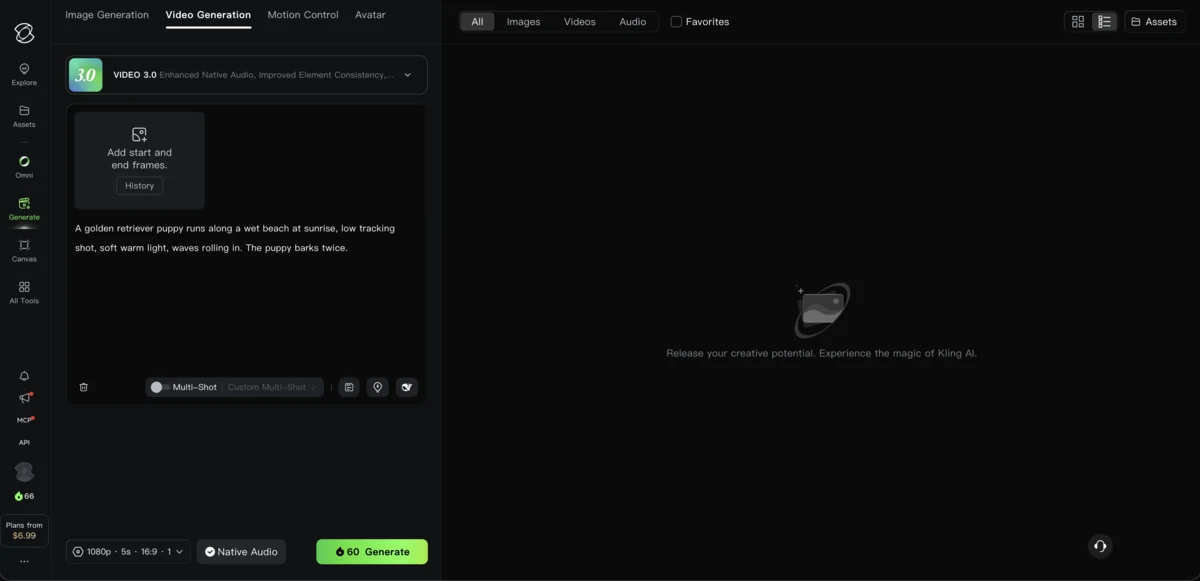
Multi-shot storyboarding is the feature I’d pick Kling for. You split one generation into up to six shots, each with its own prompt, camera move and length, and the model keeps the characters, lighting and setting the same across the cuts. Getting separate clips to cut together used to take a lot of trial and error.
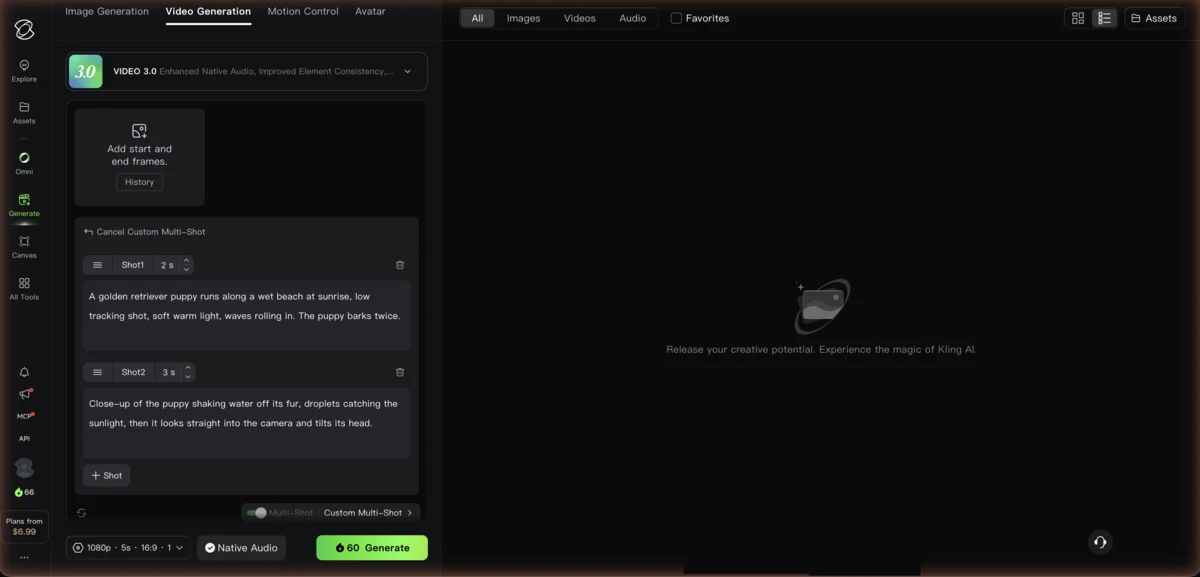
Native audio is the other big difference. Kling 3.0 makes lip-synced dialogue, ambient sound and background audio together with the video. It isn’t broadcast quality yet, but it’s good enough for rough cuts and social posts, and you don’t need a separate audio tool.
You always know the price before you generate. A 5-second clip on Kling VIDEO 3.0 costs 30 credits at 720p and 40 at 1080p, or 45 and 60 with native audio, and clips run from 3 to 15 seconds. Kling 4.0 costs more, 50 credits for 5 seconds at 720p and 75 at 1080p, and runs up to 30 seconds.
Renders at 3840x2160 natively instead of upscaling
Up to 6 shots per generation, with the same characters, lighting and setting
Lip-synced dialogue, ambient sound and effects generated with the video
Animate a still image with the movement from a reference video
A faster, cheaper version of Kling 3.0 with audio included
Kling 4.0, Kling 3.0, 3.0 Turbo and 3.0 Omni, plus Motion Control
Kling gives you raw footage. There’s no script writing, voiceover, music library, stock footage or post-production, so you need your own editor to turn the clips into something you can publish. Each generation runs 3 to 15 seconds (you can extend a clip to roughly 3 minutes), and quality drops noticeably past 60 seconds.
Billing needs a careful look. Failed or glitched generations still use credits, consumer plans don’t refund them automatically, and monthly credits expire at the end of each billing cycle. The first month is discounted on every plan: Standard costs $6.99 and then renews at $8.80/month, Pro goes from $25.99 to $32.56, Premier from $135 to $181.99, and Ultra+ from $402 to $544.99. Check the renewal price before you subscribe.
The free plan is small. Its 66 monthly credits buy about two 5-second 720p clips, with a watermark and no commercial use, and the free queue can turn jobs away at busy hours.
Best For: Filmmakers, creative directors and social ad makers who want raw AI footage to finish in their own editor.
InVideo is a prompt-to-video platform. Its chat agent, Agent Two, plans, writes, voices and assembles the video in 50+ languages, and it replaced the earlier v4 agent. Behind it sits a model library with Seedance 2.5 and 2.0, Google VEO 3.1, Runway Gen-4.5 and others, all paid from one credit balance. InVideo runs Kling 3.0 inside its own model library, so you can use Kling’s model through an InVideo subscription, paid in InVideo credits. For the full breakdown, see my InVideo AI review.
The main reason to pick InVideo is that it does the whole job. Describe the video in plain language, and Agent Two writes the script, finds or generates the footage, adds the voiceover and music, and cuts it together. For faceless YouTube channels, that saves hours of manual production.
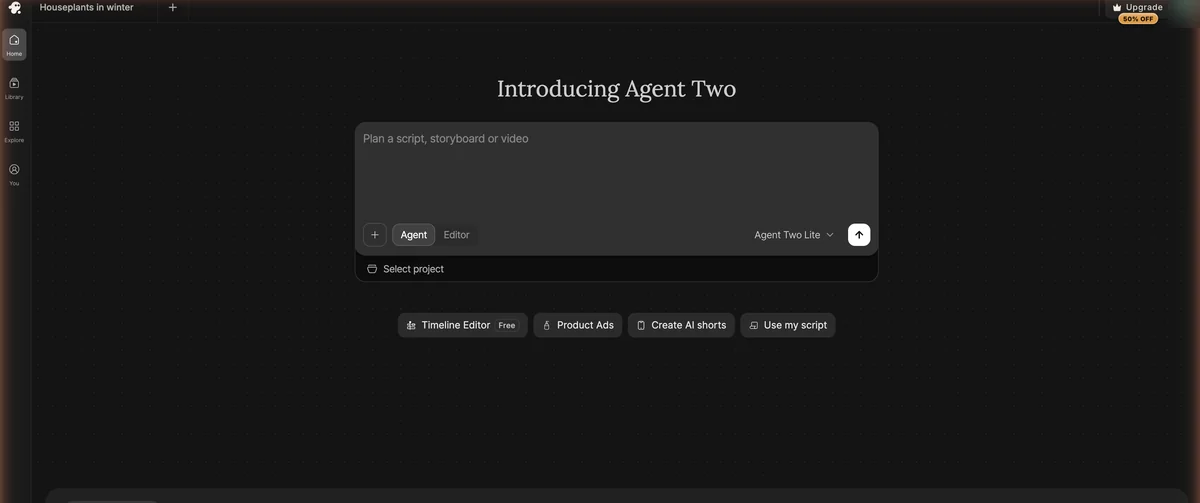
Editing works the same way. Instead of dragging clips around, you type what you want: “make the intro shorter,” “swap the background music,” or “add B-roll of city traffic.” If you’ve never learned a timeline editor, that’s a lot easier, and if you have, there’s a full timeline editor on every plan too.
Generate new footage with major video models and pay for all of them from one credit balance
Change the video by typing what you want instead of working on a timeline
A chat agent that plans, writes, voices and assembles the video in 50+ languages
A home-screen shortcut for building product ad videos
Formats for YouTube, TikTok, Instagram Reels, LinkedIn and more
ElevenLabs voices and music, plus Google Lyria 3
OpenAI closed the Sora app on April 26, 2026 and shut the Sora API on September 24, 2026, so InVideo no longer offers Sora 2. InVideo still carries VEO 3.1, Kling 3.0 and Seedance.
Credits are the biggest pain point. They’re spent the moment a generation starts, retries cost full price again, unused credits don’t roll over, and InVideo can change credit costs without notice. At about 38 credits per 5 seconds of Seedance 2.0 at 1080p, the Plus plan’s 2,000 monthly credits cover roughly four minutes of generated footage, so a long video made entirely of AI clips can use up a month in one go.
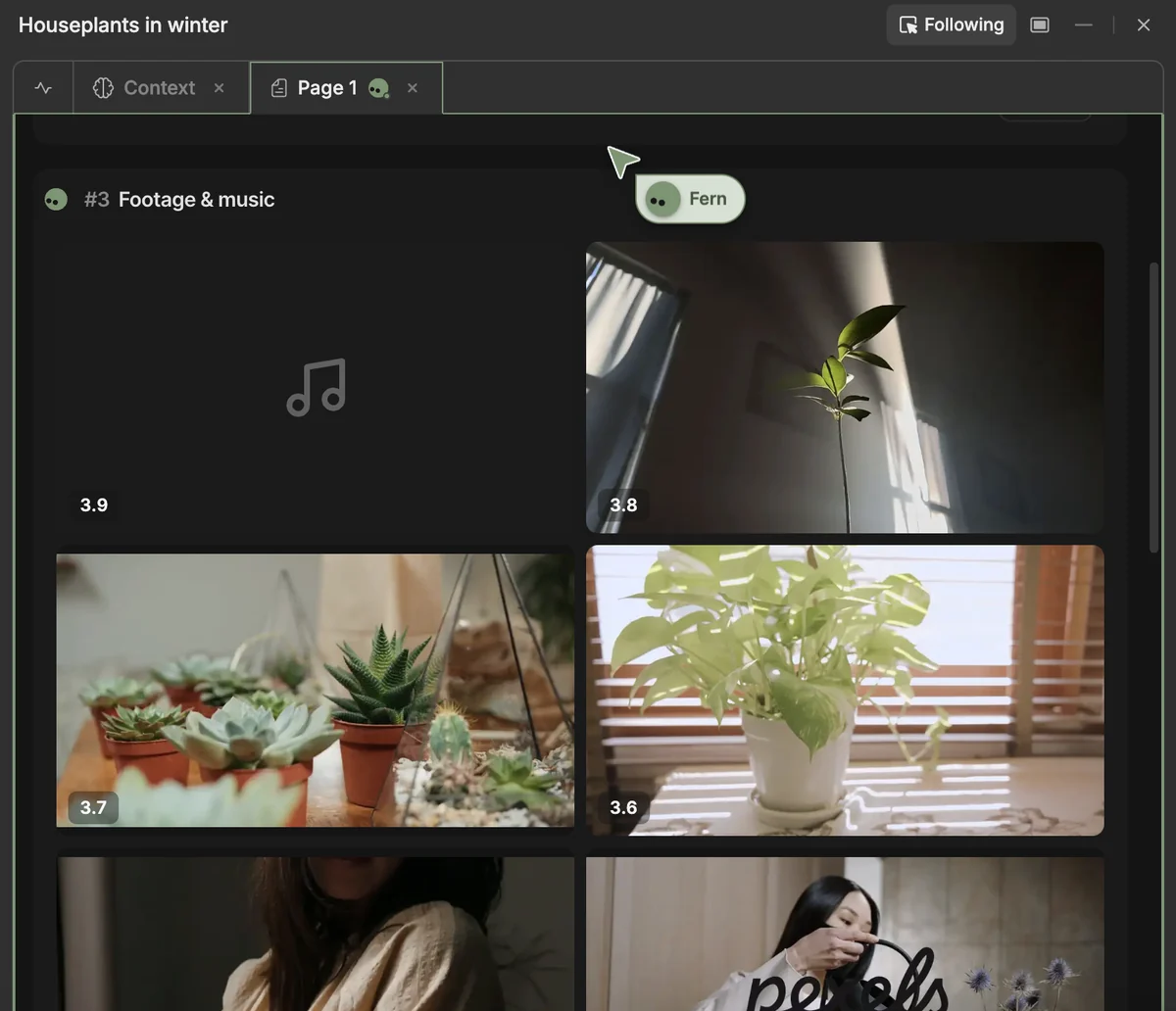
The free account won’t get you far either. I pasted a short script, about 115 words on keeping houseplants alive through winter, and asked for stock footage only, since 10 credits can’t pay for a generated clip (the cheapest Seedance one costs about 30). Agent Two recorded the narration with an ElevenLabs voice and found fitting clips for most lines, though a couple of shots of people had nothing to do with plants. Then my credits ran out before it could assemble the final cut, so I never got a finished video. That’s one script on a free account, a small test rather than a benchmark, but it means you’ll need a paid plan to judge what InVideo actually makes.
Best For: Social media marketers, faceless YouTube channels, online shops and agencies that want a finished video from a text prompt.
Both tools sell monthly credits. Kling charges by clip length, resolution and whether you want audio, while InVideo’s credits drain at a different rate for each model. Retries and failed generations cost full price on both, so budget for them.
| Plan | Annual | Monthly |
|---|---|---|
| Free | Annual $0 | Monthly $0 |
| ||
| Recommended | Annual $6.60/mo billed annually | Monthly $6.99 first month, then $8.80/mo |
| ||
| Annual $24.42/mo billed annually | Monthly $25.99 first month, then $32.56/mo | |
| ||
| Annual $1,490 first year, then $1,639.99/yr | Monthly $135 first month, then $181.99/mo | |
| ||
| Ultra+ | Annual $4,457 first year, then $4,902.99/yr | Monthly $402 first month, then $544.99/mo |
| ||
Paid yearly, Standard comes to $79.20 a year and Pro $293.04. Kling reshuffled the top two tiers in October 2026: Premier now carries 18,000 credits a month and Ultra+ 57,000, each with a cheaper first year ($1,490 and $4,457) before the regular $1,639.99 and $4,902.99.
| Plan | Annual | Monthly |
|---|---|---|
| Annual $20/mo billed annually | Monthly $20/mo | |
| ||
| Recommended | Annual $50/mo billed annually | Monthly $60/mo |
| ||
| Annual $100/mo billed annually | Monthly $150/mo ($135 first month) | |
| ||
For businesses, InVideo sells Team at $79 and Scale at $215 per seat a month, for 5 to 30 seats. There’s no free plan as such, but a free account gets 10 credits that refill every week.
Plan prices only tell you part of it. What matters is how many usable clips your credits buy, Kling doesn’t refund credits for failed generations, and in both tools every retry costs credits again.
Plan prices and credit costs as of September 2026. Kling and InVideo credits aren't worth the same, so compare what a clip costs rather than the credit totals.
| Metric | Kling AI | InVideo | Winner |
|---|---|---|---|
| Entry Price | $6.99 first month (Standard) | $20/mo (Starter) | Kling AI |
| Renewal Price | $8.80/mo, or $79.20/yr | $20/mo, monthly or yearly | Kling AI |
| Free Allowance | 66 credits a month (about 2 clips at 720p) | 10 credits a week (not enough for one Seedance clip) | Kling AI |
| Credits per Month | 660 (Standard) | 400 (Starter), 2,000 (Plus) | Depends on plan |
| Cost of a 5-Second Clip | 30 credits at 720p, 40 at 1080p (45 and 60 with audio) | About 30 to 50 credits for Seedance, on Plus and up | Depends on model |
| Resolution | 720p to native 4K | Seedance at 1080p and 4K on Plus; 4K export of your own footage on every plan | Tie |
Kling Standard’s 660 credits buy about 22 five-second 720p clips without audio, or 11 at 1080p with audio. InVideo Plus’s 2,000 credits buy about 52 five-second Seedance 2.0 clips at 1080p, and Starter can’t use Seedance at all. A retry costs the same as the first attempt on both, so expect fewer usable clips than those numbers.
66 free credits a month to test Kling 3.0. Standard is $6.99 for the first month, then $8.80.
Type a prompt, pick a model, and let Agent Two build the video. Starter costs $20 a month.
Kling is a footage generator and InVideo is a production suite, so most rows below go clearly one way or the other.
Feature comparison as of September 2026. Kling gives you more control over each clip; InVideo covers the whole production.
| Feature | Kling AI | InVideo | Winner |
|---|---|---|---|
| Text-to-Video | Yes (raw clips) | Yes (finished videos) | InVideo |
| Image-to-Video | Yes (core feature) | Yes (through Kling 3.0, Seedance and other models) | Tie |
| Script Generation | No | Yes (from prompt) | InVideo |
| Voiceover | Native audio only | ElevenLabs voices | InVideo |
| Music | No | ElevenLabs music, Google Lyria 3 | InVideo |
| Stock Footage | Not needed (generates footage) | Yes, plus 100 to 500 premium clips a month | InVideo |
| Multi-Shot Storyboard | Yes (up to 6 shots) | Yes (through Kling 3.0) | Tie |
| Motion Control | Yes | Yes (through Kling 3.0 Motion Control) | Tie |
| Conversational Editing | No | Yes (Agent Two) | InVideo |
| Video Models | Kling 4.0, 3.0, Turbo, Omni, Motion Control | Kling 3.0, VEO 3.1, Seedance and more | InVideo |
| Max Resolution | Native 4K | 4K (Seedance on Plus, and export on every plan) | Tie |
| Output Length | 3 to 15 seconds per generation | Full videos assembled by Agent Two | InVideo |
| Auto-Captioning | No | Yes | InVideo |
| Platform Sizing | No | Yes (pick the platform before it builds) | InVideo |
| Free Plan | 66 credits a month | 10 credits a week | Kling AI |
Native 4K, multi-shot storyboarding and Motion Control give you control over each shot. Made for footage you'll edit yourself
Agent Two writes the script, records the voiceover, adds music and sizes the video for the platform, so you get something publishable without an editor
The Product Ads shortcut starts an ad from the home screen, and Agent Two can use Kling 3.0, VEO 3.1 or Seedance clips when stock footage won't do
Audio generated with the video, plus Motion Control, gives directors shot-level control for creative projects
Multiplayer editing, up to 20 seats on Max and videos in 50+ languages for campaigns in several markets
Standard costs $6.99 for the first month and $8.80 after, and 66 free credits a month let you test a couple of clips first
InVideo wins this comparison for most creators. Agent Two writes, voices and assembles a finished video, and the model library includes Kling 3.0 itself next to VEO 3.1 and Seedance, all on one credit balance. Conversational editing means you don't have to learn a timeline. Starter costs $20 a month, but you need Plus ($60, or $50 a month billed annually) for Seedance.
Kling AI is the better choice if you run your own edit and want raw AI footage with shot-level control. Native 4K generation, multi-shot storyboarding and audio made in the same pass are its strengths. Standard costs $6.99 for the first month and $8.80 after, and the free plan's 66 monthly credits cover about two test clips.
It depends on your workflow. Kling AI makes raw cinematic clips with native 4K, multi-shot storyboarding and synchronized audio, from $6.99 for the first month and $8.80/month after that. InVideo builds complete videos with a script, voiceover and music from a single text prompt, starting at $20/month on Starter. Choose Kling if you have your own editing software and want source footage you control. Choose InVideo if you want finished videos without editing skills.
Yes, with limits. A free Kling account gets 66 credits a month, valid for 31 days. Free clips are 720p, carry a watermark and can't be used commercially, and you get one output per generation. A 5-second 720p clip on Kling VIDEO 3.0 costs 30 credits, or 45 with native audio, so the free credits cover about two clips a month, or one 5-second Kling 4.0 clip at 50 credits. At busy times the free queue can refuse jobs.
Yes. InVideo runs Kling 3.0 (plus Turbo and Omni) inside its own model library, next to Google VEO 3.1 and Seedance. You pay in InVideo credits, so you don't need a separate Kling subscription. The credit cost depends on the model and settings you pick.
No. OpenAI closed the Sora app on April 26, 2026 and shut the Sora API on September 24, 2026, so InVideo no longer offers Sora 2. InVideo still carries VEO 3.1, Kling 3.0 and Seedance.
Kling AI costs less to start. Standard is $6.99 for the first month, then $8.80/month, or $79.20 a year. InVideo starts at $20/month on Starter, the same price monthly or yearly, and Seedance needs Plus at $60/month or $50/month billed annually. Kling only makes raw clips, though, so you still need editing software, a voiceover and stock footage from somewhere else. InVideo puts the whole production in one subscription, which can work out cheaper than paying for Kling plus separate editing, voice and stock tools.
You can, but you may not need to. InVideo already runs Kling 3.0 inside its own model library, paid in InVideo credits. Standalone Kling makes sense when Kling footage is all you need: after the first month, Standard costs $8.80/mo for 660 credits, and a free account gets 66 credits a month. For finished videos with voiceover and stock footage, InVideo covers both.
 Featured 21 min read
 InVideo, Synthesia, Synthesys, Fliki and Runway compared on output, pricing and free tiers. Every free option carries a watermark or a usage cap.
Read Article → 15 min read
 Kling 3.0 makes video and audio in one pass. Free accounts get 66 credits a month; paid plans run $6.99 the first month, then $8.80/mo ($6.60 annual).
Read Article → 14 min read
 I ran a script through InVideo's Agent Two on a free account: good stock picks, then the 10 free credits ran out. Plans from $20 to $150/mo.
Read Article → 22 min read
 Start a faceless YouTube channel with AI tools from $6/mo. Real RPM data by niche, AI voiceovers, video creation, and the new 2027 monetization rules.
Read Article →