
Canva vs Fotor: Best Free AI Video Generator?
Head-to-head comparison of Canva and Fotor for video editing. Compare free features, AI tools, ease of use, and which is best for beginners in 2025.
Read Article →
Canva Craft is Canva’s first in-house image model, announced October 22, 2026 and live now in Dream Lab, Canva’s AI image generator, including for free users. I tested it on October 24 with three prompts. Every word on four bakery posters came out spelled right, but Craft also writes copy you never asked for.
I used a free Canva account and ran a poster, a portrait and a product shot. That is three prompts and twelve images, so treat it as a first impression, not a benchmark.
Craft sits in Dream Lab, the AI image tool on Canva’s homepage, and it is also open to developers through Canva’s public API. On my account the model picker was fixed to “Canva Craft-1 2K” with nothing else on offer. Each prompt returns four images, and mine took between one and two minutes.
Canva says Craft goes up to 2K resolution, supports more than 30 aspect ratios, takes prompts in any language and renders text in 55 languages. My picker offered six aspect ratios (16:9, 9:16, 1:1, 4:3, 3:4 and 2:1), so I used 3:4 throughout. The downloads came out as JPGs at 1760 by 2336 pixels, between 4.6 and 6.3 MB each.
Dream Lab counts as a Premium AI tool, so it draws on your monthly AI allowance. Canva Free gets up to 20 uses of Standard or Premium AI tools a month, resetting on the 1st. Canva Pro gets up to 200 Premium uses and Canva Business up to 400. You can check your count under Settings > Billing > AI usage. My three prompts used three of my twenty free uses.
Every image carries a visible AI label. Canva’s help center says you own the images you create with Dream Lab as long as you follow its terms, and notes that whether AI images can be copyrighted depends on your country.
Posters are where image models usually fall over, so I started there:
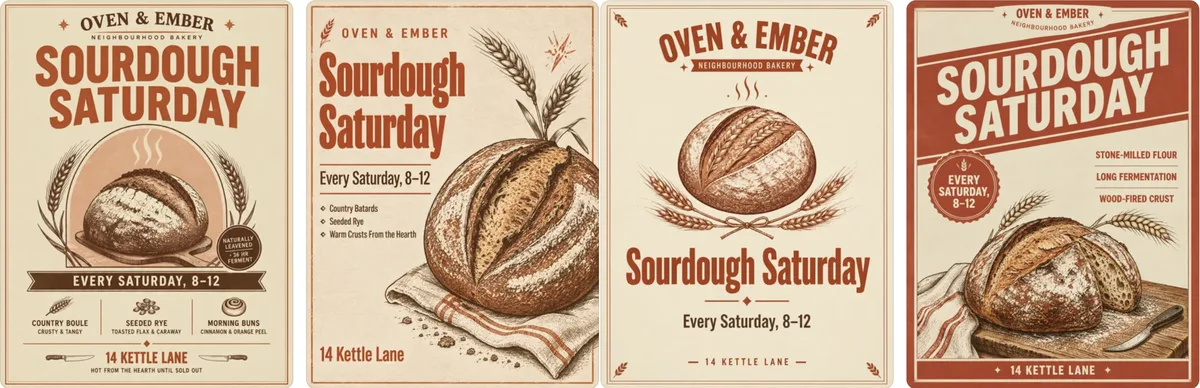
A4 poster for a neighbourhood bakery called “Oven & Ember”. Headline “Sourdough Saturday”, subline “Every Saturday, 8–12”, address line “14 Kettle Lane”. Bold condensed display type, warm terracotta and cream palette, a hand-drawn loaf illustration, slight paper grain.
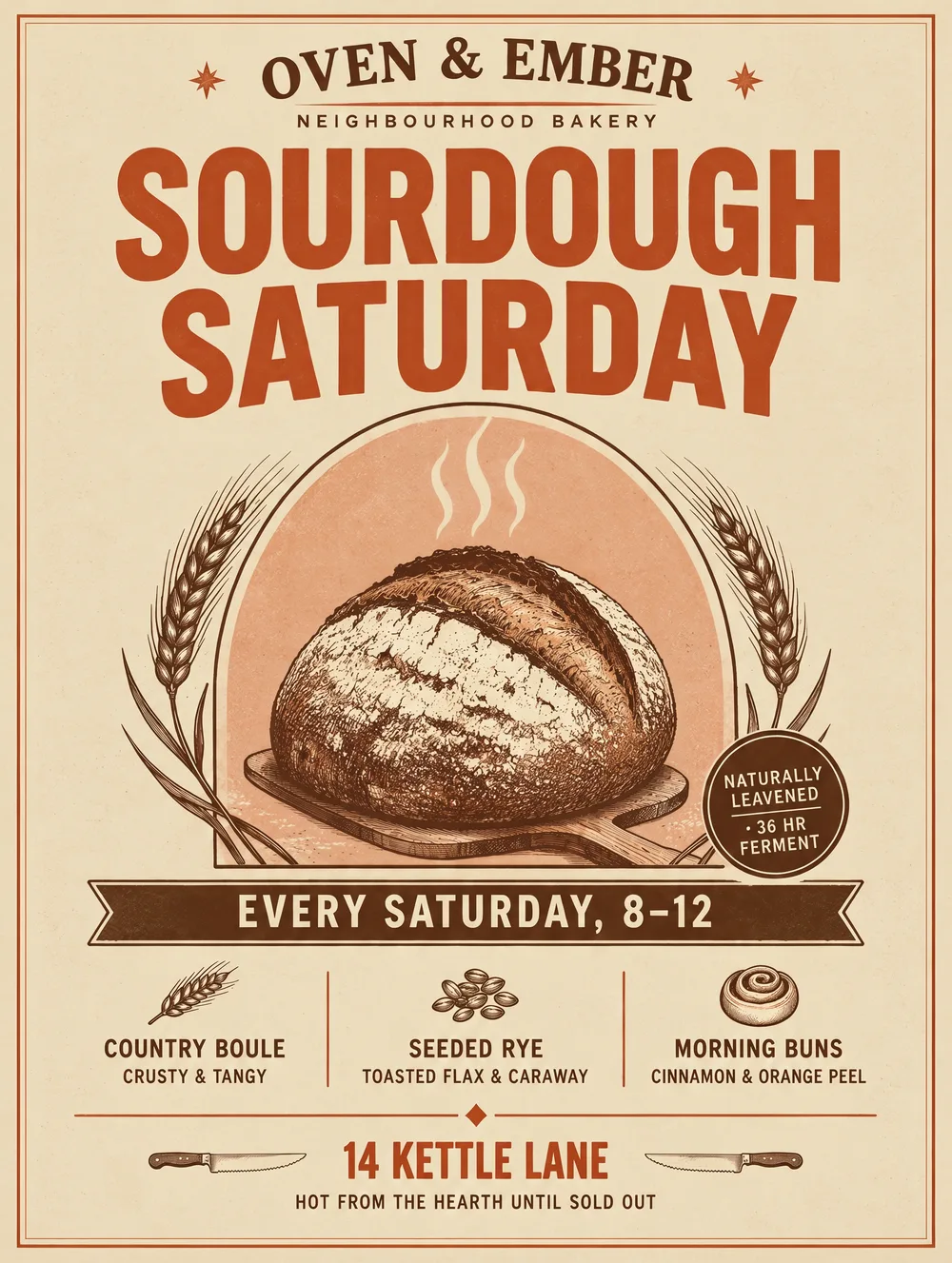
All four posters have every line I asked for, spelled correctly: Oven & Ember, Sourdough Saturday, Every Saturday, 8–12 and 14 Kettle Lane. The four layouts are properly different from each other too: an arched badge with a product strip along the bottom, a left-aligned editorial layout, a centered emblem and one with a diagonal red banner.
What I never asked for is on them too. Craft added its own copy: a “Naturally leavened, 36 hr ferment” badge, a strip reading “Country Boule, Seeded Rye, Morning Buns” with sublines, a bullet list of “Country Batards, Seeded Rye, Warm Crusts From the Hearth” and a line about “Stone-milled flour, Long fermentation, Wood-fired crust”. All of it is spelled correctly as well.
For a real bakery, that invented copy would have to go. Even so, this is the first model I’ve used where I didn’t find a single misspelled word on a poster. In my Qwen Image 2.1 test the small print was unreliable. Here every line was right.
Canva says portraits are where Craft ranks highest, so I gave it a portrait:
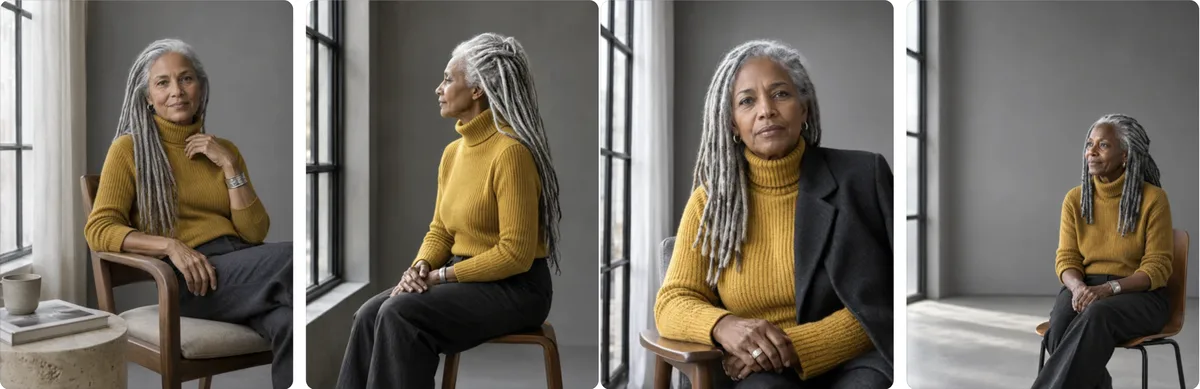
Editorial portrait of a woman in her sixties with silver locs and a mustard turtleneck, seated by a tall window, soft side light, neutral grey studio backdrop, shot on medium format, shallow depth of field.
I got four convincing photographs. The mustard turtleneck, the tall window with soft side light and the grey backdrop are in all four, and the hands, rings and earrings look right. Three have proper locs. The first reads more as loose twists.
One image ignored the shallow depth of field and the portrait brief altogether and sat her small in an empty room as a wide shot. Craft also added props on its own: a chair, a side table with a cup and a book, and a blazer over the sweater in one.
This is the category Canva says it leads, and on this one prompt I believe it.
For the third prompt I wanted a product shot with room for text:
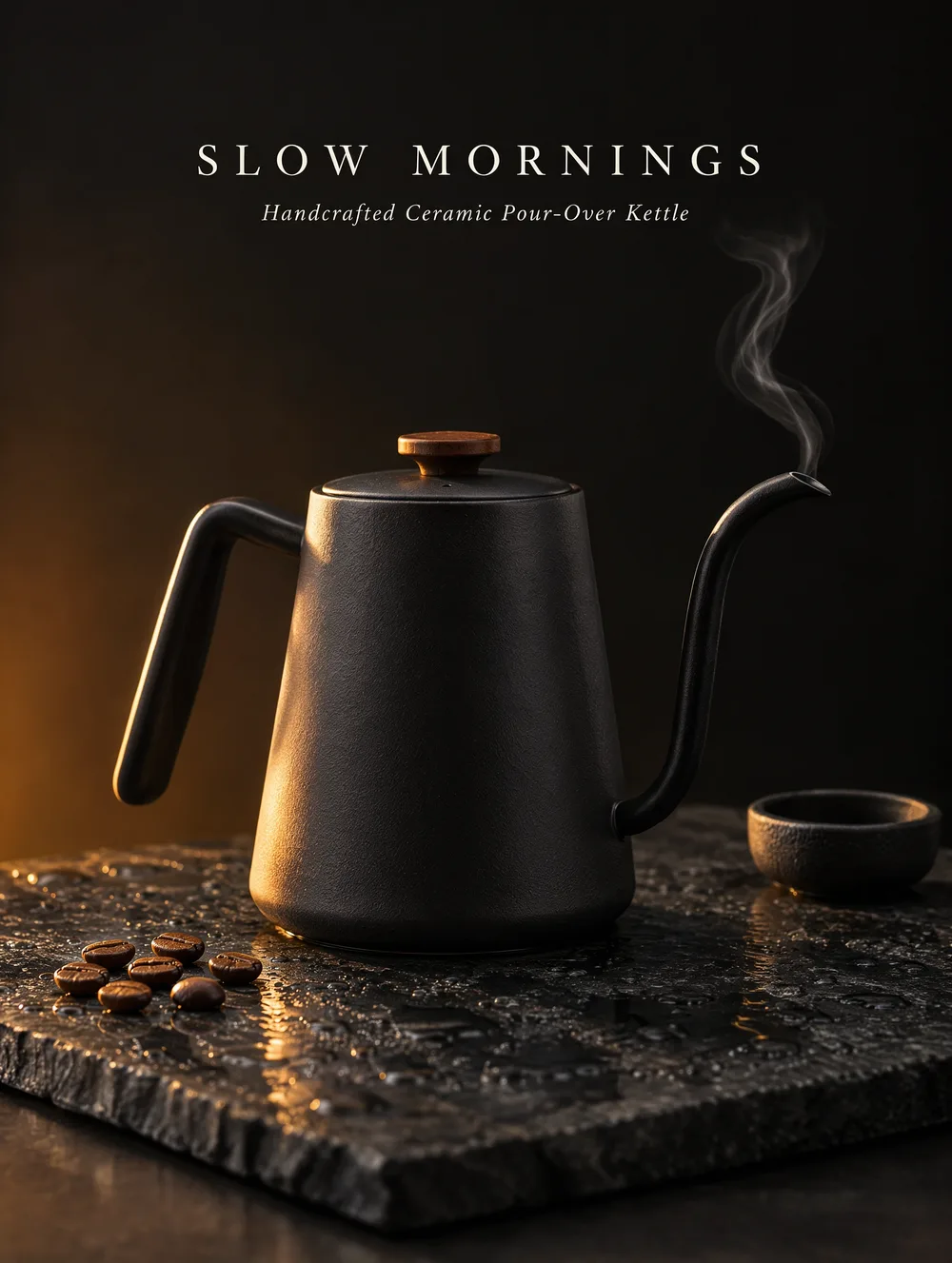
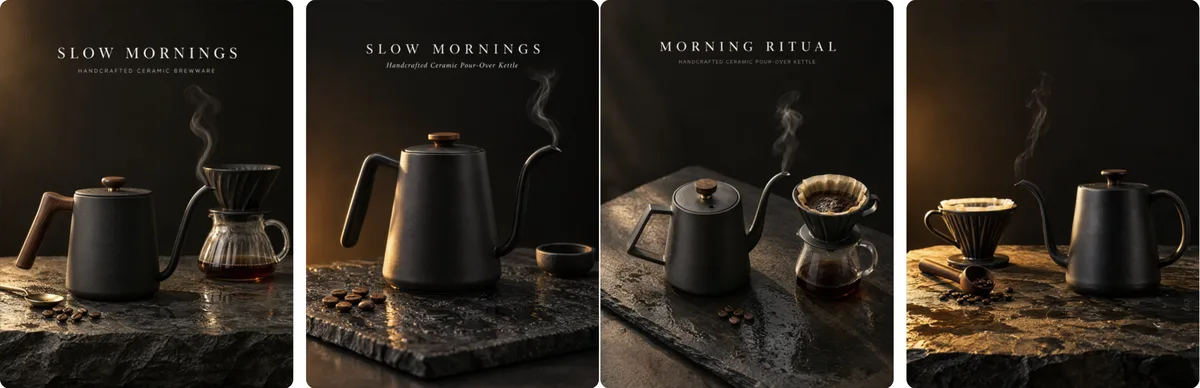
Studio product shot of a matte black ceramic pour-over kettle on a wet slate slab, a thin curl of steam, warm morning light from the left, dark moody background, space at the top for a headline.
The kettle, the wet slate, the steam and the warm side light are all there. It also added a dripper, a glass carafe, coffee beans and a scoop by itself. Then there is the headline space. Three of the four images filled it with a headline Craft wrote itself, “SLOW MORNINGS” or “MORNING RITUAL”, with a small line underneath like “Handcrafted Ceramic Pour-Over Kettle”. Only one left the space empty.
I think this is the template training showing through. Craft treats “space for a headline” as “write a headline”. If you want blank space, say so in the prompt or delete the text afterwards.
Higgsfield's Soul image model sits on its free plan with no 20-use ceiling, and you can use the outputs commercially on every plan.
Try Higgsfield Free →Craft works in two stages. A planning model reads your prompt and writes a plan of the composition: which elements appear, where they sit, their relative scale, the visual hierarchy and any text. Then a separate rendering model paints the image from that plan. Canva says this is why layouts and text come out accurately, and why the results convert well into editable layers with its Magic Layers feature.
The training leans on design rather than photos. Canva says it used millions of human-made templates from its library (posters, social posts, presentations, infographics and menus), then fine-tuned with feedback from its own designers, who judged more than 25,000 image pairs against rival models. That fits what I saw: the posters and the invented headlines both look like template habits.
On rankings, Canva says Craft debuted as the fourth most advanced image model overall on DesignArena, a crowdsourced leaderboard, which would make Canva Research the second most advanced lab for image generation. By category, Canva says it ranks first in People & Portraits (out of 87 models) and Landscapes & Nature (out of 85), second in Abstract & Patterns and fourth in Products. TechCrunch reported that the three models ahead of it are all from OpenAI, the family that includes GPT Image 2.5.
Two cheaper, faster variants, Craft-fast and Craft-ultrafast, are announced with no dates or prices. Canva says fine print and technical drawings are what it wants to improve next. Safety is handled by Canva Shield, which moderates both prompts and outputs.
One Dream Lab prompt is one use and returns four images.
| Plan | Monthly AI allowance (Premium tools) |
|---|---|
| Canva Free | 20 uses |
| Canva Pro | 200 uses |
| Canva Business | 400 uses |
Developers can call Craft through Canva’s API with the model value craft_v1_2k on POST /v1/image-generations, then poll GET /v1/image-generations/{jobId} for the result. Canva’s developer post says a job takes roughly 50 to 60 seconds. The download link lasts 24 hours, or the image can be saved to the user’s uploads.
The API is in preview, and each job spends the user’s AI allowance. Canva hasn’t published separate API pricing. Craft on Canva’s MCP server is listed as coming soon, which would let AI assistants such as ChatGPT and Claude request Craft images later.
If you make posters, social posts or flyers inside Canva, Craft is worth a go. The text comes out right, and when it adds copy you didn’t want, you can edit it in Canva afterwards. That is a minor chore.
If you want a clean image to add your own text to, expect to prompt for “no text” and then check the result. The same goes if you need more than 20 free generations a month, in which case look elsewhere or pay for Pro. Higgsfield is one place to start, and my Canva vs Fotor comparison covers the rest of what Canva offers.
The text accuracy is the reason to try it. The invented copy is the reason to read every line before you post.
Yes, you can try Canva Craft on a free Canva account. Canva Free gets up to 20 uses of Standard or Premium AI tools a month, resetting on the 1st, and one Dream Lab prompt is one use that returns four images. Pro gets up to 200 Premium uses a month and Business up to 400. I ran my three tests on October 24 on a free account.
Open Dream Lab, the AI image tool on Canva's homepage, and describe the image you want. On my account the model was fixed to Canva Craft-1 2K and I could pick from six aspect ratios. Each prompt returns four images and took me one to two minutes. Your remaining AI uses show under Settings > Billing > AI usage.
Canva trained Craft on millions of human-made templates, and its planning model writes text into the composition plan. In my tests that showed up as invented badges and product strips on posters, and as headlines on a product shot where I had asked for empty space. If you want a clean image, say so in the prompt, or delete the text afterwards.
Canva's help center says you own the images you create with Dream Lab as long as you follow Canva's terms. It also notes that whether AI-generated images can be copyrighted depends on your country. Every generated image carries a visible AI label. Check Canva's terms for your specific use before you put Craft images into paid client work.
Yes. Craft is available through Canva's public API, which is in preview. Use the model value craft_v1_2k on POST /v1/image-generations and poll the job until it finishes, which takes roughly 50 to 60 seconds. The download link lasts 24 hours. Each job spends the user's AI allowance, and Canva hasn't published separate API pricing.
Head-to-head comparison of Canva and Fotor for video editing. Compare free features, AI tools, ease of use, and which is best for beginners in 2025.
Read Article → Featured 20 min read
 Higgsfield AI review: on the Ultra plan, I ran the same prompts on Kling 3.0, Seedance 2.5 and Veo 3.1 and priced every clip in credits and cents.
Read Article → 9 min read
 Qwen Image 2.1 is Alibaba's free open-weight image model with transparent PNGs. I tested it: clean cut-outs, shaky small print, research-only license.
Read Article →