
GPT Image 2.5: ChatGPT Sketch Tested, API Price Unchanged
GPT Image 2.5 powers the new ChatGPT Images 2.5. I tested Sketch and comment edits on a free account, and API token rates still match GPT Image 2.
Read Article →
Qwen Image 2.1 is Alibaba’s new open-weight image model, released September 20, 2026. One model both generates and edits images, built around a 7-billion-parameter image generator. It makes transparent PNGs natively, takes up to 10 reference images for an edit, outputs at native 2K, and you can try it free in Qwen’s Hugging Face demos. The catch is the license, which only allows non-commercial use.
I ran three tests on September 25: a transparent product shot, a text-heavy poster and an edit, all through one of Qwen’s official Hugging Face demos. The cut-outs are the real thing. The small print isn’t there yet.
One model handles both generation and editing. A 7-billion-parameter image generator is paired with Qwen3-VL 8B, a vision-language model that reads your text instructions and any images you give it. Qwen introduced that compact design with Qwen-Image-2.0 in February, but only through Alibaba’s API. 2.1 is the first version of it you can download, and its image generator is roughly a third the size of the 20-billion-parameter original Qwen-Image from August 2025.
Transparency is the big one. It generates regular or transparent (RGBA) images straight from text, edits transparent layers directly, and can pull a subject out of a photo and drop the background. That builds on Qwen-Image-Layered, which Qwen shipped in December 2025. Editing takes up to 10 reference images, and you can point at a specific area with a circle, a painted brush stroke or a separate mask. Qwen says it keeps people and products recognizable across edits, and says typography, portrait lighting and fine detail all improved over earlier versions.
Images aren’t the only thing Qwen ships. Its 3-second voice cloning model landed last December.
I started with the thing Qwen is pushing hardest. I asked for a cold-brew bottle with condensation and a kraft label, using Qwen’s own recommended wording for transparent images:
This is an RGBA image with transparency. A glass bottle of cold-brew coffee with condensation droplets and a kraft-paper label reading “NORTH ROAST”, three coffee beans beside it. The image has alpha channel and the background is transparent.
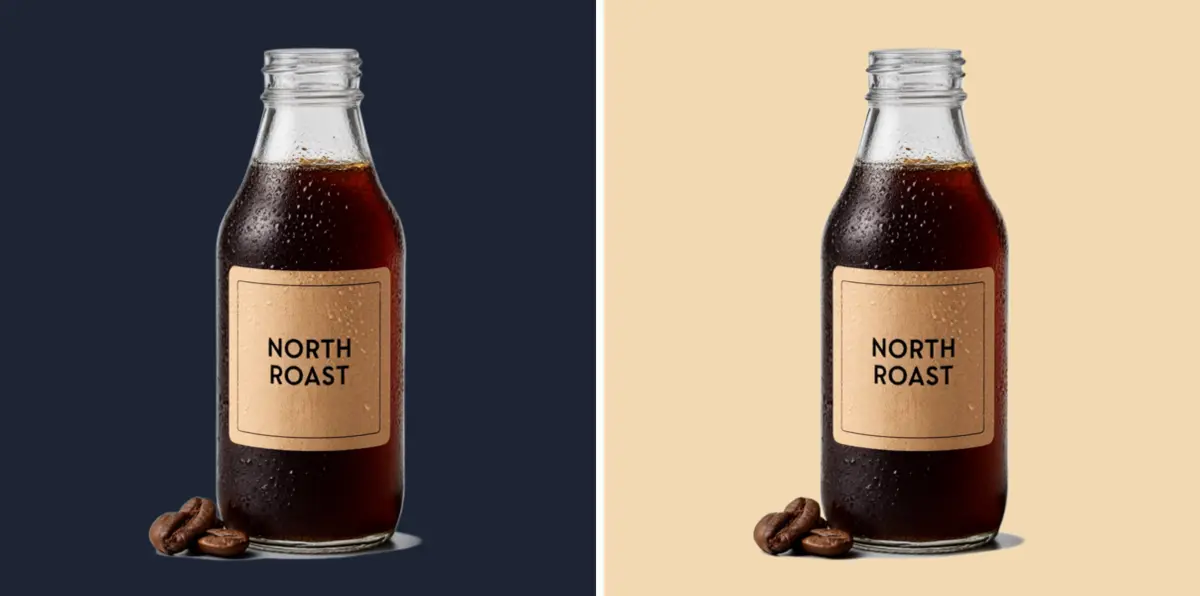
It came back as a 1024x1024 PNG, the demo’s default size, with a real alpha channel. About three quarters of the frame is see-through, the label says NORTH ROAST with no typos, and the droplets look convincing.
To see how the cut-out behaves, I dropped it onto a dark navy background and a sand-colored one. On sand it looks like a studio product shot.
On navy, one flaw jumps out. The empty neck of the bottle is solid pale grey, because the model painted the glass as if a white studio backdrop were behind it, instead of leaving it see-through. Zoom right in and there’s also a thin pale sliver left under the base, though you won’t spot it at normal size.
For stickers, icons and product cut-outs on light pages, it’s excellent, and it saves you a background-removal step. For glass, or anything headed for a dark layout, check the edges before you use it.
Qwen says text rendering improved, so I asked for a poster with three lines of text:
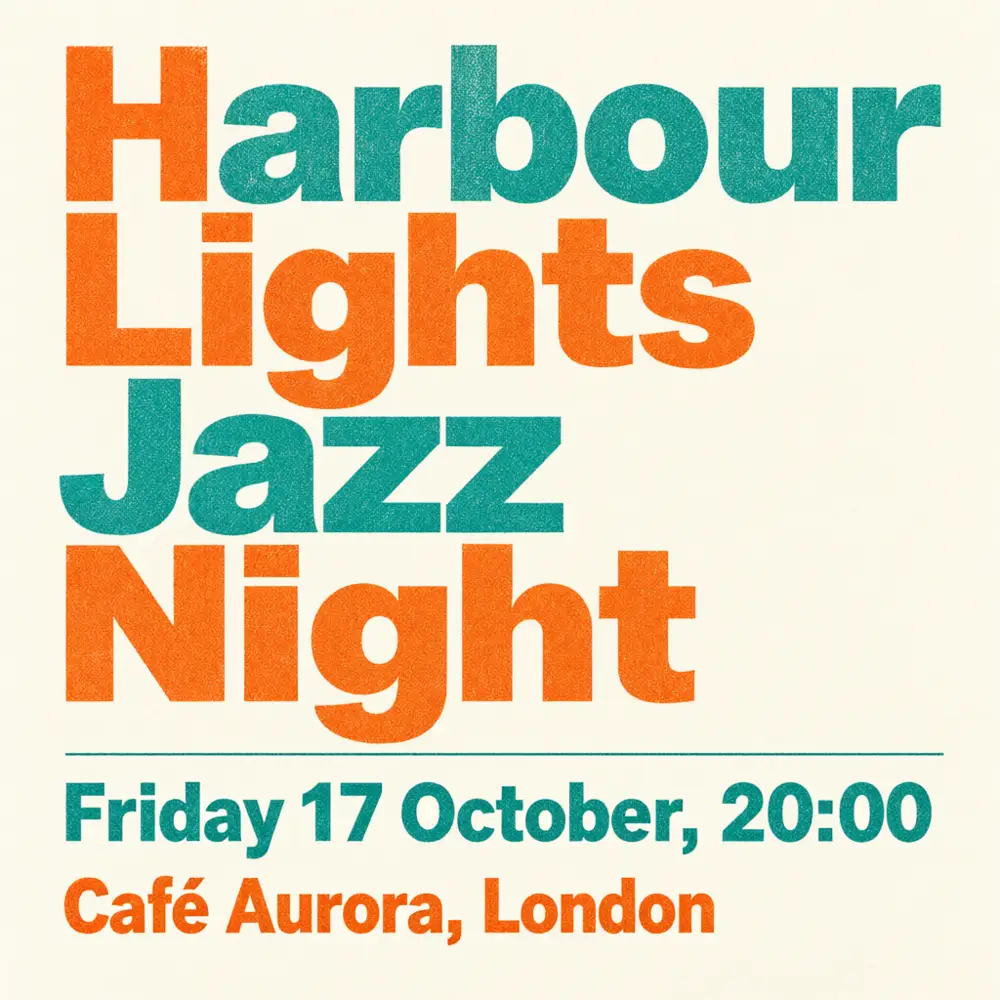
A risograph-style concert poster that reads “Harbour Lights Jazz Night”, “Friday 17 October, 20:00”, “Café Aurora, London”, two-colour teal and orange ink, grainy paper texture.
This one came back clean. The headline, the date and time, and “Café Aurora, London” are all spelled right, accent included, and the two-ink risograph look works.
It isn’t consistent, though. My first go at the same poster, with a different city on the last line, printed the time as 10:00 instead of 20:00 and mangled the city name. So trust the headlines, but read every small line before anything goes to print.
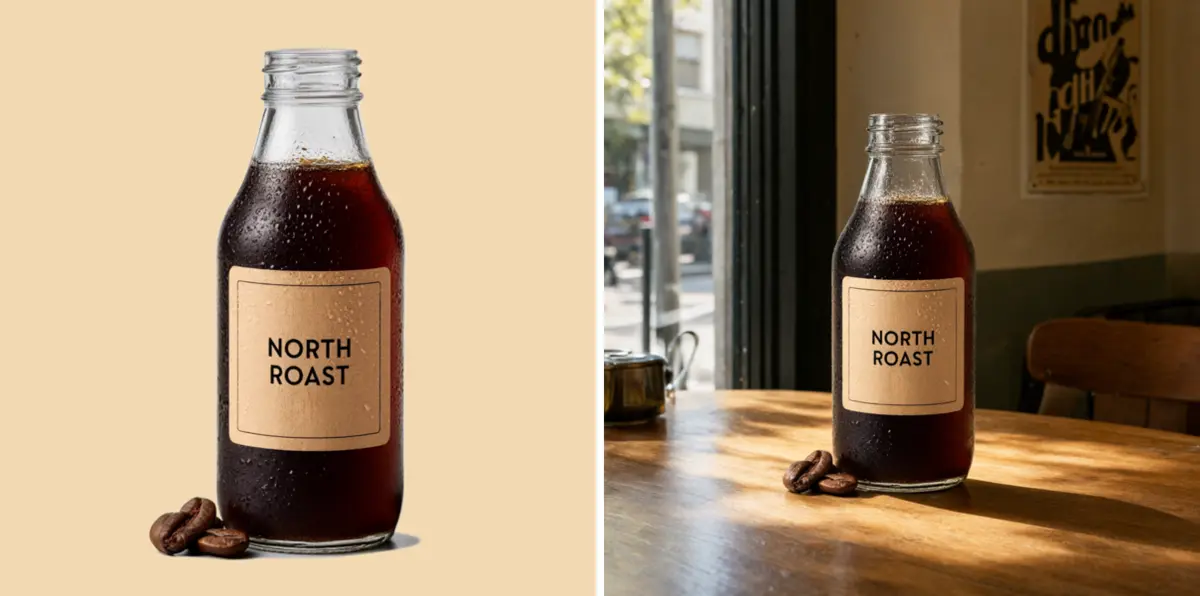
For the edit, I gave it the transparent bottle and asked it to put it on a sunlit wooden café table with a jazz poster on the wall behind, keeping the bottle and its label exactly as they were.
The bottle, the label and the three beans came back unchanged, and the window light and the shadow on the table look right. This time the glass neck is see-through, and you can see the wall behind it.
The poster on the wall is fake lettering, though, the same small-text weakness my first poster run showed.
Qwen’s main demo, the one that takes up to 10 images, kept turning me away with a full queue that morning, so my runs went through Qwen’s second Hugging Face demo, which edits one image at a time. That means I haven’t tried the 10-image editing yet.
Qwen Image 2.1 ships under the Qwen Research License Agreement, a step back from the original Qwen-Image, which came under Apache 2.0 and allowed commercial use. The new license grants a royalty-free license, but only for non-commercial purposes, and it defines non-commercial as research or evaluation. Anything past that needs a separate commercial license from Alibaba, requested by email through the address listed in the license file.
There’s no paid Qwen Image 2.1 API to buy your way around it, either. Alibaba’s paid image API, on Alibaba Cloud Model Studio, offers qwen-image-3.0 and qwen-image-3.0-pro, not this model.
The license doesn’t say anything separate about the images the model generates, so I’d treat client work, ads and anything you plan to sell as commercial use and ask Alibaba first.
If you need images you can sell today, Higgsfield’s free plan already lets you use your outputs commercially.
Higgsfield's own Soul 2.0 image model is on the free plan, and you can use your outputs commercially on every plan, free included.
Try Higgsfield Free →The full weights are a 33.1 GB download, with day-one support in ComfyUI, including ready-made text-to-image and image-editing workflows, plus Diffusers, vLLM-Omni, SGLang and LightX2V. It runs on AMD Radeon GPUs through ROCm, so you’re not locked to Nvidia.
Alongside the image model, Qwen released two prompt-rewriting models, built on Qwen3.5-VL, that expand a short prompt into a detailed one, one tuned for generation and one for editing. If you’re in mainland China, wuli.art offers every Qwen Image 2.1 feature for free. If you’re after local open-weight video instead, I covered LTX-2.5 in August.
Qwen published its own benchmark, Qwen-Image-Bench, alongside the release, so read the scores as Qwen’s own claim rather than an independent test. On it, 2.1 lands just ahead of Google’s Nano Banana 2.0 and OpenAI’s GPT Image 1.5, and behind OpenAI’s GPT Image 2.5 and GPT Image 2 and Qwen’s own closed Qwen Image 3 Pro.
Selected overall scores from Qwen-Image-Bench, the benchmark Qwen published with the release.
| Model | Qwen-Image-Bench score |
|---|---|
| GPT Image 2.5 (Sunburst) | 67.01 |
| GPT Image 2 | 64.69 |
| Qwen Image 3 Pro | 62.36 |
| Qwen Image 2.1 | 60.28 |
| Nano Banana 2.0 | 59.82 |
| GPT Image 1.5 | 59.65 |
| FLUX 2 Max | 55.33 |
| Qwen Image 2512 | 52.06 |
That’s close company for a model you can download and run on your own machine.
If you make stickers, icons or product cut-outs, try the free demo. Check glass on a dark background before you ship anything.
If you have a capable GPU and want a local image model, ComfyUI supported it from day one and has ready-made workflows to start from.
If you need images for paid work, this license doesn’t cover you. Ask Alibaba for a commercial license first, or use a tool whose terms already allow commercial use.
Yes, Qwen Image 2.1 is free to download and free to try in Qwen's two Hugging Face demos, though the demos can queue at busy times. I ran all my tests on September 25, 2026 without paying. Free doesn't mean free for commercial use, though, because it ships under a research license.
Not under the default Qwen Research License, which covers research or evaluation only. Commercial use needs a separate license from Alibaba, and there's no paid 2.1 API: Alibaba's paid API offers qwen-image-3.0 instead. The license has no separate clause for generated images, so treat paid work as commercial use, or use a tool like Higgsfield, whose free plan already allows commercial use.
Use Qwen's recommended wording: 'This is an RGBA image with transparency. [your description] The image has alpha channel and the background is transparent.' The result is a PNG with a real alpha channel. In my test the cut-out was clean, but glass needs a check on dark backgrounds.
Qwen Image 2.1 adds native transparency, so it generates and edits RGBA images directly, and it takes up to 10 reference images per edit. It keeps the compact design Qwen-Image-2.0 introduced in February 2026 through Alibaba's API, one model for generation and editing with a 7B image generator and native 2K output, and it is the first version of that design with open weights. The original Qwen-Image from August 2025 had a 20B generator. Qwen says typography, portrait lighting and fine detail all improved.
Yes, the weights are open, 33.1 GB for the full model. ComfyUI and Diffusers support it from day one, along with vLLM-Omni, SGLang and LightX2V, and AMD Radeon GPUs are supported through ROCm. You'll need a capable GPU.
 Featured 9 min read
 GPT Image 2.5 powers the new ChatGPT Images 2.5. I tested Sketch and comment edits on a free account, and API token rates still match GPT Image 2.
Read Article → 12 min read
 Higgsfield AI review: I tested the free plan (10 credits, Soul 2.0 images, one free Earth Zoom clip). Plans from $19/mo; the full Seedance lineup is $59.
Read Article → 8 min read
 LTX-2.5 generates 10-second AI video in 6.8 seconds. Open weights, free for creators under $10M, with native ComfyUI and NVIDIA optimization.
Read Article →