
ChatGPT Images 2.0: OpenAI's #1 Ranked AI Image Model
OpenAI's ChatGPT Images 2.0 brings reasoning to AI image generation with 99% text accuracy and topped Image Arena by 242 points. DALL-E retires May 12.
Read Article →
GPT Image 2.5 is OpenAI’s image generation and editing model, released September 8, 2026, as the engine behind ChatGPT Images 2.5. In the API it comes in two versions, GPT-Image-2.5 Flare for fast everyday generation and GPT-Image-2.5 Sunburst for editing where precision matters most, both reachable through the Image generation and Image edit endpoints. The update is rolling out to every ChatGPT, ChatGPT Work and Codex tier, on desktop, mobile and web.
Along with the new models comes Sketch, a drawing tool that turns a rough guide into a prompt, comments placed directly on an image, and templates for common formats like posters and headshots. OpenAI says the models render more natural lighting, keep a reference photo’s subject recognizable across edits, and cut image generation latency by as much as half compared with Images 2.0.
OpenAI’s announcement credits GPT Image 2.5 with more natural lighting and richer textures than ChatGPT Images 2.0, which launched in April 2026. OpenAI says the new models keep the subject of a reference photo recognizable across edits, follow instructions more reliably across multiple turns without the image degrading, and edit only the part that was asked for while leaving the rest of the picture alone. OpenAI also claims better handling of complex layouts, transparent backgrounds and visual styles.
With DALL-E retired, the GPT-Image models are the only image line OpenAI still ships.
OpenAI named Higgsfield AI, Adobe, Manus and Runway as launch partners. Adobe says the GPT-Image-2.5 models are available in Firefly, and Manus said that in its own evaluations, Flare ran two to four times faster than GPT-Image-2. OpenAI also says it continues to use C2PA metadata and invisible watermarking on images from the new models, and it published a system card alongside the launch.
I tried Sketch on a free ChatGPT account on September 19, 2026. You open it by typing @Sketch in the message box, and you get a small canvas with a pen, shapes, text and a row of colors. My drawing was about as basic as it gets: a lighthouse made of straight white lines on a cliff, an orange sun in the top left, two orange beams pointing right and a few blue zigzags for waves.
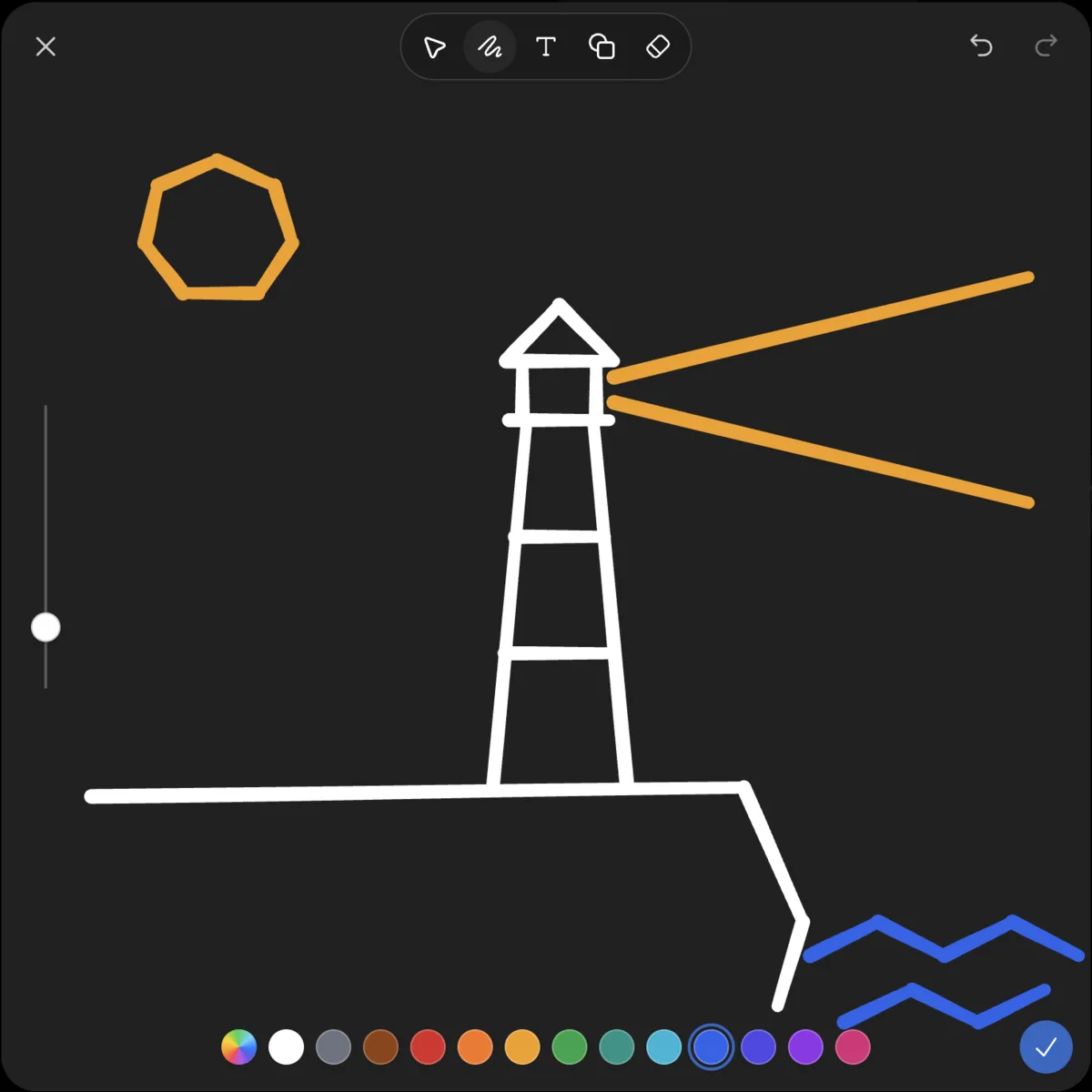
I attached it with this prompt:
Turn this sketch into a photorealistic image: a white stone lighthouse on a rocky cliff at dusk, warm light beam sweeping over a dark blue sea, low sun in a hazy orange sky. Keep my layout exactly.
The image came back in under a minute, and the layout is what impressed me. The sun sits top left where I put it, the tower stands in the middle, the beam points right, the cliff drops away on the right, and there is surf where I scribbled the waves. I had expected the model to take liberties with my composition. It didn’t. For a print-sized version, a result like this still needs an upscaler such as Upsampler, and animating it takes one of the AI video generators.
For the edit I used the new Comment tool instead of typing another prompt. I dropped a pin on the tower and wrote “Paint the tower in red and white horizontal stripes.”
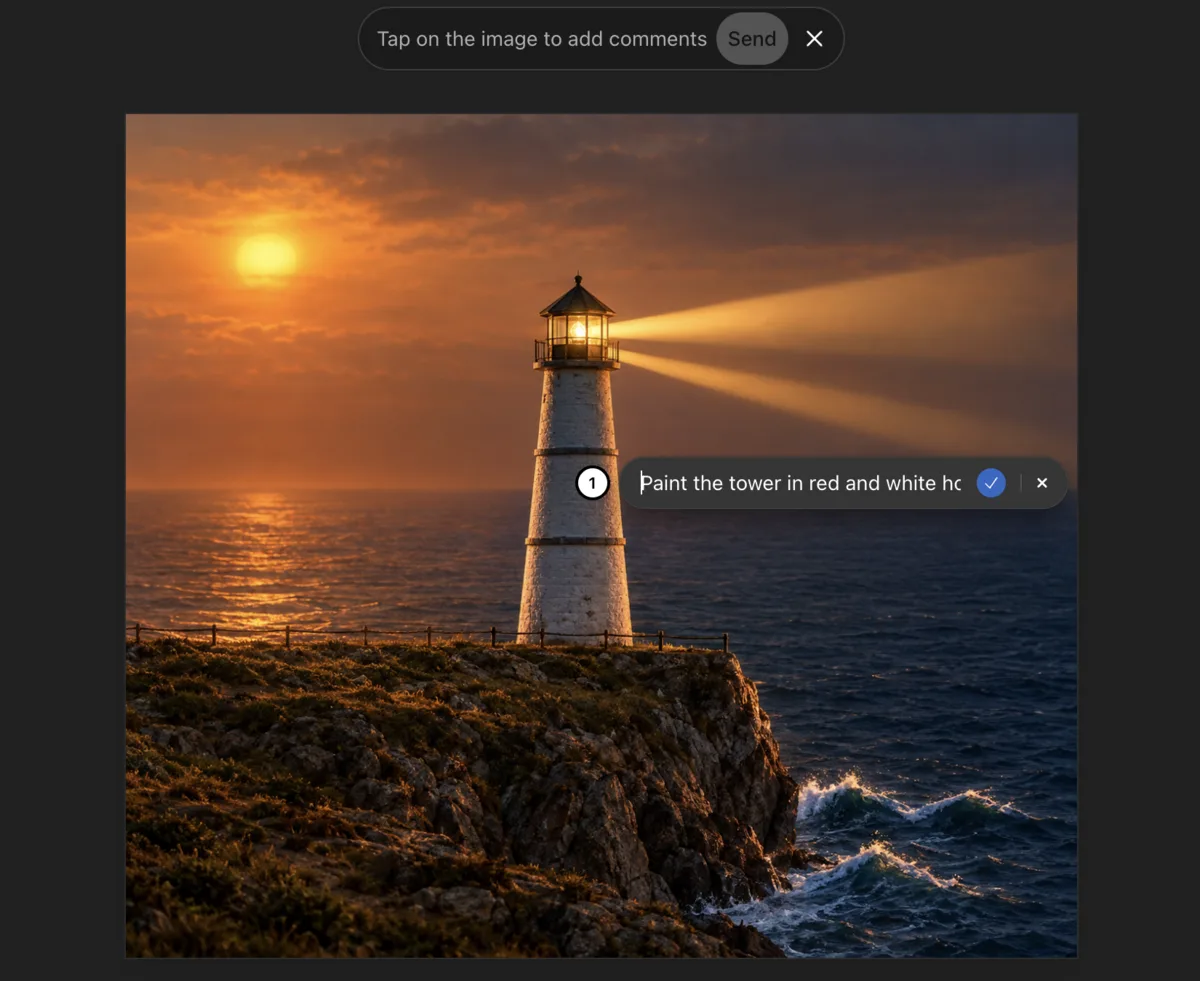
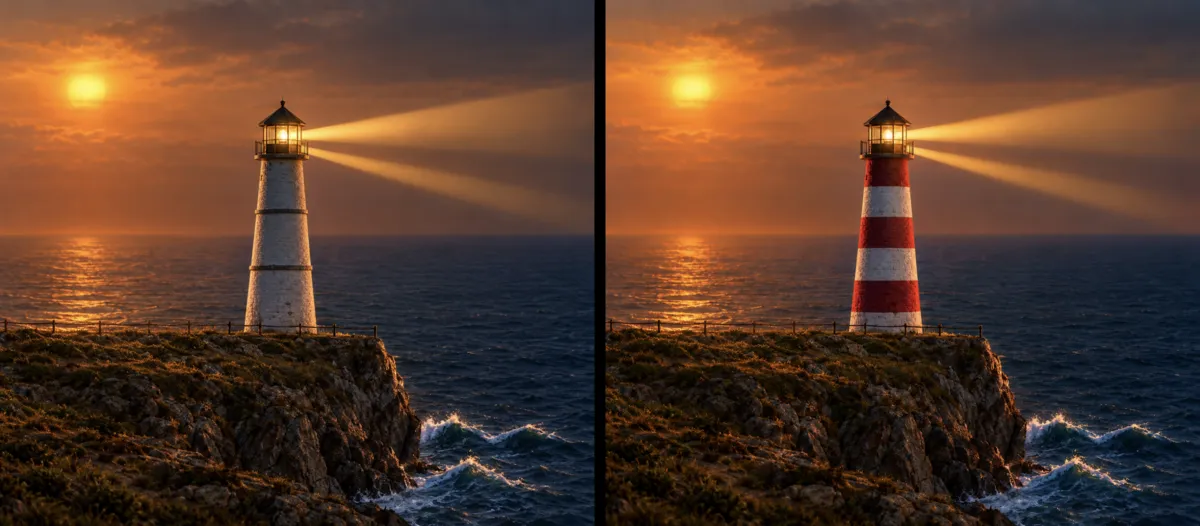
The striped version also took under a minute. I zoomed in on both versions to see what else had changed and found nothing: the railing posts, the cliff edge and the surf are in the same places. That is one edit, not a benchmark, but it matches OpenAI’s claim that the model now changes only what you ask for.
I never hit a limit. After two generations the account showed no limit notice and no credit counter, and OpenAI’s announcement does not say how many images a free account gets.
Besides comments, ChatGPT Images 2.5 adds templates for popular formats and a way to share an image together with the prompt that made it, so someone else can reuse it with their own photos.
The Images page on a free account has two tabs. Trending includes Sketch, ’80s flashback, Stickers, Create a caricature, Anime, Underwater, Pin collection and Handwritten style. Templates lists 16 options: Poster, Interior design, Logo, Illustration, Headshot, Icon, Product photo, Merch, Infographic, Flyer, Book cover, App mockup, Packaging, Advertisement, Thumbnail and Website mockup. Template-based design has been the home turf of tools like the two in the Canva vs Fotor comparison. A banner on the page says generated images now live in Library.
In the API, ChatGPT Images 2.5 splits into two models that share the rest of their spec: text and image input, image output, quality settings of low, medium, high, xhigh, max and auto, the Image generation and Image edit endpoints, inpainting, and a dated snapshot of 2026-09-08. Rate limits run the same for both, from Tier 1 (100,000 TPM, 5 images per minute) up to Tier 4 (3,000,000 TPM, 150 images per minute).
Both models share the same quality settings and rate limits; the difference is speed against edit precision.
| GPT-Image-2.5 Flare | GPT-Image-2.5 Sunburst | |
|---|---|---|
| Best for | Fast, high-quality everyday generation; the default choice for most applications | Generation and editing where precision matters most |
| Speed | OpenAI says higher quality than GPT-Image-2 at 50% lower latency | Longer generation times than Flare |
| Endpoints | Image generation, Image edit | Image generation, Image edit |
| Snapshot | 2026-09-08 | 2026-09-08 |
Both model pages carry the same line: “Token rates match GPT Image 2.”
Text output is not billed. Rates are identical for GPT-Image-2.5 Flare and Sunburst, from OpenAI's API pricing page, read September 19, 2026.
| Token type | Rate per 1M tokens |
|---|---|
| Text input | $5.00 |
| Cached text input | $1.25 |
| Image input | $8.00 |
| Cached image input | $2.00 |
| Image output | $30.00 |
OpenAI lists no per-image price for either model, and the model pages say the GPT Image 2 cost calculator does not estimate GPT-Image-2.5 token consumption. What an image costs depends on how many tokens its size and quality setting use. Because both models bill at the same rates, choosing between Flare and Sunburst is a question of speed against edit precision. Any cost gap between them would come from token use, which OpenAI has not published for 2.5. Flare is the sensible starting point for most builds, and it is the one OpenAI calls the default.
Sketch, comments and templates cost nothing extra on any tier. On my free account, the sketch, the generation and the comment edit all went through without a limit notice.
Flare and Sunburst share pricing, quality settings and rate limits, so switching between them in a build is a model-name change rather than a new integration. Teams that would rather not touch the API can reach the same models inside Adobe Firefly.
GPT Image 2.5 outputs stills only. Animating one, the lighthouse scene above for example, takes an image-to-video tool.
Kling AI turns a single image into a video clip. The free plan includes 66 monthly credits.
Open Kling AI →The step-by-step walkthrough for Kling AI covers turning a still into a video clip from start to finish.
Yes. ChatGPT Images 2.5, including the new Sketch tool, comments and templates, is rolling out to every ChatGPT tier, plus ChatGPT Work and Codex, on desktop, mobile and web, at no extra cost. I generated an image from a sketch and edited it with a comment on a free account on September 19, 2026, and no limit notice appeared.
Type @Sketch in the ChatGPT message box and pick Sketch. Draw a rough version of what you want, attach it, and describe the final image in your prompt, including the style. It does not need to be a good drawing. When I tried it with a lighthouse made of straight lines, the result kept my layout.
Flare is OpenAI's fastest model for high-quality everyday image generation and the default choice for most applications, with OpenAI citing higher quality than GPT-Image-2 at 50% lower latency. Sunburst is the more capable model for generation and editing, aimed at workflows where editing precision matters most, and takes longer to generate. Both use the same API endpoints and quality settings.
GPT-Image-2.5 Flare and Sunburst bill at identical token rates: $5.00 per 1 million text input tokens, $1.25 cached, $8.00 per 1 million image input tokens, $2.00 cached, and $30.00 per 1 million image output tokens. Text output is not billed. OpenAI has not published a per-image price, and its GPT Image 2 cost calculator does not estimate GPT-Image-2.5 token use.
OpenAI says it continues to use C2PA metadata and invisible watermarking on images produced by ChatGPT Images 2.5 and the GPT-Image-2.5 API models, and it published a system card covering the launch's safety measures.
 Featured 6 min read
 OpenAI's ChatGPT Images 2.0 brings reasoning to AI image generation with 99% text accuracy and topped Image Arena by 242 points. DALL-E retires May 12.
Read Article → 9 min read
 OpenAI shut down the DALL-E GPT on August 30, 2026. The image AI that started the 2022 art boom is fully retired. How to save your images, what's next.
Read Article → 21 min read
 InVideo, Synthesia, Synthesys, Fliki and Runway compared on output, pricing and free tiers. Every free option carries a watermark or a usage cap.
Read Article →